Category Archives: Graphic Apps

Animation Tools, CAD, Converters & Optimizers, Editors, Font Tools, Gallery & Cataloging Tools, Icon Tools, Other, Screen Capture, Viewers

reaConverter Pro 7.1.87

Type: Shareware
Cost: $99.99
Size: 110.70 MB
Release date: Jan 11 2016
Platform: Win2000,WinXP,Win7 x32,Win7 x64,Windows 8,Windows 10,WinServer,WinOther,WinVista,WinVista x64
Publisher’s Site:  http://reasoft.com
Publisher’s Product Page:  http://www.reaconverter.com/
Country: United States of America

reaConverter Pro

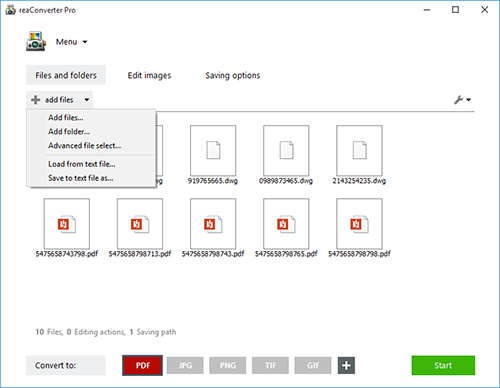
Convert Multiple Images Quickly with a Bulk Image Converter


reaConverter is a bulk image converter providing a quick and convenient way to convert any number of images with just a few clicks. Thanks to its simple and clear interface, the program is understandable immediately even to those who have little or no experience with using such programs. When you need to convert large numbers of images all at once or make simple changes to multiple images, this batch image converter makes things quick and simple. Using this software, you will literally save hours and hours compared to manually converting each individual image.

reaConverter is a highly versatile solution which supports virtually every image format that you are ever likely to encounter. You can easily convert folders containing thousands of images in a single operation, and the process is quick and efficient as well. The program can read a huge variety of different formats, including all of the standard formats such as BMP and JPG. It also support numerous RAW format types used by professional digital cameras as well as other advanced formats, metafiles, CAD/AutoCAD formats, vector formats and even formats which are nowadays extremely rare. In total, reaConverter can read no less than 545 different formats, including 338 rare ones. Most of these rare formats will not open with any standard photo or image viewer application, so using the bulk image converter is a great way to make them more accessible with just a few clicks. In addition, reaConverter supports 55 output formats, allowing you to convert any of the supported read formats into a variety of common, advanced and other formats. In short, reaConverter supports pretty much every conceivable image format that you will ever encounter.

Graphcat<

2D/3D cad: dwg, dxf, plt, cgm, svg, pdf 11

Type: Shareware
Cost: $48
Size: 44.76 MB
Release date: Sep 29 2015
Platform: Win2000,WinXP,Win7 x32,Win7 x64,Windows 8,Windows 10,WinServer,WinOther,WinVista,WinVista x64
Publisher’s Site:  http://www.cadsofttools.com
Publisher’s Product Page:  http://cadsofttools.com/products/abviewer/
Country: Germany


2D/3D cad: dwg, dxf, plt, cgm, svg, pdf

ABViewer is multipurpose software for working with drawings. It enables you to view, edit, convert, measure and print DWG/DXF; PDF, PLT, STP, IGES, SVG, CGM, EPS and other CAD files, as well as 3D models and raster images. It allows working with a single part of a drawing or a group of files. ABViewer has a wide range of tools to create and edit files. Use special Redline mode if you want to add markups and comments to the drawing.
Besides that, ABViewer allows measuring not only 2D objects, but also 3D ones. Measuring STP and IGS files, you can get information about the distance between two points, edge length, curvilinear edge radius, height between two parallel surfaces as well as surface area of 3D objects. Measurement results are presented above the 3D model and the drawing with the dimensions can be printed out or saved as JPG. In addition, with the help of the scale factor you can get the real measured data in any drawing scale.
You can easily convert one or several files at the same time into DWG/DXF, PDF, PLT, STL, JPG, BMP + other formats. Moreover, ABViewer offers PDF to DWG conversion, which transforms PDF data into editable DWG entities.
Use the integrated Compare files command to find the changes that were applied to the drawings. Another valuable feature is georeferencing, i.e. transforming drawing coordinates to geographical ones.
The last but not the least important step in work with drawings is printing. If you need to print a large drawing and you only have an A4 printer, you could use the special tool multipage printing. So called tiled printing allows plotting images on any number of sheets of any format with the necessary scale.
Also if you work with a great amount of project documents, you should try batch printing. It allows printing several files in one click! Furthermore, you can select necessary print settings for each drawing layout.
Thus, ABViewer makes work with drawings more efficient and easier! All this at a reasonable price!

reaConverter Lite 7.1.82

Type: Freeware
Cost: $0
Size: 10.93 MB
Release date: Nov 30 2015
Platform: Win2000,WinXP,Win7 x32,Win7 x64,Windows 8,Windows 10,WinServer,WinOther,WinVista,WinVista x64
Publisher’s Site:  http://reasoft.com
Publisher’s Product Page:  https://www.reaconverter.com/download/#compare
Country: United States of America


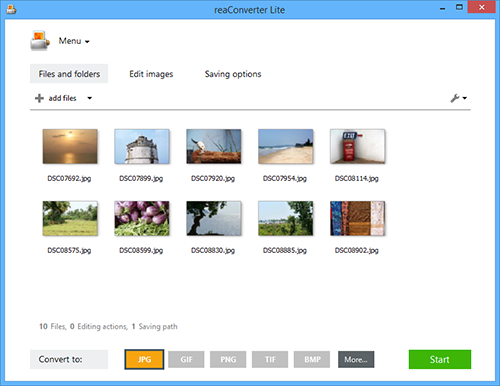
reaConverter Lite

Free batch advanced image converter and image editing application.
reaConverter Lite can handle ultra-fast batch conversions between JPEG, GIF, TIFF, PNG and BMP images with access to lots of advanced picture editing techniques such as:

Alteration and Orientation tools: Resize, Crop, Canvas Size, Rotate, Mirror, Auto Crop, Auto Rotate

Adjustments tools: Brightness/Contrast, Color Balance, Gamma Correction, Hue/Saturation, White Balance, Photo Filter, Black & White, Invert, Color Depth

Creative Retouching tools: Sharpen, Blur, Anti-aliasing, Stylize, Border, Shadow, Noise, Selective Color Change, Background Change, Lens Correction, JPEG Artifacts Remove, Black and White Noise Remove

Watermarking tools: Image Watermark, Text Watermark, Dynamic Watermark, Primitive Drawings

Free version of reaConverter Lite also supports all formats features and tuning like:
Change Color Space (CMYK, RGB, YCbCr, …), Copy Metadata (EXIF, IPTC), Transfer Alfa Channel, Set DPI, Manage ICC Profile, Control Bit Depth, Format-Specific Saving Settings, Alter Multi-Page Settings, Select Transparency Color, Add TIFF Compression (CCITT, LZW, RLE, …), Set Quality.

Additional free features: Process Files from ZIP Folders, Create Thumbnails, Move Original Files, Move Unprocessed Files, Delete Files After Conversion, Set Manual File Date, Keep Path Info and Folders Structure, Name Files with Macros, EXIF and TIFF Tags, Skip Blank Files or Pages.

reaConverter Lite is uber-powerful and free image conversion tool with a great variety of features. It gives advanced solution for image processing and tuning.