Category Archives: Graphic Apps

Animation Tools, CAD, Converters & Optimizers, Editors, Font Tools, Gallery & Cataloging Tools, Icon Tools, Other, Screen Capture, Viewers

ShapeBook with 2D3DSteel 4.4.2009

Type: Shareware
Cost: $149.95
Size: 20.75 MB
Release date: Jan 21 2010
Platform: Win2000,WinXP,Win7 x32,Win7 x64,Windows 8,Windows 10,WinServer,WinOther,WinVista,WinVista x64
Publisher’s Site:  http://www.southforktech.com/
Publisher’s Product Page:  http://www.southforktech.com/shapebook.htm
Country: United States of America


ShapeBook with 2D3DSteel

ShapeBook with 2D3DSteel is a versatile productivity tool for steel industry professionals. ShapeBook is a quick reference tool for the detailing dimensions and design properties of steel shapes. ShapeBook is also a material list calculator that creates steel material lists with weight, surface area, and price extensions. ShapeBook also includes a shape search and selection tool for finding shape sizes. The data contained in this version of ShapeBook is based on the AISC Steel Construction Manual, Thirteenth Edition plus large pipe sizes, bar size materials, plate, flat bar, round bar, & square bar. You can work in US Imperial and Metric units.


ShapeBook is now a powerful estimating tool for estimating the cost of steel, and coatings. The Calculator Material List extends the weight, surface area, and pricing (price per pound or kilogram) and (price per square foot or meter of surface area). You use the weight and surface area calculator on the selected shape by entering the quantity, length, weight price, surface price, and clicking the ‘Calculate’ button. The total weight and surface area are displayed and if the ‘Add to Calculator Material List’ check box is checked the entry is added into your Calculator Material List with the weight, surface area, price per pound or kilogram, and price per square foot or meter of surface area. The total weight, total surface area, total price per pound or kilogram, and total price per square foot or meter of surface area are shown on the totals line at the bottom of the list. The material list can be easily edited, sorted, re-priced, and printed.

2D3DSteel is an AutoCAD VLX application that draws steel details. It includes many new specialized tools for drawing and dimensioning steel in 2D and 3D. 2D3DSteel will run in any version of Full AutoCAD. It will not run on the LT versions of AutoCAD. All of the shapes available in ShapeBook can be quickly and accurately added to your drawings.

Graphcat<

reaConverter 7.1.74

Type: Shareware
Cost: $49.99
Size: 104.24 MB
Release date: Nov 16 2015
Platform: Win2000,WinXP,Win7 x32,Win7 x64,Windows 8,Windows 10,WinServer,WinOther,WinVista,WinVista x64
Publisher’s Site:  http://reasoft.com
Publisher’s Product Page:  https://www.reaconverter.com/
Country: United States of America


reaConverter

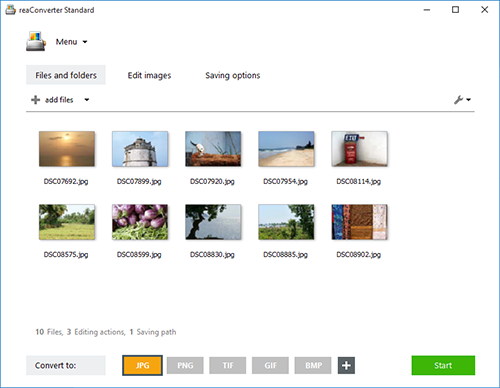
reaConverter is a powerful batch image converter which allows you to convert multiple images between a huge variety of different formats in a single operation. The bulk image converter provides immense support for different formats, so you can use it to open and convert any image of any format you are ever likely to encounter, including both rare and obsolete formats. In total, 545 input image formats are supported as well as 56 output formats.

Supported formats include all of the standard and advanced formats, RAW formats used by professional digital photographers, Microsoft Office Document formats including DOC, DOCX and RTF, CAD and AutoCAD formats and a whole lot more.

In addition to standard bulk image conversion features, you can also edit multiple images in one hit, including resizing, mirroring, applying filters and watermarks and much more. If you are looking for the ultimate batch image converter, then reaConverter is the solution you should be looking for.

The new update of reaConverter 7 lets creative people do what they should – create – taking the most of routine operations upon itself. The feature is called Watch Folders, and that’s what it does: watches folders containing images for new or modified files
and instantly applies predefined actions to them. Working invisibly in the background, reaConverter’s Watch Folders feature allows a user to resize, crop, adjust brightness and colors, add watermarks and otherwise alter images of 400+ supported formats that landed in the specified source folder.

You can find out more at http://www.reaconverter.com and download a trial version or purchase the bulk image converter today.

Super Refocus for Mac 1.5.1

Type: Shareware
Cost: $29.99
Size: 20.35 MB
Release date: Sep 28 2015
Platform: Mac OS X
Publisher’s Site:  http://www.effectmatrix.com/
Publisher’s Product Page:  http://www.effectmatrix.com/mac-appstore/add-focus-to-photos.htm
Country: Hong Kong


Super Refocus for Mac

Super Refocus – Easily Add Focus and Depth to Your Photos.

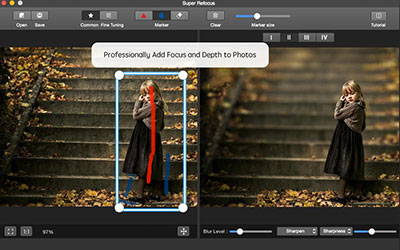
Super Refocus for Mac easily creates selective focus, lens blur, motion blur and tilt-shift effects. With Super Refocus, the amazing tilt-shift photography is easy generated. By simply applying a blurred background and increasing the depth of field, a sense of depth is created to draw attention to the most important objects of an image. Super Refocus extends filter and lens functionality beyond your camera and allows you to make these adjustments after the shot, simplifying your shoot and giving you more control.

Main Features:

1 Automatically determine the target prospects based on the target box with state-of-the-art image segmentation algorithm.

2 Two processing modes: Regular mode and Customized mode. It offers simple tools to quickly start and sophisticated tools to further retouch photographic effects.

3 Adjust the scope of the focus area and the background with drawing stroke.

4 Four Perspective Modes offer different types of natural blurring effect for the background.

5 Determine the blur gradient for any area with customized mode.

6 Complete professional image editing with the advanced focus algorithm.

7 Intuitively control 5 blur levels and precise adjust blur strength.

8 Clear the target prospects with an advanced sharpen algorithm to achieve professional refocusing effect.

9 Live previews and real-time editing.

10 Undo, redo history can be saved so you can always undo, redo your changes with unlimited times.

Accomplish things in your photos more quickly and with less effort.