Category Archives: Graphic Apps

Animation Tools, CAD, Converters & Optimizers, Editors, Font Tools, Gallery & Cataloging Tools, Icon Tools, Other, Screen Capture, Viewers

Super Eraser for Mac 1.2.5

Type: Shareware
Cost: $24.99
Size: 13.23 MB
Release date: Oct 19 2015
Platform: Mac OS X
Publisher’s Site:  http://www.effectmatrix.com/
Publisher’s Product Page:  http://www.effectmatrix.com/mac-appstore/super-inpaint-for-mac.htm
Country: Hong Kong

Super Eraser for Mac

Super Eraser for Mac is a magic super photo inpaint App to instantly remove unwanted objects from image for Mac and instantly fix your hotos for Mac with a few clicks. It performs the best among all other retouching apps that ruin your photos.


Super Eraser for Mac photo retouching tool uses the latest image processing technology to achieve the Best InPaint treatment effect. With the intelligent restoration algorithm, Super Eraser for Mac has the ability to handle complex scenes or irregular shaped hole with highly textured objects and reconstruct missing or damaged patch from pixels around the selection to create a seamless repair of an image.

Top Reasons to Install Super Eraser to inpaint for Mac:

– Smart Algorithm Enjoy the least amount of work for the best results in quality and quantity.

– Amazing Realistic Result:

1 Remove unwanted watermark, logo, signature, date stamp, text etc.
2 Delete unwanted objects , such as wires, buildings, garbage bins, etc.
3 Erase skin blemishes,acnes …
4 Get rid of image objects, pedestrians, tourists.

– Very Fast Speed: Get the magical images done in seconds-to-minutes instead of minutes-to-hours. It is time to say goodbye to Photoshop.

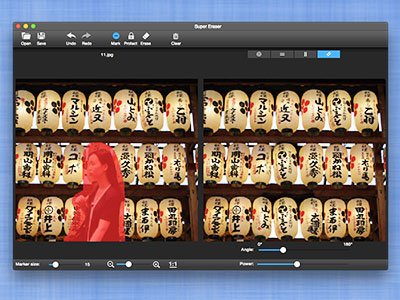
– Intuitive User Interface: Easy to use and completely non-technical. Just select the Brush or Lasso tool to mark unwanted objects with red color, Super Eraser will do the rest for you.

– Precision Tool: The only tool for making red/green marks for extremely fast separation without sacrificing quality.

– Live Preview: Instant Preview effect and make necessary revision. Redo immediately if you are dissatisfied with the result.

– Supported formats: All popular image formats: JPG, PNG, GIF, BMP, TIFF …

People all over the world use Super Eraser every day to beautify their photos. Try it out today to be more creativity!

Pay attention: You need mark protected parts as GREEN color to avoid multiple mirror effects.

Graphcat<

ACDSee 19.0.0.405

Type: Shareware
Cost: $59.99
Size: 106.89 MB
Release date: Sep 24 2015
Platform: Win2000,WinXP,Win7 x32,Win7 x64,Windows 8,Windows 10,WinServer,WinOther,WinVista,WinVista x64
Publisher’s Site:  http://www.acdsee.com
Publisher’s Product Page:  http://www.acdsee.com/en/products/acdsee-19
Country: United States of America


ACDSee

ACDSee 19 – Organize, edit, and share your photos with ease.

Overview: Trusted digital asset management paired with photo editing essentials, ACDSee 19 allows users to execute the fundamental elements of their photography workflow with ease and speed. ACDSee 19 is the efficiency-driven solution for your growing photo collection.

Features:
ACDSee 19 is packed with tools to help you organize your photos, perfect your best, and inspire your friends and family. Now featuring an entire mode for chronologically viewing your entire image collection from a bird’s-eye view, collections, exact color matching, pressure sensitivity for the brush tool designed to keep your edits as precise as possible, high DPI support for crisp viewing on 4K monitors, and much more, ACDSee 19’s new features add even more value to this dependable software.

Collections – NEW:
Group your photos in one place for a simple take on highly complex organizing and easy searching. Create Collections to fast-track the right photos to the right workflow, such as printing, batch editing, sharing to web, developing, or accumulating for a slideshow. Construct Smart Collections containing a search, which you can return to at any time. Utilize an extensive list of search variables, including relative dates, date ranges, metadata, and file properties. Smart Collection’s search will update its findings as files are added to the database zero effort on your part.

Photos Mode – NEW:
Experience the entirety of your photo collection by date. Gain new perspective on your memories by browsing it by year, month, or day. Conveniently locate your place in giant collections thanks to pop-up dates showing you exactly where you are in time. Quickly move from this panoramic chronoscopic view to organizing, viewing individual files, or taking them directly into Edit mode for adjustment.

4K Support – NEW:
View your images on 4k monitors in sharp, uncompromising detail no number of words can describe.

Super Denoising for Mac 1.2.0

Type: Shareware
Cost: $19.99
Size: 16.35 MB
Release date: Oct 21 2015
Platform: Mac OS X
Publisher’s Site:  http://www.effectmatrix.com
Publisher’s Product Page:  http://www.effectmatrix.com/mac-appstore/super-denoise-noiseware-mac.htm
Country: Hong Kong


Super Denoising for Mac

Anyone who takes photos will need Super Denoising.

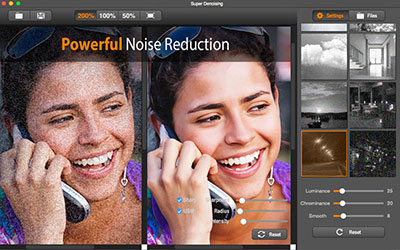
Super Denoising is an effective photo noise reduction software for Mac to remove image noise and improve image quality without disrupting crisp outlines and image colors for clearer, more natural images.

Our adjustments strike a balance between these two points to deliver exceptional detail, outstanding image quality, and a distinctive, natural look. This is why serious photographers are adopting it into their workflows.

Amazing Features:

1 Intelligent, world-class noise reduction technology.
2 Smartly detect and instantly remove noise of 8 different levels.
3 Despeckle JPEG Artifacts.
4 One-click to auto remove noise and maintain details, colors and textures.
5 Live previews and real-time editing.
6 Batch noise reduction – Batch reduce image noise for Mac with same reduction parameter value.
7 Photo Enhancement

The Applicable Occasions of Super Denoising for Mac:
1 Smart phone, digital camera and SLR camera: effectively reduce or eliminate noise from underexposed photos.
2 Scanner and fax machine: reduce thermal noise and digital noise in high ISO.

Super Denoising Makes Your Noisy Photos Look Their Best:
– Perfectly improve the quality of digital photos taken at night (photos with a high ISO).
– The portrait and event photos taken indoors or at dusk (especially in low light conditions) is crisp and natural-looking.
– Create a digital image that can be used for printing.