Category Archives: Graphic Apps

Animation Tools, CAD, Converters & Optimizers, Editors, Font Tools, Gallery & Cataloging Tools, Icon Tools, Other, Screen Capture, Viewers

Q2ID Bundle2015

Type: Demo
Cost: $199
Size: 46.16 MB
Release date: Jun 18 2015
Platform: Win2000,WinXP,Win7 x32,Win7 x64,Windows 8,Windows 10,WinServer,WinOther,WinVista,WinVista x64
Publisher’s Site:  http://www.markzware.com
Publisher’s Product Page:  https://markzware.com/products/q2id/
Country: United States of America


Q2ID

Q2ID is an InDesign plugin to quickly convert QuarkXPress documents in Adobe InDesign. No more re-creating documents from scratch. The Q2ID InDesign plugin gives you a big head-start on QuarkXPress to InDesign data conversion.


Our Q2ID Bundle Subscription gives you access to all current Q2ID plugin versions. You will have access to Q2ID for InDesign CC, CS6, CS5.5 and CS5 both Macintosh and Windows platforms with a single purchase and License.

Currently running Adobe InDesign CS5 but thinking of upgrading? You’ll be covered when you decide to upgrade to CS6 or CC.
If Adobe releases a new CC version which breaks compatibility with our current CC plugin, you’ll get the upgraded plugin for free.
What’s that you say? Quark released a new version? You’ll have access to the upgraded plugins which can convert the new Quark documents.
Easy License Management: Never Remember an Activation Code again!

Markzware’s Q2ID data conversion software converts the intricate details of the original QuarkXPress document and instantly re-creates the document within Adobe InDesign. Q2ID works in InDesign CC, CS6, CS5.5 or CS5 on both Macintosh and Windows platforms.

Items that convert from QuarkXPress using the Q2ID QuarkXPress to InDesign plugin include: page positioning, color models, fonts and styles, images, and text attributes, as well as tables, layers, blends, runarounds, linked text boxes, anchored boxes, and pantone colors.

Q2ID converts Quark 4 through Quark 10 documents. That gives you the ability to convert over 15 years worth of documents.

Read more here: https://markzware.com/products/q2id/

Graphcat<

reaConverter Lite 7.1.54

Type: Freeware
Cost: $0
Size: 10.47 MB
Release date: Jul 03 2015
Platform: Win2000,WinXP,Win7 x32,Win7 x64,Windows 8,WinServer,WinOther,WinVista,WinVista x64
Publisher’s Site:  http://reasoft.com
Publisher’s Product Page:  https://www.reaconverter.com/download/#compare
Country: United States of America


reaConverter Lite

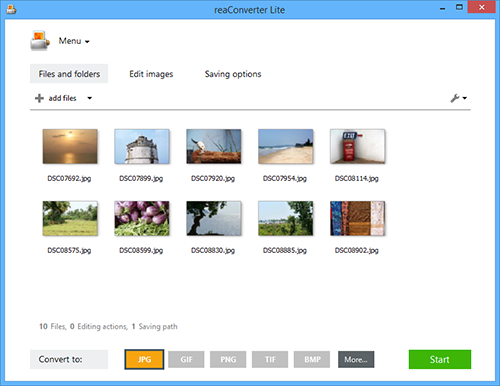
Free batch advanced image converter and image editing application.
reaConverter Lite can handle ultra-fast batch conversions between JPEG, GIF, TIFF, PNG and BMP images with access to lots of advanced picture editing techniques such as:

Alteration and Orientation tools: Resize, Crop, Canvas Size, Rotate, Mirror, Auto Crop, Auto Rotate

Adjustments tools: Brightness/Contrast, Color Balance, Gamma Correction, Hue/Saturation, White Balance, Photo Filter, Black & White, Invert, Color Depth

Creative Retouching tools: Sharpen, Blur, Anti-aliasing, Stylize, Border, Shadow, Noise, Selective Color Change, Background Change, Lens Correction, JPEG Artifacts Remove, Black and White Noise Remove

Watermarking tools: Image Watermark, Text Watermark, Dynamic Watermark, Primitive Drawings

Free version of reaConverter Lite also supports all formats features and tuning like:
Change Color Space (CMYK, RGB, YCbCr, …), Copy Metadata (EXIF, IPTC), Transfer Alfa Channel, Set DPI, Manage ICC Profile, Control Bit Depth, Format-Specific Saving Settings, Alter Multi-Page Settings, Select Transparency Color, Add TIFF Compression (CCITT, LZW, RLE, …), Set Quality.

Additional free features: Process Files from ZIP Folders, Create Thumbnails, Move Original Files, Move Unprocessed Files, Delete Files After Conversion, Set Manual File Date, Keep Path Info and Folders Structure, Name Files with Macros, EXIF and TIFF Tags, Skip Blank Files or Pages.

reaConverter Lite is uber-powerful and free image conversion tool with a great variety of features. It gives advanced solution for image processing and tuning.

Daminion 4.0

Type: Freeware
Cost: $0
Size: 41.23 MB
Release date: Jul 14 2015
Platform: Win2000,WinXP,Win7 x32,Win7 x64,Windows 8,WinServer,WinOther,WinVista,WinVista x64
Publisher’s Site:  http://daminion.net
Publisher’s Product Page:  http://daminion.net/feature-tour/daminion
Country: United States of America


Daminion

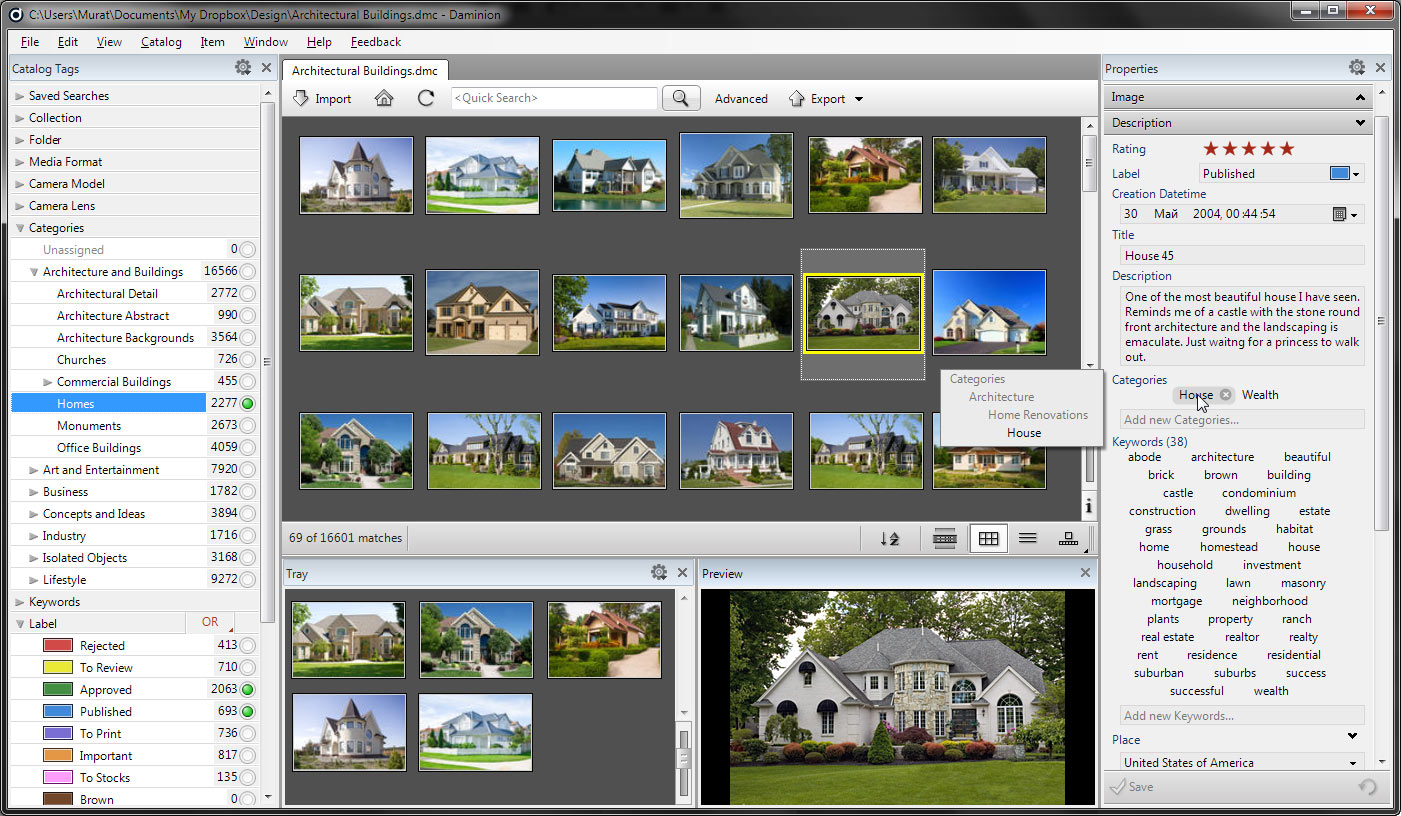
Daminion is a multi-user, easy-to-use digital photo and document management solution for your precious multimedia content.

Easy asset cataloging means goodbye to last-minute scrambling. Daminion also supports storage of data inside files, including copyright information, synchronization of database information with EXIF, IPTC, XMP, and MWG, as well as format-specific metadata in a wide variety of formats. The metadata mark your copyrighted material; this helps to protect your intellectual property rights.

Daminion supports a wide variety of media formats, including raster, vector, camera RAW images, video, music and PDF files. Your library remains portable: catalogs contain relative file paths. That means you can easily move a folder with media files and the catalog to a new location. Multiple catalogs can be opened in separate tabs simultaneously in modern web browsers. You can work with Shared and Local catalogs in the same workspace as well.

The program’s export feature supports optimization on demand; users can export media files with specific conversion rules. In one click your files can be optimized for uploading to Flickr or Facebook. Convert files on demand without redundant file duplicates or different image sizes and formats.

Daminion is a full-featured digital asset management solution that will help you get the most out of your assets. Catalog it, move it, share it and do everything else you need, all from within Daminion. Know where your content is – and then put it to work!