Category Archives: Graphic Apps

Animation Tools, CAD, Converters & Optimizers, Editors, Font Tools, Gallery & Cataloging Tools, Icon Tools, Other, Screen Capture, Viewers

JBatch It 6.20

Type: Shareware
Cost: $25.95
Size: 6.42 MB
Release date: Jun 11 2015
Platform: WinXP,Win7 x32,Win7 x64,Windows 8,WinServer,WinVista,WinVista x64
Publisher’s Site:  http://www.batchimage.com
Publisher’s Product Page:  http://www.batchimage.com/product/jbatchit
Country: United States of America

JBatch It

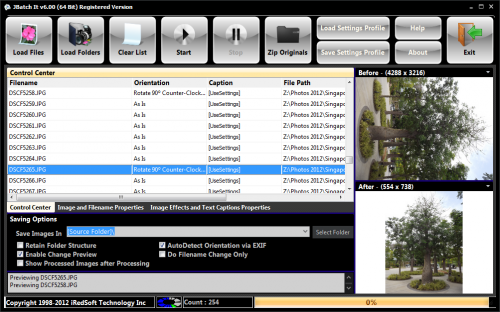
JBatch It! is an automated Batch Imaging Editor which allows you to resize, rename, add captions and more. It is a must-have tool for webmasters and digital photographers alike. It supports Dot Per Inch modification, JPEG quality and smoothing properties and allows resizing which image aspects ratio. It allows adding of drop shadow and perform several fundamental batch editing features. It supports applying effects such as drop shadow, old picture, sepia, round corners, negative, grayscale and more. A Must Have Tool for Digital Photography

Graphcat<

Batch It Pro 5.31

Type: Shareware
Cost: $49.95
Size: 8.18 MB
Release date: Jun 18 2015
Platform: Win2000,WinXP,Win7 x32,Win7 x64,Windows 8,Windows RT,WinServer,WinOther,WinVista,WinVista x64
Publisher’s Site:  http://www.batchimage.com
Publisher’s Product Page:  http://www.batchimage.com/product/batchitpro
Country: United States of America


Batch It Pro

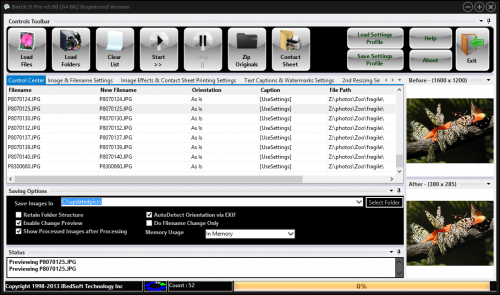
Batch It Pro is at heart a Windows based Batch Image Processor which caters o the growing needs of the digital photographers at large. If you require a quick and easy program to resize and rename a huge batch of images, Batch It Pro is here for you.


It loads JPEG, PNG, Single Page TIFF, BMP, JPEG 2000, PCX, PBM, PPM, PGM, Targa, GIF and Windows HD Photos and saved to JPEG, PNG, BMP, GIF, TIFF, PCX, PBM, PPM, PGM, JPEG 2000 and Windows HD Photo.

Batch It Pro can batch resize, rename, add captions, add watermarks, add drop shadows and more in minutres instead of hours or days if you do it manually.

Batch It Pro is made as a Simple-to-Use application. All you need to do is to load the images, set the necessary conversation processes and click Start and let it do all the legwork for you.

The All New Batch It Pro v5 now comes in two variants which supports both the 64 Bit and 32 Bit Windows includes the latest Windows 8. The 64 Bit takes advantage of the speed and memory addressing which allow you to process faster and larger images.

Batch It Ultra 5.18

Type: Shareware
Cost: $69.95
Size: 11.84 MB
Release date: Jun 11 2015
Platform: Win2000,WinXP,Win7 x32,Win7 x64,Windows 8,Windows RT,WinServer,WinOther,WinVista,WinVista x64
Publisher’s Site:  http://www.batchimage.com
Publisher’s Product Page:  http://www.batchimage.com/product/batchitultra
Country: United States of America


Batch It Ultra

Batch It Ultra is our flagship Batch Image Processor. Now available in Native 32 and 64 Bit. It is a tool which helps you batch resize, change format, rename, add up to 3 text captions, add up to 3 watermarks, apply special effects and adjust photo settings. It also has support printing and saving of photos in a contact sheet.

* Batch Resizing – You can resize by pixels, by percentage, by ratio, by cropping and also by frame. The By Frame method allows you to keep the same ratio aspects and pad the smaller side. You can resize up to 3 sizes in a single run.

* Format Change – It supports import of JPEG, PNG, TIFF, BMP, JPEG 2000, Windows HD Photo, GIF, Targa, DIB, RLE, PIX, Truevision and other formats & export to JPEG, PNG, BMP, GIF, TIFF, JPEG 2000, PCX, PBM, PPM, PGM and Windows HD Photo.

* File Renaming – You can keep the same file name, add a zero-padded running number, tag prefix and suffix or even adjust the filename to what you want with the available macros.

* Text Captions and Watermarks – Add up to 3 text captions or PNG/GIF watermarks such as a description or a copyright tag. You can set the watermarks and text captions to appear anywhere on the image with the various alignments option provided and have the option to refine the location through the X and Y offsets.

* Special Effects & Photo Adjustments – Supports Sharpen, Blur, Brightness, Contrast, Old Photo Effects, Emboss, Negative, Grayscale, Auto Equalize, Red/Green/Blue Adjustment, Drop Shadow Effect, Red Eye Removal, Round Corners, Borders and create Tiled Images.

* There are 3 different licenses which includes the standard version and the Command Line and Server versions which can support command line parameters.

* There are two versions, a native 32 Bit and a native 64 Bit version to take advantage of your operating system. Both are available for download from our website.

Take advantage of our 21 Days Trial copy