Category Archives: Graphic Apps

Animation Tools, CAD, Converters & Optimizers, Editors, Font Tools, Gallery & Cataloging Tools, Icon Tools, Other, Screen Capture, Viewers

ACDSee 18.1.0.233

Type: Shareware
Cost: $59.99
Size: 1.16 MB
Release date: Sep 25 2014
Platform: Win7 x32,Win7 x64,Windows 8
Publisher’s Site:  http://www.acdsee.com
Publisher’s Product Page:  http://www.acdsee.com/en/products/acdsee-18
Country: United States of America


ACDSee

ACDSee 18 – Organize, edit, and share your photos with ease.


Overview: ACDSee 18 allows photographers to carry out all the essential elements of the creative process and distribution in one place. Managing your growing photo collection has never been this painless.

Features:
ACDSee 18 is packed with tools to help you organize your photos, perfect your best, and inspire your friends and family. With an impressive array of automatic functions designed to keep your workflow flowing, a host of new filters to keep the creativity coming, and quick access to the cloud, ACDSee 18 gives you unprecedented efficiency.

Smart Indexer – NEW
In order to maximize your overall ACDSee experience, the Smart Indexer catalogs folders and adds them to the ACDSee Database when your computer is idle. The Smart Indexer is so smart that it knows when you’ve made changes and automatically keeps everything up-to-date, so that you don’t even have to think about it.

Auto Lens View – NEW
Quickly preview your images in a variety of filters as you browse them with View mode using Auto Lens View.

PicaView – NEW
Revel in the convenience of a sneak peek of your images through your OS’ context menu, as you go, with ACDSee PicaView. Save time not having to open your images in an application to identify them, view their EXIF information, and launch them in ACDSee for further editing without any bother at all.

1-Step EQ – NEW
Enjoy the simplicity of automatic exposure adjustment with 1-Step EQ. ACDSee’s patented LCE technology powers 1-Step EQ’s intuitive corrections as you open the image.

SeeDrive – NEW
Conveniently take care of all your cloud-related tasks right from Manage mode. Upload images to and download from ACDSee 365, organize, control privacy settings, and share with your family, friends, and the world.

Support for Windows Touch Gestures – NEW
Motion through your viewing process quickly and elegantly on your tablet or mobile device.

Graphcat<

reaConverter Pro 7.1.34

Type: Shareware
Cost: $99.99
Size: 94.71 MB
Release date: May 22 2015
Platform: Win2000,WinXP,Win7 x32,Win7 x64,Windows 8,WinServer,WinVista,WinVista x64
Publisher’s Site:  http://reasoft.com
Publisher’s Product Page:  http://www.reaconverter.com/
Country: United States of America


reaConverter Pro

Convert Multiple Images Quickly with a Bulk Image Converter

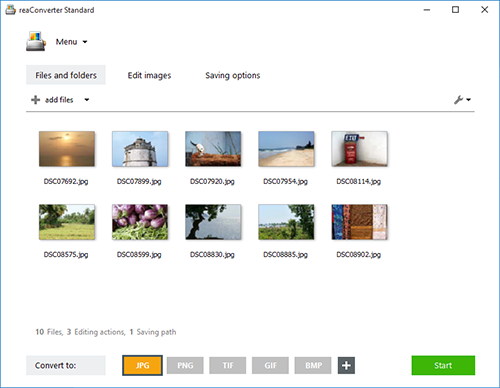
reaConverter is a bulk image converter providing a quick and convenient way to convert any number of images with just a few clicks. Thanks to its simple and clear interface, the program is understandable immediately even to those who have little or no experience with using such programs. When you need to convert large numbers of images all at once or make simple changes to multiple images, this batch image converter makes things quick and simple. Using this software, you will literally save hours and hours compared to manually converting each individual image.

reaConverter is a highly versatile solution which supports virtually every image format that you are ever likely to encounter. You can easily convert folders containing thousands of images in a single operation, and the process is quick and efficient as well. The program can read a huge variety of different formats, including all of the standard formats such as BMP and JPG. It also support numerous RAW format types used by professional digital cameras as well as other advanced formats, metafiles, CAD formats, vector formats and even formats which are nowadays extremely rare. In total, reaConverter can read no less than 434 different formats, including 338 rare ones. Most of these rare formats will not open with any standard photo or image viewer application, so using the bulk image converter is a great way to make them more accessible with just a few clicks. In addition, reaConverter supports 53 output formats, allowing you to convert any of the supported read formats into a variety of common, advanced and other formats. In short, reaConverter supports pretty much every conceivable image format that you will ever encounter.

Easy GIF Animator 6.2

Type: Shareware
Cost: $29.65
Size: 14.12 MB
Release date: May 05 2015
Platform: WinXP,Win7 x32,Win7 x64,Windows 8,WinVista,WinVista x64
Publisher’s Site:  http://www.blumentals.net/
Publisher’s Product Page:  http://www.easygifanimator.net
Country: Latvia


Easy GIF Animator

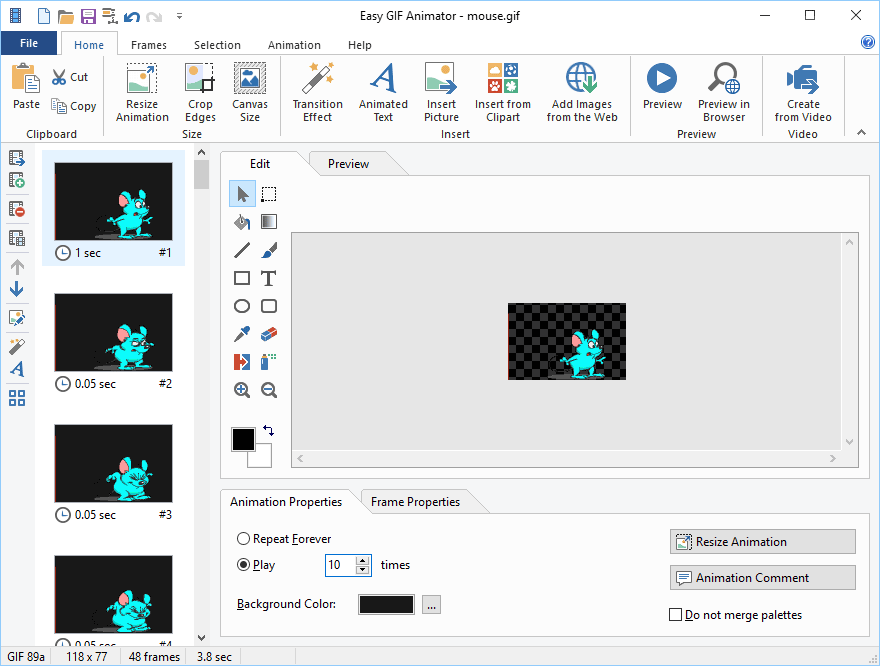
Easy GIF Animator is powerful yet very easy to use software for creating and editing animated GIF images. With this animated GIF editor you can easily create animated pictures, banners and buttons in no time. You can use special features to add stunning visual effects and prepare your animation for publishing on your web page. Easy GIF Animator supports all types of GIF animation and provides high compression and great quality for your animated GIF images. To top it all off, Easy GIF Animator is the best priced animated GIF editor on the market today.

With Easy GIF Animator You Can:
* Easily create animated banners, pictures and buttons
* Create animated GIF images from scratch
* Edit and modify animated GIF images
* Convert video to GIF animation
* Add visual effects to your GIF animation
* Add sparkle effect to any image
* Create moving text effects
* Optimize animated GIF images so they take less space and load faster
* Preview GIF animation in web browser
* Manage animation frames
* Set animation loop count and frame duration
* Extract separate animation frames
* Convert GIF animation to grayscale
* Edit animated GIF palette
* Reverse GIF animation or a portion of it
* Export GIF animation to AVI format
* Use GIF, JPG, BMP and PNG images in your animation
* Generate HTML code for publishing animation on the web