
Category Archives: Graphic Apps

Animation Tools, CAD, Converters & Optimizers, Editors, Font Tools, Gallery & Cataloging Tools, Icon Tools, Other, Screen Capture, Viewers

reaConverter Lite 7.1.23

Type: Freeware
Cost: $0
Size: 10.80 MB
Release date: Apr 23 2015
Platform: WinOther,Win98,Win2000,WinXP,Win7 x32,Win7 x64,Windows 8,WinServer,WinVista,WinVista x64
Publisher’s Site:  http://reasoft.com
Publisher’s Product Page:  https://www.reaconverter.com/download/#compare
Country: United States of America
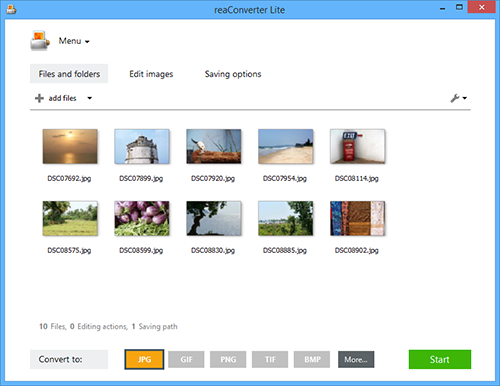

reaConverter Lite

Free batch advanced image converter and image editing application.
reaConverter Lite can handle ultra-fast batch conversions between JPEG, GIF, TIFF, PNG and BMP images with access to lots of advanced picture editing techniques such as:


Alteration and Orientation tools: Resize, Crop, Canvas Size, Rotate, Mirror, Auto Crop, Auto Rotate

Adjustments tools: Brightness/Contrast, Color Balance, Gamma Correction, Hue/Saturation, White Balance, Photo Filter, Black & White, Invert, Color Depth

Creative Retouching tools: Sharpen, Blur, Anti-aliasing, Stylize, Border, Shadow, Noise, Selective Color Change, Background Change, Lens Correction, JPEG Artifacts Remove, Black and White Noise Remove

Watermarking tools: Image Watermark, Text Watermark, Dynamic Watermark, Primitive Drawings

Free version of reaConverter Lite also supports all formats features and tuning like:
Change Color Space (CMYK, RGB, YCbCr, …), Copy Metadata (EXIF, IPTC), Transfer Alfa Channel, Set DPI, Manage ICC Profile, Control Bit Depth, Format-Specific Saving Settings, Alter Multi-Page Settings, Select Transparency Color, Add TIFF Compression (CCITT, LZW, RLE, …), Set Quality.

Additional free features: Process Files from ZIP Folders, Create Thumbnails, Move Original Files, Move Unprocessed Files, Delete Files After Conversion, Set Manual File Date, Keep Path Info and Folders Structure, Name Files with Macros, EXIF and TIFF Tags, Skip Blank Files or Pages.

reaConverter Lite is uber-powerful and free image conversion tool with a great variety of features. It gives advanced solution for image processing and tuning.

Graphcat<

FlightCheck 7.5.67

Type: Demo
Cost: $199
Size: 63.99 MB
Release date: Jul 23 2014
Platform: Mac OS X
Publisher’s Site:  http://www.markzware.com
Publisher’s Product Page:  http://markzware.com/products/flightcheck/
Country: United States of America


FlightCheck

FLIGHTCHECK is the essential quality control tool for any and all participants in the print and rich media markets, from creative designers to manufacturing professionals and organizations. FlightCheck now supports Adobe CC!

FlightCheck by Markzware helps you create excellent output for magazines, catalogs, brochures, advertisements, manuals, and virtually any document intended for print. It provides complete quality control of output and helps avoid re-printing jobs, saving printers and publishers valuable time and money.

FlightCheck will preflight digital files thoroughly, perform a detailed scan, and warn you about digital print problems, while directing you to them for repair. Markzware’s FlightCheck guides you through the preflight workflow process with a preflight checklist and issues a preflight report with complete print job analysis, highlighting digital print errors, item by item, including incorrect image resolution, missing fonts, incorrect colors, spot colors, transparency and much more. FlightCheck will then package and collect all required print job elements, such as images and fonts, to ensure that jobs print as expected.

One of the key capabilities of FlightCheck is its power to preflight file formats and image types of a wide variety. A partial list includes Adobe InDesign, Adobe Acrobat PDF, Adobe Illustrator, Adobe Photoshop, Adobe PageMaker, Adobe FreeHand, QuarkXPress, Microsoft Office, CorelDRAW, EPS, TIFF and many more. Read more – https://markzware.com/products/flightcheck/#ixzz2rvHm5bcm

Typograf font manager 5.2

Type: Shareware
Cost: $35
Size: 1.55 MB
Release date: Jul 21 2014
Platform: WinXP,Win7 x32,Win7 x64,Windows 8,WinServer,WinOther,WinVista,WinVista x64,Other
Publisher’s Site:  http://www.neuber.com
Publisher’s Product Page:  http://www.neuber.com/typograph/index.html
Country: Germany


Typograf font manager

This is in fact a very top of a font list manager for all kinds of Opentype, TrueType and Type one fonts for printers. You will be able to preview all fonts; you will also have all of the font information as well as the type face classifications and orders such as the author, designer, website, date and copyright information. You also will have access to the Unicode character sets as well as to the layouts of the keyboard, and the zoom views. In addition to this you will be able to find and compare all of the fonts that are similar and then print and see them in different ways. This will also manage your fonts in a database and then also in groups. It will give you a quick preview as well of font files on the network. All people in your team will have access to the same kinds of font types which will be different based on the kind of computer and system that everyone has. In addition to this it will also be possible to ensure that you will be able to have access to all of the fonts as well as all of the information that needs to be made available for font classes as well as other internal structures. For instance there are file management functions as well as information about different kinds of interfaces as well as other kinds as well of information about the typography which is available. Specifically as well that means that you will be able to search for and duplicated the files on your hard drive so that you have access to them for all kinds of media and are able to sort and use them by name, file, size, family, copyright, and width. You can edit all of the file information which is a part of the software. Users are able to take advantage of all of the kinds of font names and tags which make things easy for both viewing and printing. There are also minor supported updates.