Category Archives: Graphic Apps

Animation Tools, CAD, Converters & Optimizers, Editors, Font Tools, Gallery & Cataloging Tools, Icon Tools, Other, Screen Capture, Viewers

Convert CGM to Image 9.7.5

Type: Shareware
Cost: $1495
Size: 10.00 kB
Release date: Jan 15 2009
Platform: Win2000,WinXP,Win7 x32,Win7 x64,Windows 8,Linux
Publisher’s Site:  http://www.cgmlarson.com
Publisher’s Product Page:  http://www.cgmlarson.com/convert_CGM_files_to_image_formats_aerospace.shtml
Country: United States of America


Convert CGM to Image

Convert CGM Files to Image ™ Formats. Exchange CGM Files with popular graphics formats: GIF, JPEG, PNG, TIFF…Convert CGM, a CGM file converter, provides users with the most flexibile and easy to use software for converting drawings and technical illustrations into common formats used by the Aerospace & Defense, Automotive, and Manufacturing industries.


Advanced features include color swapping, Group IV compression for monochrome images, and batch conversion. Server versions include access to the command-line interface for automated conversion.

Request Evaluation Convert CGM Features:
Convert Single or Batches of files – saving you time!
DPI – dots per inch resolution control.
Multi-picture CGM file support.
Options for compressions, image quality, grayscale, Size (pixels, inches, metric),
Aspect Ratio, Gamma, and Rotation.

Available for Windows, Linux, and Unix environments

Desktop Version – works on your Windows workstation. Offers an easy to use interface, users simply choose CGM files for conversion, then select the output formats, and the directory for the newly formatted files.
Server Version – The Server version operates in command line mode with control parameters, so you can ‘automate and configure’ your conversion work-flow.
Network Compatible – for easier digital asset management on your workstations,
servers, or storage arrays.

Larson Convert CGM is the leading CGM converter software on the market today.

Graphcat<

HoudahGeo 4.0.1

Type: Demo
Cost: $29
Size: 17.64 MB
Release date: Dec 03 2014
Platform: Mac OS X,Other
Publisher’s Site:  http://www.houdah.com
Publisher’s Product Page:  http://www.houdah.com/houdahGeo/
Country: Luxembourg


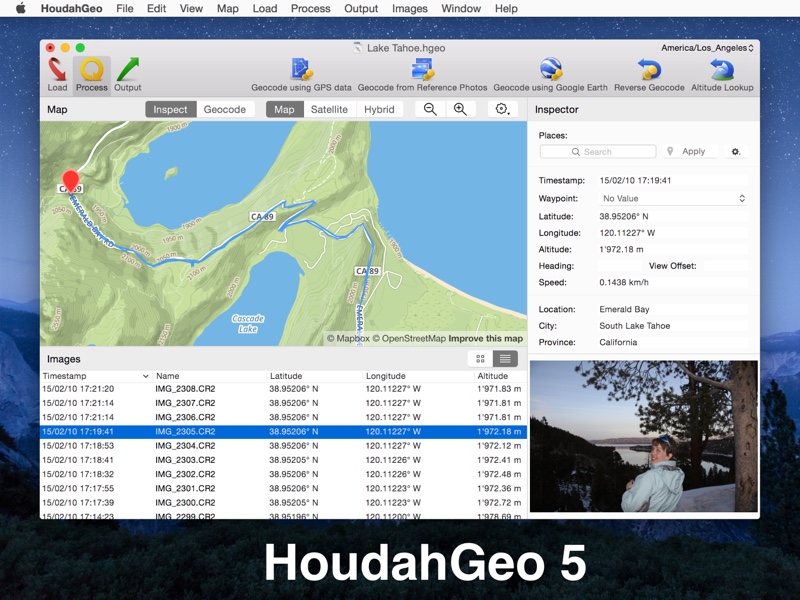
HoudahGeo

HoudahGeo: Know where you took that photo!

HoudahGeo is a one-stop photo geocoding and geotagging solution for Mac OS X.
Export geotags to EXIF, XMP and IPTC.
GPS device optional.

HoudahGeo ‘pins’ photos to locations where they were taken.
Professional grade processing. Mac ease of use.

HoudahGeo can store latitude, longitude, and altitude information right within the image file – invisibly, with no loss of quality.
HoudahGeo writes EXIF, XMP, and IPTC tags. JPEG, RAW or XMP files.

HoudahGeo projects may be published to EveryTrail or viewed and shared using Google Earth.
Geotagged photos may be saved to Evernote or uploaded to Flickr or locr.

* One-stop geocoding for the Mac

HoudahGeo caters to two very different needs:
– Geotagging for archival purposes using EXIF, XMP and IPTC tags
– Geocoding for publishing to Google Earth, Flickr, EveryTrail or locr

* GPS device: optional

HoudahGeo offers you many ways of geocoding your favorite photos:
– Automatic: Matches photos to GPS track logs and waypoints. GPX, NMEA, Sony LOG, Wintec TES, etc.
– iPhone / iPad: Matches photos to reference photos taken using iPhone
– Using a map: Pick locations using the built-in map
– Using Google Earth: Point to the desired location
– Precision: Attach photos to GPS waypoints
– Manual: Enter coordinates found on Google Earth, Wikipedia, etc.

* GPS device: supported

HoudahGeo connects directly to many brands and models of GPS track loggers.
It also reads GPX, NMEA, LOG, TES, … and TCX files created by third party software.

Q2ID InDesign-CC-2

Type: Demo
Cost: $199
Size: 46.16 MB
Release date: Jul 10 2014
Platform: Win7 x32,Win7 x64,Windows 8,Mac OS X,
Publisher’s Site:  http://www.markzware.com
Publisher’s Product Page:  https://markzware.com/products/q2id/
Country: United States of America


Q2ID

Q2ID is an InDesign plugin to quickly convert QuarkXPress documents in Adobe InDesign. No more re-creating documents from scratch. The Q2ID InDesign plugin gives you a big head-start on QuarkXPress to InDesign data conversion.

Our Q2ID Bundle Subscription gives you access to all current Q2ID plugin versions. You will have access to Q2ID for InDesign CC, CS6, CS5.5 and CS5 both Macintosh and Windows platforms with a single purchase and License.

Currently running Adobe InDesign CS5 but thinking of upgrading? You’ll be covered when you decide to upgrade to CS6 or CC.
If Adobe releases a new CC version which breaks compatibility with our current CC plugin, you’ll get the upgraded plugin for free.
What’s that you say? Quark released a new version? You’ll have access to the upgraded plugins which can convert the new Quark documents.
Easy License Management: Never Remember an Activation Code again!

Markzware’s Q2ID data conversion software converts the intricate details of the original QuarkXPress document and instantly re-creates the document within Adobe InDesign. Q2ID works in InDesign CC, CS6, CS5.5 or CS5 on both Macintosh and Windows platforms.

Items that convert from QuarkXPress using the Q2ID QuarkXPress to InDesign plugin include: page positioning, color models, fonts and styles, images, and text attributes, as well as tables, layers, blends, runarounds, linked text boxes, anchored boxes, and pantone colors.

Q2ID converts Quark 4 through Quark 10 documents. That gives you the ability to convert over 15 years worth of documents.

Read more here: https://markzware.com/products/q2id/