Category Archives: Network & Internet

Ad Blockers, Browser Tools, Browsers, Download Managers, File Sharing/Peer to Peer, FTP Clients, Network Monitoring, Other, Remote Computing, Search/Lookup Tools, Terminal & Telnet Clients, Timers & Time Synch, Trace & Ping Tools

Classic FTP Power for Mac 3.04

Type: Shareware
Cost: $60.00
Size: 1.62 MB
Release date: Dec 21 2016
Platform: Mac OS X
Publisher’s Site:  https://www.nchsoftware.com/inventory/index.html
Publisher’s Product Page:  https://www.nchsoftware.com/classic/index.html
Country: United States of America


Classic FTP Power for Mac

Classic FTP Plus for Mac is an easy to use ftp client to view, manage, edit, upload, download and delete files from a remote server or network. As the name suggests, Classic FTP has been specifically designed to look and feel like a typical ftp software client. While offering all the same features as other ftp clients, Classic FTP is perfect for both advanced and novice website administrators. Complete with useful features like "Mirror and Upload" to synchrozinze local and remote files, and synchronized navigation to reduce the risk of uploading files to the wrong folder.


Classic FTP Plus for Mac Features:
* Intuitive user interface makes uploading files easy
* Synchronize local and remote folders to keep everything up-to-date
* Supports the secure FTP protocol (SSL)
* Compatible with all popular FTP servers
* Transfer files via the internet, over a local area network (LAN) or between computers and external hard drives
* Easy setup wizard to help you establish FTP site connections

About NCH Software:
NCH Software offers more than 80 easy-to-use audio, video, business, dictation, computer utilities, and other software solutions that improve productivity and usability for small businesses and consumers. Focusing on specific needs, NCH provides users with what they need at a price they can afford. This approach generates more than four million unique visitors and nearly three million downloads per month from www.nchsoftware.com

Graphcat<

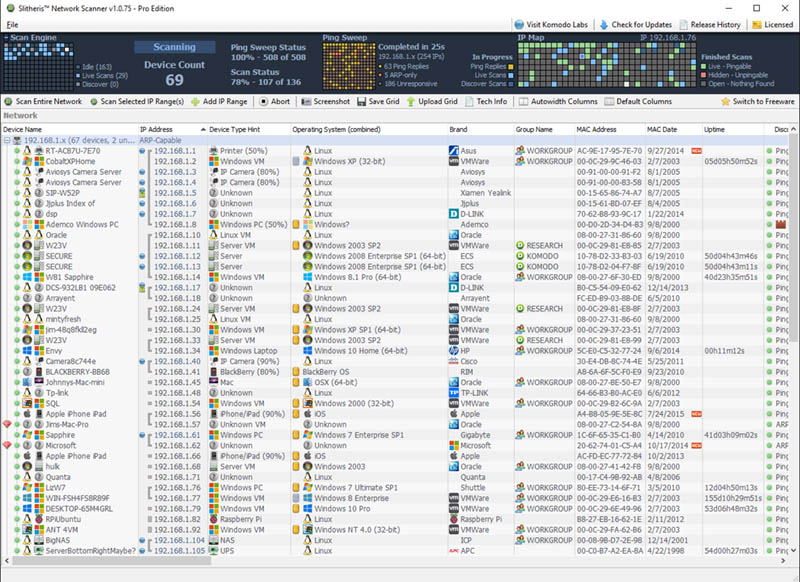
Slitheris Network Discovery 1.1.278

Type: Shareware
Cost: $195
Size: 5.56 MB
Release date: Oct 10 2018
Platform: Win2000,WinXP,Win7 x32,Win7 x64,Windows 8,Windows 10,WinServer,WinOther,WinVista,WinVista x64
Publisher’s Site:  http://www.komodolabs.com/
Publisher’s Product Page:  http://www.komodolabs.com
Country: United States of America


Slitheris Network Discovery

Slitheris Network Discovery is much more than a typical IP scanner, capable of scanning 100 network devices in about 5 minutes! Most network scanners detect the basics like the MAC Address, but leave the OS field empty and don’t even bother identifying device types. Our IP scanner uses standard multi-threaded ping sweeps to find pingable devices, and uses ARP pings and other advanced network discovery technology to detect unpingable hidden devices. Other state-of-the-art features include operating system detection of Windows, Linux, iOS, and Android using proprietary TCP/UDP OS fingerprinting. Slitheris includes experimental network device type detection to find servers, printers, switches, routers, iPhones, iPads and more using heuristic analysis and device type fingerprinting. Network device names are pulled from up to 10 different possible locations on each device, assisting in detecting network device types. It even detects true case-sensitive PC names for Windows computers and servers. Slitheris Network Scanner comes in both freeware and Pro versions to suit the needs of all small, medium and enterprise organizations. Even home users will find Slitheris Network Scanner extremely useful on their own home networks.

Action1 Add Network Adapter 2.5

Type: Freeware
Cost: $0
Size: 5.28 MB
Release date: Aug 28 2018
Platform: Win2000,WinXP,Win7 x32,Win7 x64,Windows 8,Windows 10,WinServer,WinOther,WinVista,WinVista x64
Publisher’s Site:  https://www.action1.com/p/Free-Add-Network-Adapter-120.html
Publisher’s Product Page:  https://www.action1.com/p/Free-Add-Network-Adapter-120.html
Country: United States of America


Action1 Add Network Adapter

Use this action to add a new network adapter remotely to multiple computer at once and specify default getaway, IP address, DCHP settings and other configuration parameters for the new network interface. To change existing network adapter configuration, use another action called "Set Network Adapter Configuration".

Sign-up for Action1 Free Edition to enable IT workload automation and orchestrate job scheduling. Action1 allows to run manual and scheduled batch processes and actions centrally across the entire network. Action1 is entirely SaaS, with online web-based interface (no management tools to install) and it has zero cost for basic functionality. Running in the Cloud, Action1 discovers all of your endpoints in seconds, allowing you to manage your entire network by running queries and executing actions in plain English.