
Category Archives: Network & Internet

Ad Blockers, Browser Tools, Browsers, Download Managers, File Sharing/Peer to Peer, FTP Clients, Network Monitoring, Other, Remote Computing, Search/Lookup Tools, Terminal & Telnet Clients, Timers & Time Synch, Trace & Ping Tools

Slitheris Network Discovery 1.0.159

Type: Shareware
Cost: $195
Size: 5.24 MB
Release date: Jun 26 2016
Platform: Win2000,WinXP,Win7 x32,Win7 x64,Windows 8,Windows 10,WinServer,WinOther,WinVista,WinVista x64
Publisher’s Site:  http://www.komodolabs.com/
Publisher’s Product Page:  http://www.komodolabs.com
Country: United States of America
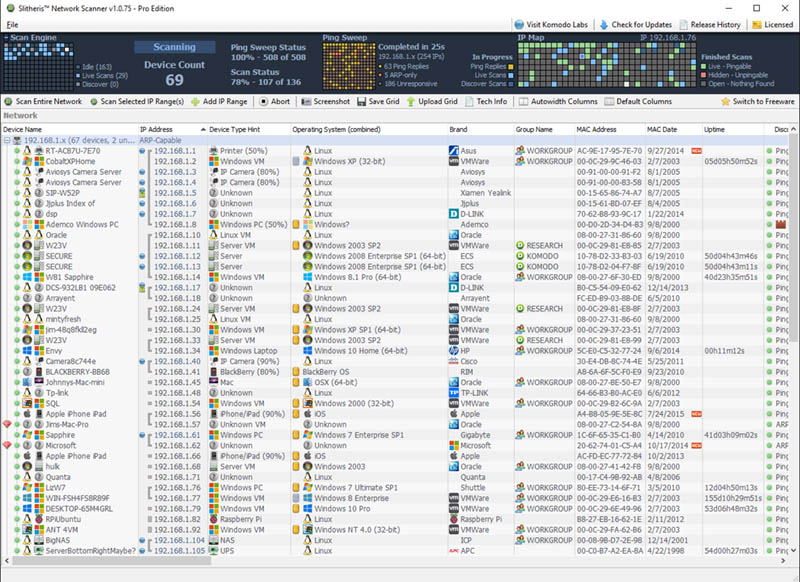

Slitheris Network Discovery

Slitheris Network Discovery is much more than a typical IP scanner, capable of scanning 100 network devices in about 5 minutes! Most network scanners detect the basics like the MAC Address, but leave the OS field empty and don’t even bother identifying device types. Our IP scanner uses standard multi-threaded ping sweeps to find pingable devices, and uses ARP pings and other advanced network discovery technology to detect unpingable hidden devices. Other state-of-the-art features include operating system detection of Windows, Linux, iOS, and Android using proprietary TCP/UDP OS fingerprinting. Slitheris includes experimental network device type detection to find servers, printers, switches, routers, iPhones, iPads and more using heuristic analysis and device type fingerprinting. Network device names are pulled from up to 10 different possible locations on each device, assisting in detecting network device types. It even detects true case-sensitive PC names for Windows computers and servers. Slitheris Network Scanner comes in both freeware and Pro versions to suit the needs of all small, medium and enterprise organizations. Even home users will find Slitheris Network Scanner extremely useful on their own home networks.
Graphcat<

FTPGetter Professional 5.89.0.85

Type: Shareware
Cost: $85
Size: 17.32 MB
Release date: May 18 2016
Platform: Win2000,WinXP,Win7 x32,Win7 x64,Windows 8,Windows 10,WinServer,WinOther,WinVista,WinVista x64
Publisher’s Site:  http://www.ftpgetter.com
Publisher’s Product Page:  http://www.ftpgetter.com
Country: Ukraine


FTPGetter Professional

With FTPGetter 3 Professional, users have an simpler way to get to files from a server using an FTP/SFTP client. Normally, their only option is to manually log in and move, check, or add files. This can be time-consuming for any worker and is not the most efficient use of time. Plus, users who need to stay abreast of the most recent file changes and updates can easily miss them when having to search for them manually. The FTPGetter 3 Professional program will automate FTP and SFTP transfers so this time-consuming manual approach becomes a thing of the past. The application allows users to set up tasks, such as synchronizing the files on the server with those in the user’s local folder, and schedule their frequency (once per day, several days per week, etc.). Then the software takes care of the tasks while the worker goes about their normal routine. The ability to automate FTP and SFTP transfers also means users can stay up to date with the files more simply and can even send or receive email notifications when specific jobs are finished. The easy-to-use interface of the software is another bonus. Users can set up and schedule tasks with a few clicks of the mouse. Wizards incorporated into the program make this part of the set-up a breeze even for novice users. This will be a relief to the end users, as well as to the organisation’s IT department. Using an FTP/SFTP client to access server files is a good idea, particularly in a business setting, but the FTPGetter 3 Professional software allows that good idea to be implemented more efficiently.

Zapya WebShare 1.3

Type: Freeware
Cost: $0
Size: 2.07 GB
Release date: May 13 2016
Platform: Android
Publisher’s Site:  http://www.izapya.com
Publisher’s Product Page:  http://www.izapya.com
Country: United States of America


Zapya WebShare

Zapya, the worlds fastest file sharing tool, has been well received on multiple platforms since its launch. Now Zapya is releasing a new app in the Android platform in the form a simple and yet powerful tool known as WebShare.
Webshare will allow users to access all of the contents from a Android phone on any device that is in the same Wi-Fi network. Instead of having to download an application on to your computer, the all of the following can be done in the web browser:


– View Photos
– Play Songs
– Watch Videos
– Access any folder from the phone in PC web
– Download files from the phone in PC web
– Upload files onto phone
– Access Android Apps(.apk)

New Features:
– Remote control Android camera in PC web, now your old phone can be used as a baby monitor!
– Display Android notifications and messages in PC web
– Send text from PC web to Android clipboard and search site

Zapya WebShare – A New Way to Share
