Category Archives: Network & Internet

Ad Blockers, Browser Tools, Browsers, Download Managers, File Sharing/Peer to Peer, FTP Clients, Network Monitoring, Other, Remote Computing, Search/Lookup Tools, Terminal & Telnet Clients, Timers & Time Synch, Trace & Ping Tools

Permission Analyzer 2.0

Type: Shareware
Cost: $299
Size: 129.63 MB
Release date: Sep 30 2015
Platform: Win2000,WinXP,Win7 x32,Win7 x64,Windows 8,Windows 10,WinServer,WinOther,WinVista,WinVista x64
Publisher’s Site:  http://www.perdemia.com
Publisher’s Product Page:  http://www.permissionanalyzer.com
Country: Netherlands


Permission Analyzer

Permission Analyzer scans your network and combines NTFS permissions with user and group data from the Active Directory. All data that is stored locally can be retrieved to create overviews of permissions per group or user. You will be able to monitor permissions for entire user groups and receive notifications if undesired permissions are flagged within your network.


Main features
Scanning the network
Configure the directories and LDAP Organizational Units to scan. All directory information and group memberships from LDAP are saved in a local database file. Run the scan whenever you like or schedule an automated scan. Permission Analyzer supports an external database, allowing multiple workstations to share the same information source.

Running your overviews
All information is saved on a database, allowing you to conduct targeted search queries in seconds, instead of scanning the whole network every time you want to apply a new filter. Add filters for specific members, all members of a group or LDAP OU, permissions or folders.

Tracing permissions
The main overview provides an aggregated summary of all permissions found and may contain the permissions of multiple users or groups. The Trace function is part of the overview and shows you the origin of permissions for a specific user or group and folder (via the group membership or parent folder they have been inherited). Use this view to zoom in on your search results.

Creating reports and policies
Save your filters as report and export them to HTML or CSV and e-mail. Use Permission Analyzer to run reports automatically using command-line parameters. Save your filters as policies and receive e-mail notifications if your policy report contains unwanted permissions.

Graphcat<

FTPGetter Professional 5.83.0.27

Type: Shareware
Cost: $85
Size: 17.03 MB
Release date: Dec 07 2015
Platform: Win2000,WinXP,Win7 x32,Win7 x64,Windows 8,Windows 10,WinServer,WinOther,WinVista,WinVista x64
Publisher’s Site:  http://www.ftpgetter.com
Publisher’s Product Page:  http://www.ftpgetter.com
Country: Ukraine


FTPGetter Professional

With FTPGetter 3 Professional, users have an simpler way to get to files from a server using an FTP/SFTP client. Normally, their only option is to manually log in and move, check, or add files. This can be time-consuming for any worker and is not the most efficient use of time. Plus, users who need to stay abreast of the most recent file changes and updates can easily miss them when having to search for them manually. The FTPGetter 3 Professional program will automate FTP and SFTP transfers so this time-consuming manual approach becomes a thing of the past. The application allows users to set up tasks, such as synchronizing the files on the server with those in the user’s local folder, and schedule their frequency (once per day, several days per week, etc.). Then the software takes care of the tasks while the worker goes about their normal routine. The ability to automate FTP and SFTP transfers also means users can stay up to date with the files more simply and can even send or receive email notifications when specific jobs are finished. The easy-to-use interface of the software is another bonus. Users can set up and schedule tasks with a few clicks of the mouse. Wizards incorporated into the program make this part of the set-up a breeze even for novice users. This will be a relief to the end users, as well as to the organisation’s IT department. Using an FTP/SFTP client to access server files is a good idea, particularly in a business setting, but the FTPGetter 3 Professional software allows that good idea to be implemented more efficiently.

Total Network Monitor 2.1.0

Type: Shareware
Cost: $90
Size: 6.87 MB
Release date: Nov 26 2015
Platform: Win2000,WinXP,Win7 x32,Win7 x64,Windows 8,Windows 10,WinServer,WinOther,WinVista,WinVista x64
Publisher’s Site:  http://www.softinventive.com/
Publisher’s Product Page:  http://www.softinventive.com/total-network-monitor/
Country: United States of America


Total Network Monitor

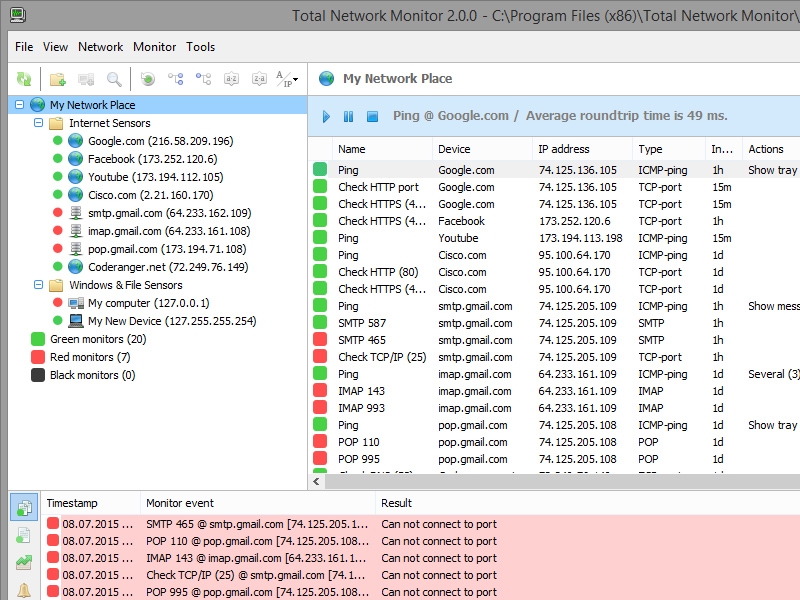
Monitor large and medium-size networks without leaving a chair! Total Network Monitor looks after a LAN no matter how large, sending alerts automatically if any pre-defined events happen. Watch network performance and get notified about the issues immediately with a variety of alerting options. You won’t miss an alert no matter where you are! Total Network Monitor can notify you by email or by phone, while attempting to resolve the issue by launching certain actions or your custom script.

Total Network Monitor makes your entire network easily controllable without leaving a chair. A variety of network monitoring alert notification options will ensure you are alerted about a problem in network performance no matter whether you are in front of your computer or not. Thanks to the many available tests, probes, and automatic scans performed by Total Network Monitor, network monitoring becomes as automated as possible.

The network monitoring utility can probe the Internet, test Windows, and scan files to ensure optimal performance of your entire LAN. The ability to probe ICMP, TCP, HTTP, POP/SMTP, FTP, and IMAP protocols makes Total Network Monitor the ultimate network monitoring tool. Windows performance tools are just one click away, including Registry, Event Log, and Service State tools. Remote file systems are easy to check with convenient network monitoring functions.

The network monitoring tool is capable of building a network topology map entirely on its own by launching a comprehensive scan of the network. Should a new PC be added to your network, it will appear on the map created by Total Network Monitor.

Just glance at the network monitoring window to see how your network is performing at the moment. Every feature of Total Network Monitor is just one click away. You can re-arrange the views by device, event, or monitors to see how every part of your network is performing.