
Category Archives: Network & Internet

Ad Blockers, Browser Tools, Browsers, Download Managers, File Sharing/Peer to Peer, FTP Clients, Network Monitoring, Other, Remote Computing, Search/Lookup Tools, Terminal & Telnet Clients, Timers & Time Synch, Trace & Ping Tools

QuickDNS 1.0

Type: Freeware
Cost: $0.00
Size: 171.00 kB
Release date: Sep 06 2014
Platform: Win2000,WinXP,Win7 x32,Win7 x64,Windows 8,WinServer,WinVista,WinVista x64,Unix,Linux,Mac OS X,Java
Publisher’s Site:  http://mindprod.com
Publisher’s Product Page:  http://mindprod.com/products1.html#QUICKDNS
Country: Canada

QuickDNS

What is QuickDNS for?


– It speeds up your browser when it looks up a website.

– It enables your browser to find critical websites even when your DNS
servers are down.

Overview

How does it work? Let me explain with a familiar analogy. When you
telephone someone, you either:

– memorise the number.
– look it up in your address book.
– look it up in a paper phone book.
– look it up in some electronic phone book.
– call directory assistance.

When your browser goes to a website, e.g. mindprod.com, similarly, it
needs to look up the number to get the IP 65.110.21.43. Your computer
does this automatically every time you visit a website by first visiting a
computer on the web called a DNS server to look up the name for you.

DNS Lookup vs Hosts. Lookup

There are two problems with this:

– it adds an extra second or more to fetching a web page. It is a bit
like looking up the number in an electronic phone book every time you make
a phone call.

– if there is anything wrong with the DNS server, you are dead in the
water, even if the website you want to visit is fully functional. What
you can do is create a little electronic address book of commonly visited
websites called C:\Windows\system32\drivers\etc\hosts. The computer does
not have to pester the DNS server to get these numbers. You can create
this file manually with a text editor such as Notepad. You can manually
look up the IPs of your common servers with the ping utility, e.g. on the
command line type: ping mindprod.com

The problem is, from time to time, the IPs change and your browser gets
sent to the wrong IP. You need something to keep the list of IPs up to
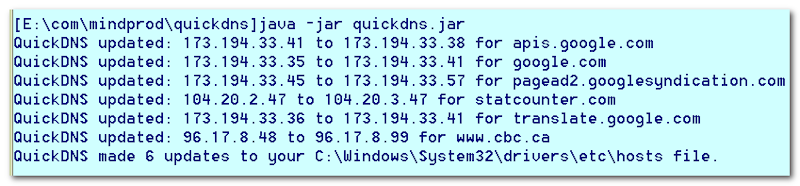
date. That is where QuickDNS comes in. You might run it every week or
every time you reboot or every time lookup seems to be failing.

See the online manual for details.

Graphcat<

Total Software Deployment 1.0.0

Type: Shareware
Cost: $90
Size: 19.52 MB
Release date: Oct 27 2015
Platform: Win2000,WinXP,Win7 x32,Win7 x64,Windows 8,Windows 10,WinServer,WinOther,WinVista,WinVista x64
Publisher’s Site:  http://www.softinventive.com/
Publisher’s Product Page:  http://www.softinventive.com/total-software-deployment/
Country: United States of America


Total Software Deployment

Managed software deployment for corporate networks.
Total Software Deployment makes deploying software on any number of computers a blast. Software inventory management, automatic network scanning, and concurrent deployment of multiple types of installation packages make TSD a clear winner among remote deployment tools.
Unlike competition, this tool supports advanced concurrent deployment, allowing to install multiple packages on multiple PCs. You can specify how many computers and how many packages per computer can be installed at any moment. Once you made up your mind, you can start deploying in just one click.
Total Software Deployment enables organization-wide visibility across network computers, maintaining a comprehensive list of software installed on all computers in your corporate network.

NEWT Professional Network Inventory 2.5.295

Type: Shareware
Cost: $199
Size: 4.51 MB
Release date: Aug 17 2015
Platform: Win2000,WinXP,Win7 x32,Win7 x64,Windows 8,Windows 10,WinServer,WinOther,WinVista,WinVista x64
Publisher’s Site:  http://www.komodolabs.com/
Publisher’s Product Page:  http://www.komodolabs.com
Country: United States of America


NEWT Professional Network Inventory

Inventory and discover all computers using NEWT Professional network inventory. Gather important hardware and software information without ever having to visit a remote machine. NEWT uses advanced audit methods to retrieve the data you need into an easy-to-read spreadsheet-like view. Export all data to an MS Access database to generate detailed queries. Scannable information includes CPU (type, speed, cores, etc.) CPU temperature, operating system, Windows product keys, IP address, network adapter, serial number, asset tag, video adapter, audio card, computer monitor info (serial number, size in inches, type, etc.), hard drives (size, types such as IDE, SATA, serial number, SMART health status, manufacturer, power on hours, power cycles, etc.), logical & network drives (drive letter, type, free space, partition size, etc.), network share info, memory slots info (including manufacturer, speed and type), hot fix info, installed applications (software name, publisher, version, product keys, install path, etc.), printers, Windows services, fonts, environment variables, system slots, virus definitions, startup programs, and many others. Export data to CSV, HTML, Text files or a fully relational MS Access database.