Category Archives: Network & Internet

Ad Blockers, Browser Tools, Browsers, Download Managers, File Sharing/Peer to Peer, FTP Clients, Network Monitoring, Other, Remote Computing, Search/Lookup Tools, Terminal & Telnet Clients, Timers & Time Synch, Trace & Ping Tools

Online App Box 1.0.0.0

Type: Freeware
Cost: $0
Size: 582.00 kB
Release date: Nov 18 2014
Platform: WinXP,WinVista,WinVista x64,Win7 x32,Win7 x64,Win2000,Win98
Publisher’s Site:  http://www.onlineappbox.com
Publisher’s Product Page:  http://www.onlineappbox.com/download.htm
Country: China


Online App Box

Online App Box can run lots of online applications remotely without having to install them. After you register an account, you can fast launch the remote application at the client side. It will map a virtual disk to help you easily upload or download data according to the menu Open and Save As a file in the online application. You can remotely edit document, photo, music and video files easily and quickly with the online applications. Our website can also create an account to use the online software.

Graphcat<

FTPGetter Professional 5.75

Type: Shareware
Cost: $85
Size: 16.83 MB
Release date: Mar 05 2015
Platform: WinXP,Win2000,WinServer,WinVista
Publisher’s Site:  http://www.ftpgetter.com
Publisher’s Product Page:  http://www.ftpgetter.com
Country: Ukraine


FTPGetter Professional

With FTPGetter 3 Professional, users have an simpler way to get to files from a server using an FTP/SFTP client. Normally, their only option is to manually log in and move, check, or add files. This can be time-consuming for any worker and is not the most efficient use of time. Plus, users who need to stay abreast of the most recent file changes and updates can easily miss them when having to search for them manually. The FTPGetter 3 Professional program will automate FTP and SFTP transfers so this time-consuming manual approach becomes a thing of the past. The application allows users to set up tasks, such as synchronizing the files on the server with those in the user’s local folder, and schedule their frequency (once per day, several days per week, etc.). Then the software takes care of the tasks while the worker goes about their normal routine. The ability to automate FTP and SFTP transfers also means users can stay up to date with the files more simply and can even send or receive email notifications when specific jobs are finished. The easy-to-use interface of the software is another bonus. Users can set up and schedule tasks with a few clicks of the mouse. Wizards incorporated into the program make this part of the set-up a breeze even for novice users. This will be a relief to the end users, as well as to the organisation’s IT department. Using an FTP/SFTP client to access server files is a good idea, particularly in a business setting, but the FTPGetter 3 Professional software allows that good idea to be implemented more efficiently.

MobaXterm 7.6

Type: Freeware
Cost: $0
Size: 21.52 MB
Release date: Feb 16 2015
Platform: Win2000,WinXP,Win7 x32,Win7 x64,Windows 8,WinServer,WinOther,WinVista,WinVista x64,Other
Publisher’s Site:  http://mobaxterm.mobatek.net
Publisher’s Product Page:  http://mobaxterm.mobatek.net
Country: France


MobaXterm

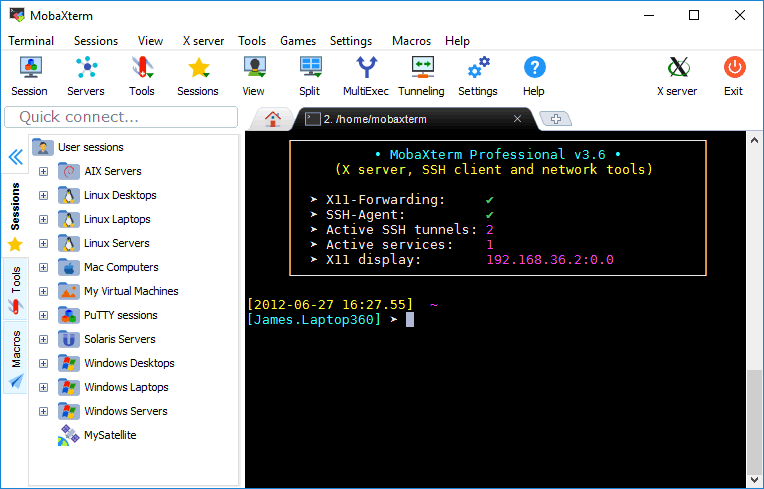
MobaXterm is a set of Unix commands (GNU/Cygwin) included in a single portable exe file. MobaXterm integrates an X server and several network clients (SSH, RDP, VNC, telnet, rlogin, sftp, ftp, …) accessible through a tab-based terminal.


MobaXterm also integrates a complete set of GNU/Unix commands.

Key features:
* Free X server fully configured (based on Xorg)
* Tab-based terminal with antialiased fonts and macro support
* Easy DISPLAY exportation from any remote host
* X11-Forwarding capability in OpenSSH
* Program without installation that you can start from an USB stick
* Light and portable application, packaged in a single executable