Category Archives: Network & Internet

Ad Blockers, Browser Tools, Browsers, Download Managers, File Sharing/Peer to Peer, FTP Clients, Network Monitoring, Other, Remote Computing, Search/Lookup Tools, Terminal & Telnet Clients, Timers & Time Synch, Trace & Ping Tools

IP Tools for Excel 3.6.1

Type: Shareware
Cost: $34.95
Size: 9.78 MB
Release date: Feb 13 2019
Platform: Win2000,WinXP,Win7 x32,Win7 x64,Windows 8,Windows 10,WinServer,WinOther,WinVista,WinVista x64
Publisher’s Site:  https://checkthenetwork.com/
Publisher’s Product Page:  http://CheckTheNetwork.com/ip-tools-for-excel
Country: United States of America

IP Tools for Excel

NEW – IP Tools for Excel – Add-in / Plug-in for Microsoft Excel


Instant Productivity – Instant Results – in Microsoft Excel

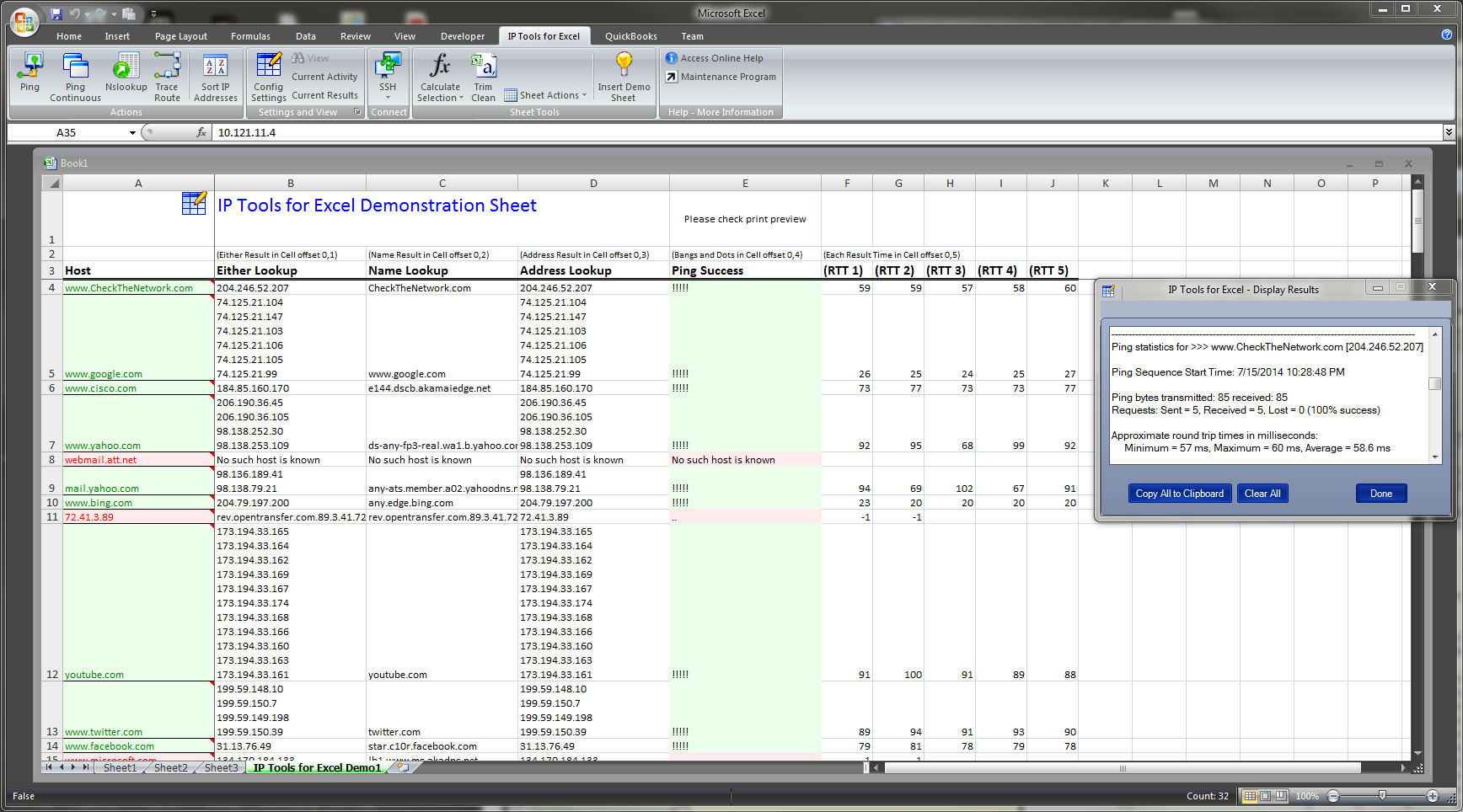
Provides functionality to execute and display results from commands and functions: ping, nslookup, tracert, OpenTCP, OpenHTTP, GetCertificateSSL()

— Ping sweep or nslookup an entire list of IP addresses or names instantly – Very Fast Results

Features:

– Right click and choose command on any cell or range including entire column up to 1,048,576
– Get SSL certificate from server and test the expiry date. Any x.509 certificate field
– Nslookup – DNS lookup forward or reverse — Do they match
– Trace Route via the tracert command
– Ping any selected list of IP addresses or host names – sweep it – run continuous
– openTCP ports and scan – openHTTP to test web
– Ping packet parameters are customizable – 1 to 200k pings per address
– Launch to http or https from any list of host names or IP addresses
– Launch SSH Telnet RDP connections
– Sort IP Addresses in Excel – 192.168.45.252 does not come before 192.168.45.54
– Output directly in Excel with 1000’s of output and format options
– Set output to ANY cell
Comments
Cell Shading
Text Color
– Subnet Calculator
– IPAM
– And more

*** GUI interface for setting options and settings

Very Fast Results output with as many display options.

The installation contains also contains IP Tools for Excel Maintenance which is available from the Start Menu. Useful to enable or disable IP Tools startup in Excel. Additionally the installation provides for clean removal via Control Panel – Add Remove programs if required.

Used by network engineers, system administrators, NOC personnel, network security professionals and auditors. Plenty of positive feedback received.

TRY it now, we would like YOUR feedback to assist us with further product development.

Thank you.

Productive Solutions Inc. at https://checkthenetwork.com/

Graphcat<

Advanced IP Scanner 2.5.3850

Type: Freeware
Cost: $0
Size: 19.44 MB
Release date: Mar 27 2018
Platform: Win2000,WinXP,Win7 x32,Win7 x64,Windows 8,Windows 10,WinServer,WinOther,WinVista,WinVista x64
Publisher’s Site:  http://www.radmin.com
Publisher’s Product Page:  http://www.advanced-ip-scanner.com
Country: British Virgin Islands


Advanced IP Scanner

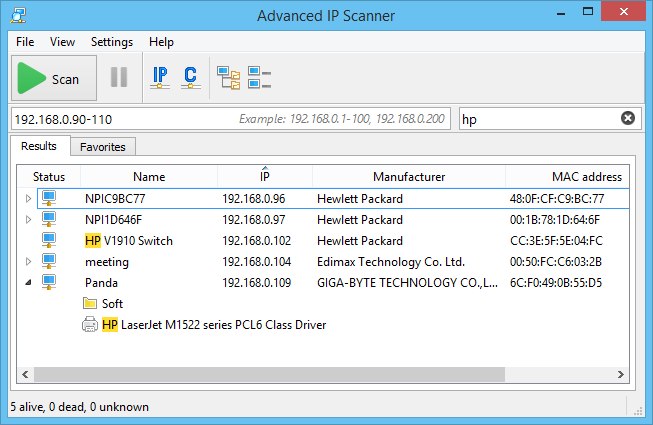
Advanced IP Scanner is a free, fast and powerful network scanner with a user-friendly interface. In a matter of seconds, Advanced IP Scanner can locate all the computers on your wired or wireless local network and conduct a scan of their ports. The program provides easy access to various network resources, such as HTTP, HTTPS, FTP and shared folders. It also enables you to detect all the IP addresses on your Wi-Fi network.

The remote PC shutdown feature lets you shut down any remote computer or group of computers running Windows. You can also wake these machines up remotely using Advanced IP Scanner, if their network cards support the Wake-On-LAN function.

You can scan RDP resources and access them directly from the program and as well as to run ping, tracert, and SSH commands on a selected computer. It is also possible to launch the program directly from the installer with no manual installation required.

Advanced IP Scanner and Radmin remote control software are deeply integrated. IP Scanner lets you scan your network, find all computers running Radmin Server, and connect to any one of them with one click. The free Radmin Viewer needs to be installed on your PC for you to access a remote machine running Radmin Server. With Radmin, you can access the remote PC in Full Control, File Transfer, and Telnet modes.

For simpler batch operations on a subset of computers, you can add machines to a list of Favorites. Advanced IP Scanner will automatically load the list at startup. You can choose whether to scan your entire network or just the computers in a Favorites list. You are also able to save your Favorites list for scanning purposes and other operations.

IP Tools for Excel 3.6.2

Type: Shareware
Cost: $34.95
Size: 9.81 MB
Release date: Apr 01 2019
Platform: Win2000,WinXP,Win7 x32,Win7 x64,Windows 8,Windows 10,WinServer,WinOther,WinVista,WinVista x64
Publisher’s Site:  https://checkthenetwork.com/
Publisher’s Product Page:  http://CheckTheNetwork.com/ip-tools-for-excel
Country: United States of America


IP Tools for Excel

NEW – IP Tools for Excel – Add-in / Plug-in for Microsoft Excel

Instant Productivity – Instant Results – in Microsoft Excel

Provides functionality to execute and display results from commands and functions: ping, nslookup, tracert, OpenTCP, OpenHTTP, GetCertificateSSL()

— Ping sweep or nslookup an entire list of IP addresses or names instantly – Very Fast Results

Features:

– Right click and choose command on any cell or range including entire column up to 1,048,576
– Get SSL certificate from server and test the expiry date. Any x.509 certificate field
– Nslookup – DNS lookup forward or reverse — Do they match
– Trace Route via the tracert command
– Ping any selected list of IP addresses or host names – sweep it – run continuous
– openTCP ports and scan – openHTTP to test web
– Ping packet parameters are customizable – 1 to 200k pings per address
– Launch to http or https from any list of host names or IP addresses
– Launch SSH Telnet RDP connections
– Sort IP Addresses in Excel – 192.168.45.252 does not come before 192.168.45.54
– Output directly in Excel with 1000’s of output and format options
– Set output to ANY cell
Comments
Cell Shading
Text Color
– Subnet Calculator
– IPAM
– And more

*** GUI interface for setting options and settings

Very Fast Results output with as many display options.

The installation contains also contains IP Tools for Excel Maintenance which is available from the Start Menu. Useful to enable or disable IP Tools startup in Excel. Additionally the installation provides for clean removal via Control Panel – Add Remove programs if required.

Used by network engineers, system administrators, NOC personnel, network security professionals and auditors. Plenty of positive feedback received.

TRY it now, we would like YOUR feedback to assist us with further product development.

Thank you.

Productive Solutions Inc. at https://checkthenetwork.com/