Category Archives: Security & Privacy

Access Control, Anti-Spam & Anti-Spy Tools, Anti-Virus Tools, Covert Surveillance, Encryption Tools, Other, Password Managers

SterJo Facebook Password Finder 1.0

Type: Freeware
Cost: $0
Size: 861.00 kB
Release date: Jul 08 2015
Platform: Win2000,WinXP,Win7 x32,Win7 x64,Windows 8,Windows 10,WinServer,WinOther,WinVista,WinVista x64
Publisher’s Site:  http://www.sterjosoft.com
Publisher’s Product Page:  http://www.sterjosoft.com
Country: Macedonia


SterJo Facebook Password Finder

SterJo Facebook Password Finder is free application designed to recover the password of your Facebook account saved by most web browsers. Almost every browser has an option to remember logins and save you a lot of time when you need to retype them. But sometimes you could easily forget facebook password especially if you change it often.


The primary objective of this tool is to help users that have forgotten their password and want to recover it instantly. Interface of the program is very simple to use and all you have to do is click a button to recover your facebook login details.

NOTE: This is not a facebook password hacker nor even a facebook password cracker and it should be used only to recover your own forgotten facebook login stored by the web browser.

Graphcat<

SterJo Mail Passwords 1.0

Type: Freeware
Cost: $0
Size: 859.00 kB
Release date: Jul 23 2015
Platform: Win2000,WinXP,Win7 x32,Win7 x64,Windows 8,Windows 10,WinServer,WinOther,WinVista,WinVista x64
Publisher’s Site:  http://www.sterjosoft.com
Publisher’s Product Page:  http://www.sterjosoft.com
Country: Macedonia


SterJo Mail Passwords

SterJo Mail Passwords is a lightweight software that recovers forgotten mail passwords to Gmail, Yahoo, Hotmail, AOL, GMX, Zoho and some other free email services. Currently it supports the most used web browsers like Chrome, Firefox, Internet Explorer and Opera.

The interface has very simple structure where password scanning is done with a simple click. All previously saved mail passwords by the web browsers are displayed in a second within the mail service. This tool could recover mail passwords only if they were previously saved and stored by web browsers, but forgotten in time.

Security Task Manager 2.1.8

Type: Shareware
Cost: $29
Size: 2.83 MB
Release date: Jan 20 2017
Platform: Win2000,WinXP,Win7 x32,Win7 x64,Windows 8,Windows 10,WinServer,WinOther,WinVista,WinVista x64
Publisher’s Site:  http://www.neuber.com
Publisher’s Product Page:  http://www.neuber.com/taskmanager/index.html
Country: Germany


Security Task Manager

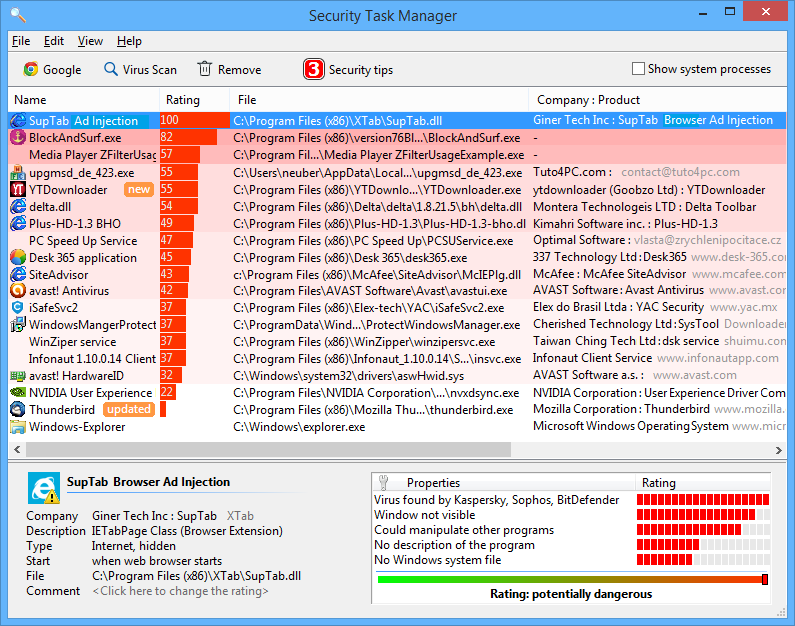
Security Task Manager is a computer utility designed to offer full access to the processes running in Windows. In addition to the range of information that usually appears in the Windows Task Manager, Security Task Manager also offers additional features, such as an independent, non-certificate based safety rating system that is based on behavioral analysis of code and processes, rather than relying on malware signature files, which become outdated over time. Security Task Manager’s main focus is on your computer’s currently running processes, and offers a great deal of information on them: process name, CPU usage, memory usage, file name and location, process type (Program, Service, etc.), company name, security rating, and more. The program is well-suited to any office, medical or academic environment where you have to rely on efficient behavior, both in your employees and in your hardware. Security Task Manager will also help you keep an eye out for any malware, be it a virus, a Trojan, or any variety of non-sanctioned monitoring software. The Protector security software, which comes free with the paid version of Security Task Manager, actively shuts down any sort of keystroke logging software, programs that are designed to steal passwords, credit card numbers, social security numbers, company secrets and other sensitive information. The Protector will also catch any mouse movement monitoring software, and will alert you if the Windows Registry has been tampered with. In case you do find a process that seems less than trustworthy, you can isolate it using Security Task Manager’s quarantine function, which allows you to select, isolate, and, if needed, delete the offending process from your system. Quarantine is a useful option if you are not sure whether or not the process in question is actually malicious. The Security Task Manager program, as well as the included Protector, is available for Windows XP and newer, including Windows 8.