
Category Archives: Security & Privacy

Access Control, Anti-Spam & Anti-Spy Tools, Anti-Virus Tools, Covert Surveillance, Encryption Tools, Other, Password Managers

VyprVPN for Mac 2.9.0

Type: Freeware
Cost: $0
Size: 11.65 MB
Release date: Feb 08 2016
Platform: Mac OS X
Publisher’s Site:  https://www.goldenfrog.com
Publisher’s Product Page:  https://www.goldenfrog.com/vyprvpn/mac
Country: Switzerland
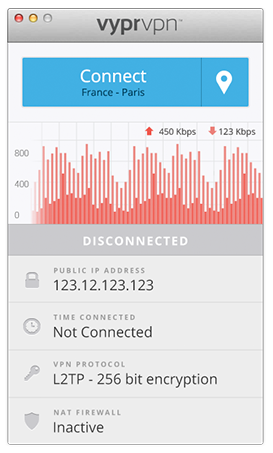

VyprVPN for Mac

The VyprVPN for Mac application automatically configures and simplifies managing your VPN connections on your desktop and laptop devices. Switch freely between 40+ global server locations and multiple VPN protocols with a single click. VyprVPN also offers cutting-edge apps for Windows, iOS and Android devices. The VyprVPN apps feature a sleek and intuitive look and feel, with powerful new features and customization options. The apps are faster, easier-to-use, and more stable and intuitive than any other free VPN app available!


Unlike most free VPN providers, VyprVPN is not an outsourced or hosted solution that relies on third parties to deliver its VPN service. Golden Frog writes 100% of its VPN server software, manages its own network, and owns the hardware to ensure your privacy is protected and your VPN connection speeds are fast.

The VyprVPN for Mac App includes:

Sleek 2.0 Interface with Retina support – New look and feel with powerful new features and customization options

Fast One-Click Connect – Connect and disconnect your VPN with a single click.

Easily encrypt your internet connection and secure your personal data

Faster Server Switching – View, select and switch easily between all 40+ VyprVPN server locations in North America, Europe, Asia and Oceania. You can also favorite specific servers for easy access

Easily Switch VPN Protocols – Choose between PPTP, L2TP, OpenVPN (160 bit encryption) and OpenVPN (256 bit encryption)

VyprVPN Speed Graph – Monitor your connection speed and view your upload and download speeds with VyprVPN enabled or disabled

Ping Test – Ping test the VyprVPN servers to choose the fastest server with the lowest ping time

Easy Access From the Mac Menu Bar – Connect and switch server locations, and view your IP address and connection speed from the Mac Menu Bar.

VyprVPN service is required to use the apps. Learn more about VyprVPN service and sign up for a free VPN account at www.goldenfrog.com/vyprvpn

Graphcat<

Emsisoft Emergency Kit 11.0.0.6082

Type: Freeware
Cost: $0
Size: 199.57 MB
Release date: Jan 21 2016
Platform: Win2000,WinXP,Win7 x32,Win7 x64,Windows 8,Windows 10,WinServer,WinOther,WinVista,WinVista x64
Publisher’s Site:  http://www.emsisoft.com
Publisher’s Product Page:  http://www.emsisoft.com/en/software/eek/
Country: New Zealand


Emsisoft Emergency Kit

Free, fully portable dual-engine cleaning toolkit that scans for and removes Malware and Potentially Unwanted Programs (PUPs) from your PC. Its the tool of choice for a second opinion scan and works well in combination with any other antivirus- and anti-malware programs. No installation required, just download and run. A typical full system scan only takes a minute and no internet connection is required to run a scan.

The cleaning toolkit includes the Emsisoft Commandline Scanner, which contains the same functionality as the Emergency Kit Scanner but without a graphical user interface. This tool is made for professional users and is perfect for batch jobs.

You can extract the contents of the Emsisoft Emergency Kit to a USB flash drive to create your own universal tool for scanning and cleaning infected PCs.

WinGuard Pro 2016

Type: Shareware
Cost: $9.99
Size: 2.51 MB
Release date: Sep 20 2015
Platform: Win2000,WinXP,Win7 x32,Win7 x64,Windows 8,Windows 10,WinServer,WinOther,WinVista,WinVista x64
Publisher’s Site:  http://www.winguardpro.com
Publisher’s Product Page:  http://www.winguardpro.com/index.html
Country: United Kingdom


WinGuard Pro

WinGuard Pro 2016 can Password Protect Programs and encrypt files on your computer. Users can add Password Protection to any Windows Program (ie Store Apps, Desktop Apps, Exe’s). Lock Installers, Internet and File Explorer – that’s right; if you need some extra security, WinGuard Pro 2016 can Block Software Installations, Internet, File Explorer, Harddrive Access and a whole lot more, all for free.

Overview

People who share common computers at office or at home are normally concerned about the privacy of their files, programs, and data, since such situations can result in other users viewing, editing or deleting their files mistakenly or even knowingly. No need to fret about this problem anymore, thanks to WinGuard Pro 2016 which is a system security application capable of applying password-protection to various parts of your computer like Windows programs, files, folders, and Web pages as well. Therefore, without shutting down or locking your system, you can keep intruders at bay even when your programs are running and files are opened.

Installation

Process of installation for WinGuard Pro 2016 is really fast and simple. The installer only asks for confirmation of basic details such as setup destination path and the users who can access this application. That’s it! The application is ready to protect your data. It is supported by following operating systems: Windows XP/Vista/7/8/10.

Interface

The GUI of this application is quite decent, modern, and intuitive; the layout is designed in such a way so that anyone with or without much technical experience can easily get accustomed to it.