Category Archives: Security & Privacy

Access Control, Anti-Spam & Anti-Spy Tools, Anti-Virus Tools, Covert Surveillance, Encryption Tools, Other, Password Managers

Security Task Manager 2.1e

Type: Shareware
Cost: $29
Size: 2.71 MB
Release date: Oct 14 2015
Platform: Win2000,WinXP,Win7 x32,Win7 x64,Windows 8,Windows 10,WinServer,WinOther,WinVista,WinVista x64
Publisher’s Site:  http://www.neuber.com
Publisher’s Product Page:  http://www.neuber.com/taskmanager/index.html
Country: Germany

Security Task Manager

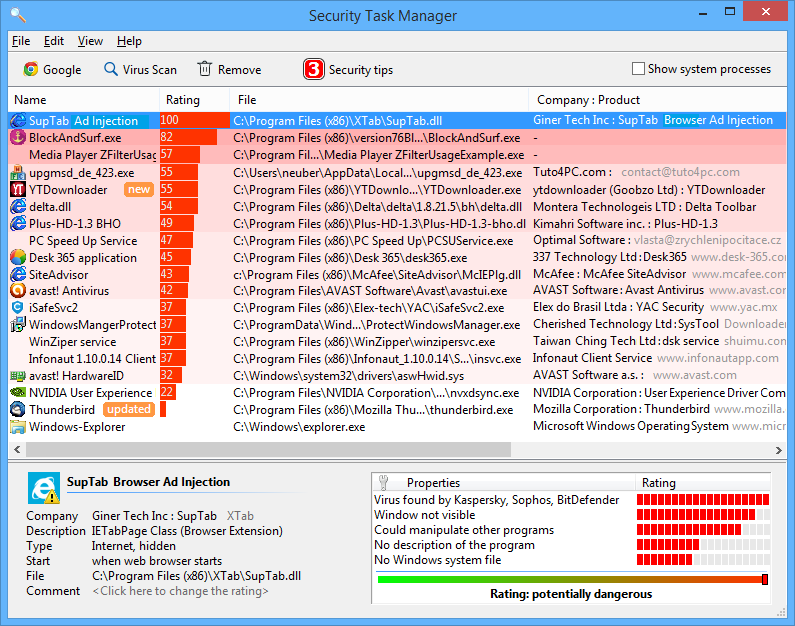
Security Task Manager is a computer utility designed to offer full access to the processes running in Windows. In addition to the range of information that usually appears in the Windows Task Manager, Security Task Manager also offers additional features, such as an independent, non-certificate based safety rating system that is based on behavioral analysis of code and processes, rather than relying on malware signature files, which become outdated over time. Security Task Manager’s main focus is on your computer’s currently running processes, and offers a great deal of information on them: process name, CPU usage, memory usage, file name and location, process type (Program, Service, etc.), company name, security rating, and more. The program is well-suited to any office, medical or academic environment where you have to rely on efficient behavior, both in your employees and in your hardware. Security Task Manager will also help you keep an eye out for any malware, be it a virus, a Trojan, or any variety of non-sanctioned monitoring software. The Protector security software, which comes free with the paid version of Security Task Manager, actively shuts down any sort of keystroke logging software, programs that are designed to steal passwords, credit card numbers, social security numbers, company secrets and other sensitive information. The Protector will also catch any mouse movement monitoring software, and will alert you if the Windows Registry has been tampered with. In case you do find a process that seems less than trustworthy, you can isolate it using Security Task Manager’s quarantine function, which allows you to select, isolate, and, if needed, delete the offending process from your system. Quarantine is a useful option if you are not sure whether or not the process in question is actually malicious. The Security Task Manager program, as well as the included Protector, is available for Windows XP and newer, including Windows 8.

Graphcat<

BotFence 2.15

Type: Shareware
Cost: $199
Size: 5.34 MB
Release date: Nov 23 2015
Platform: Win2000,WinXP,Win7 x32,Win7 x64,Windows 8,Windows 10,WinServer,WinOther,WinVista,WinVista x64
Publisher’s Site:  http://www.servolutions.com
Publisher’s Product Page:  http://www.servolutions.com/botfence.htm
Country: Switzerland


BotFence

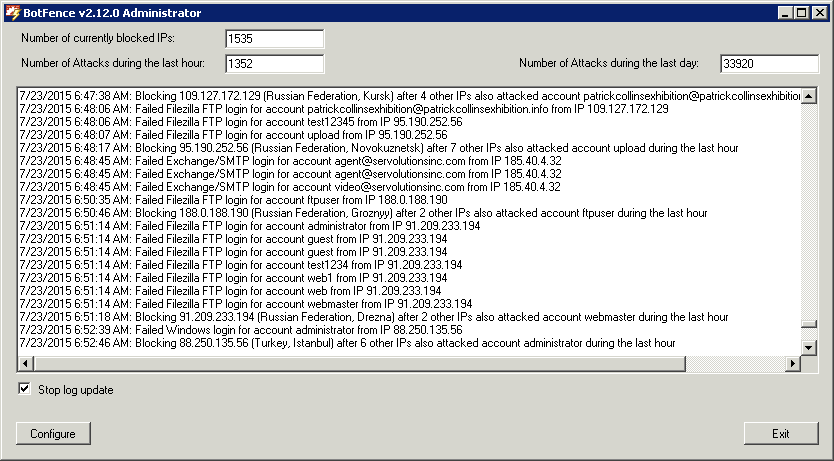
Automatically blocks IP addresses with hacking attempts on your windows server services (rdp, FTP, SQL-Server) using the Windows firewall.
The software runs as a Windows background service and monitors RDP, FTP und SQL-Server events for failed logins. If a configurable number of failed login events is detected from the same IP address BotFence dynamically lists that IP address im the Windows firewall as blocked.
If your Windows server is reachable from the internet and you want certain services like remote desktop, FTP transfers or SQL-Server to be accessible from outside then hacking attempts on your server will definitely be made. Numerous automated hacking tools, called ‘bots’ are active on the internet. They scan IP address ranges for published services and when they find FTP, RDP or SQL-Server services active they will try hundreds or even thousands of frequently-used passwords. ‘Administrator’ (rdp) and ‘sa’ (superuser for SQL-Server) are the most targeted accounts. As long as the bots don’t guess your passwords right you’ll probably never now about them, apart from the high server load caused by the thousands of login attempts.

BotFence 2.15.0002

Type: Shareware
Cost: $199
Size: 5.35 MB
Release date: Feb 19 2016
Platform: Win2000,WinXP,Win7 x32,Win7 x64,Windows 8,Windows 10,WinServer,WinOther,WinVista,WinVista x64
Publisher’s Site:  http://www.servolutions.com
Publisher’s Product Page:  http://www.servolutions.com/botfence.htm
Country: Switzerland


BotFence

Automatically blocks IP addresses with hacking attempts on your windows server services (rdp, FTP, SQL-Server) using the Windows firewall.
The software runs as a Windows background service and monitors RDP, FTP und SQL-Server events for failed logins. If a configurable number of failed login events is detected from the same IP address BotFence dynamically lists that IP address im the Windows firewall as blocked.
If your Windows server is reachable from the internet and you want certain services like remote desktop, FTP transfers or SQL-Server to be accessible from outside then hacking attempts on your server will definitely be made. Numerous automated hacking tools, called ‘bots’ are active on the internet. They scan IP address ranges for published services and when they find FTP, RDP or SQL-Server services active they will try hundreds or even thousands of frequently-used passwords. ‘Administrator’ (rdp) and ‘sa’ (superuser for SQL-Server) are the most targeted accounts. As long as the bots don’t guess your passwords right you’ll probably never now about them, apart from the high server load caused by the thousands of login attempts.