Category Archives: Security & Privacy

Access Control, Anti-Spam & Anti-Spy Tools, Anti-Virus Tools, Covert Surveillance, Encryption Tools, Other, Password Managers

MessageLock 2.2.0.221

Type: Shareware
Cost: $49.99
Size: 16.29 MB
Release date: Jan 21 2015
Platform: WinXP,WinVista,WinVista x64,Win7 x32,Win7 x64
Publisher’s Site:  https://www.encryptomatic.com
Publisher’s Product Page:  https://www.encryptomatic.com/ml/
Country: United States of America

MessageLock

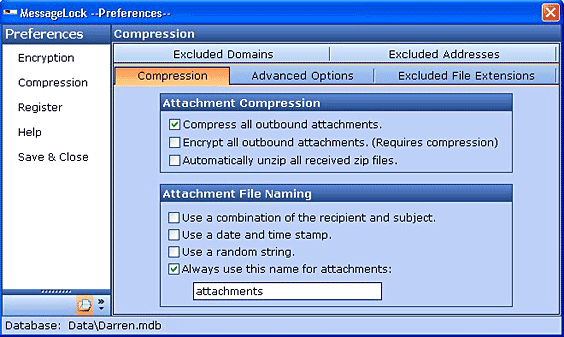
MessageLock(TM) by Encryptomatic(R) LLC is quite possibly the easiest way to send encrypted messages from Microsoft Outlook. MessageLock provides 1-click encryption of email messages and attachments within Microsoft Outlook, combining strong U.S. Gov’t approved AES-256 bit encryption with the nearly universal compatibility of the Zip file utility. MessageLock delivers encryption and compression for your message and/or file attachments, protecting your data while it is traveling across your intranet and the internet.


MessageLock gives you a choice of encryption methods, from super-strong AES-256 bit, to AES-128 bit. It also integrates with the Lockbin.com web service, allow you to send files and messages to anyone in a HIPAA complaint manner.

To use MessageLock, just click the "Encrypt Email" button before sending your message. The first time you send a message to someone, MessageLock will ask you for a password and then remember it for the next email you send.

If MessageLock is installed at recipient’s end, the message can be decrypted immediately upon receipt and displayed as a regular message with no interaction required by the recipient. MessageLock includes a single line of text at the bottom of the message that alerts the recipient that this message was transmitted securely, otherwise they would probably never know.

If the receiver does not have MessageLock, they can still decrypt the zip file if they have the password, and any zip utility that supports the encryption method used. WinZip 10.0 or the free zip utilities like Izarc can both decrypt AES-256. Free decryptor software for MessageLock is also available.

Download a fully functional 15 day trial and see how easy MessageLock is to use.

Graphcat<

PDF Postman 2.0.1.1820

Type: Shareware
Cost: $79.99
Size: 25.95 MB
Release date: Jun 06 2014
Platform: Win2000,WinXP,Win7 x32,Win7 x64,Windows 8,WinServer,WinOther,WinVista,WinVista x64
Publisher’s Site:  https://www.encryptomatic.com
Publisher’s Product Page:  https://www.encryptomatic.com/pdfpostman/
Country: United States of America


PDF Postman

Do you need a way to send secure messages from Microsoft Outlook? PDF Postman can help! This add-in app for MS Outlook will protect your message and file attachments using AES-256 strong encryption that is compatible with major PDF viewers, such as Adobe Reader. Encrypted PDF files are easy on recipients, since most people already have a PDF viewer on their device capable of opening encrypted PDF files. This method works across platforms (Windows, iOS, Linux, Android, etc). With one click, PDF Postman will send secure email messages from Microsoft Outlook in a way that does not inconvenience recipients.

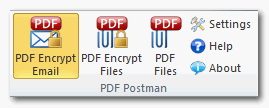
PDF Postman does not require the use of a third party to store your files. Just type your Outlook message, attach any files, click the "PDF Encrypt" button and send. PDF Postman will convert your message into a secure PDF document and attach any files inside the PDF.

The recipient only needs to know the password, and can view your message and extract your files using the PDF viewer on their device.

Use PDF Postman to create secure passwords and store them for the next time you email the recipient. You can store an unencrypted copy of your email in your Outlook Sent Items folder, or modify the default email message. Enterprise customers can centralize password collection passwords into a database.

Download a 15 day free trial of PDF Postman. It requires Microsoft Windows 8, 7, Vista, XP and Microsoft Office Outlook 2013 2010 2007 or 2003 (32 and 64bit versions of Outlook are supported). After the full 15 day trial, don’t uninstall PDF Postman! It reverts to Free Mode, which allows you to send up to 5 messages per month!

Surfblocker 5.2

Type: Shareware
Cost: $39.95
Size: 10.84 MB
Release date: Aug 05 2015
Platform: Win2000,WinXP,Win7 x32,Win7 x64,Windows 8,WinServer,WinOther,WinVista,WinVista x64
Publisher’s Site:  http://www.blumentals.net/
Publisher’s Product Page:  http://www.surfblocker.com
Country: Latvia


Surfblocker

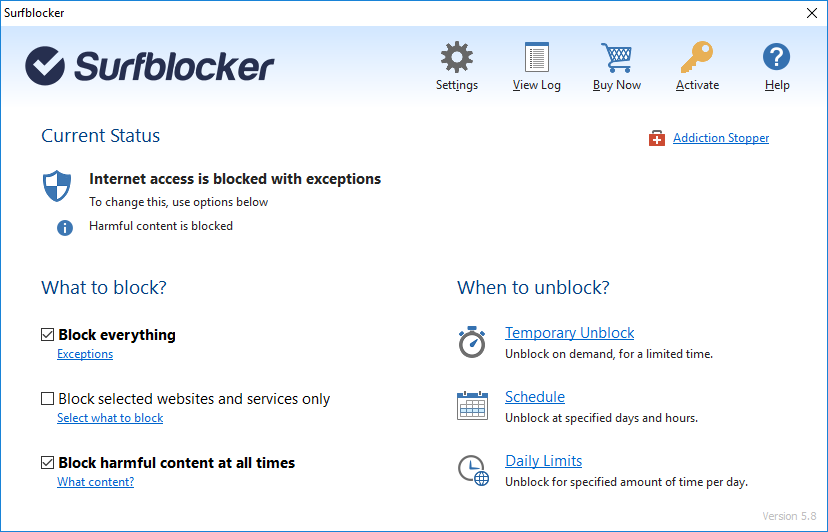
Surfblocker helps parents keep kids away from Internet harms and business managers keep employees focused on work.

With Surfblocker you can restrict access to the Web, block harmful content and decide what content is available to your users. You can restrict internet access at specified times or on demand. You can disable connection completely or limit Internet to work with allowed programs and services only. In order to fully enable Internet access, user defined password must be entered. You can easily schedule Internet availability. Timer allows you to disable Internet connection after specified amount of time.

Key features:

* Restrict internet access
* Password protect internet access
* Block adult content hazardous websites
* Block corruptive content
* One-click enable or disable Internet
* Block specific websites
* Allow specific websites
* Limit Internet usage time
* Schedule internet availability
* Internet usage quotas
* Remote control

For Parents:
* Protect your kids from using Internet too much
* Balance Internet use
* Prevent Internet addiction
* Ensure healthy daily routine

For Businesses:
* Keep employees from online entertainment at work
* Increase productivity
* Boost workforce performance
* Allow only work-related stuff