Category Archives: System Utilities

Automation Tools, Backup & Restore, Benchmarking, Clipboard Tools, File & Disk Management, File Compression, Launchers & Task Managers, Other, Printer, Registry Tools, Shell Tools, System Maintenance, Text/Document Editors

UnTextTransfer 1.0.8.4

Type: Shareware
Cost: $12
Size: 514.00 kB
Release date: Nov 23 2019
Platform: Win2000,WinXP,Win7 x32,Win7 x64,Windows 8,Windows 10,WinServer,WinOther,WinVista,WinVista x64
Publisher’s Site:  https://www.bdgysearches.com/abcguzis/ddpaulguzis.html
Publisher’s Product Page:  https://www.untxttransfer.com
Country: United States of America


UnTextTransfer

Unlimited Text Transfer at Will is a simple way of choosing one of 46 different stored areas to transfer text to another application. The program has four screens for text input. The user can save or not save the text in four screens. In addition, the user can transfer any text in a desired textbox to the clipboard. The Unlimited Text Transfer at Will program will then end. Then using a keyboard key combination(such as Ctrl + V combination on many keyboards), text will input the transferred text to any application of the user’s choosing. The TEXTBOX is a box where the user can enter any text. Upon entering the desired text, an English language spell checker will underline a misspelled word in Red. The user has the option of right clicking the red underline to see correct spelling that the spell checker suggests. If the user ignores the underlined word or words, it will not affect the desired output. The entered text will come to the end of the textbox. Once at the end of the textbox, it will continue onto the next line of the textbox. The lines in the textbox will create a continuous line of outputted text, unless a Return key or Tab key is pressed. Window 4 has a wider textbox than the other three windows have. The SAVE WITHOUT TRANSFER ITEMS key will save all the screens with the entered text. However, it will not transfer any text to the clipboard. After saving the text, Unlimited Text Transfer at Will program will end. Clicking the TRANSFER key will transfer the text in that textbox to the clipboard. It will save all the text on the screens. Finally, it will end UNLIMITED TEXT TRANSFER AT WILL program. Once the program has ended, the user can input the text anywhere using the keyboard key combination. The transferred text will display at the cursor of the active application. Clicking the CLOSE BUTTON (X) on the upper right of the UNLIMITED TEXT TRANSFER at Wiill program, will not save, and not transfer any text. This program will usually transfer up to 2GB.

Graphcat<

UFS Explorer Standard Recovery 7.13

Type: Shareware
Cost: $54.95
Size: 15.51 MB
Release date: Oct 14 2019
Platform: Win2000,WinXP,Win7 x32,Win7 x64,Windows 8,Windows 10,WinServer,WinOther,WinVista,WinVista x64
Publisher’s Site:  https://www.sysdevlabs.com
Publisher’s Product Page:  https://www.ufsexplorer.com/ufs-explorer-standard-recovery.php
Country: Ukraine


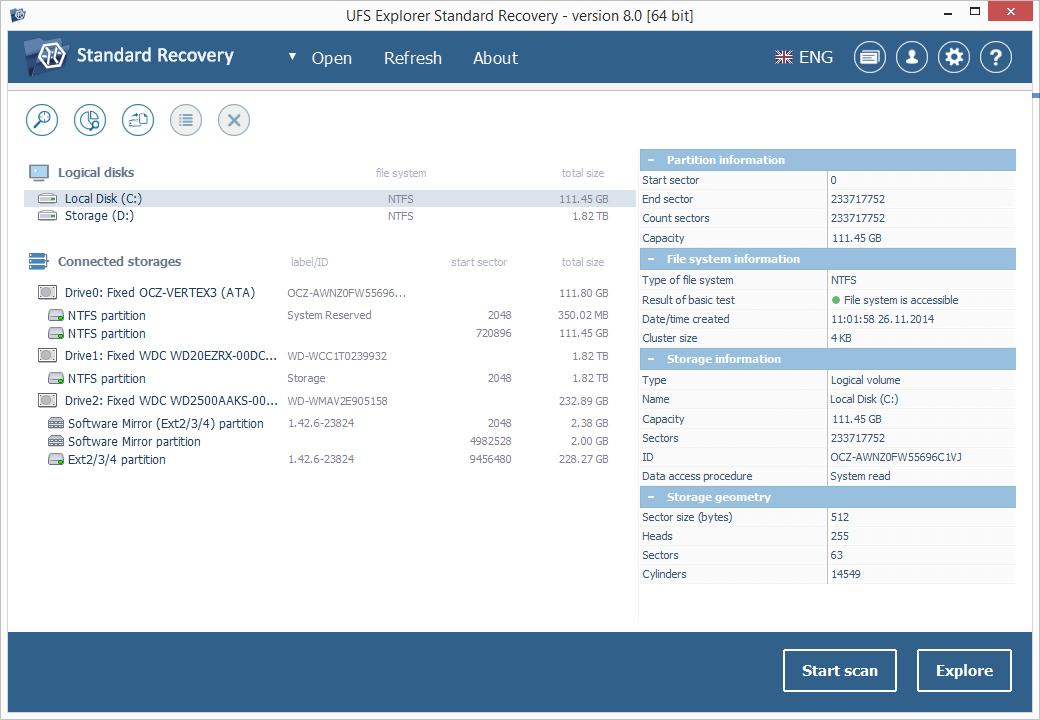
UFS Explorer Standard Recovery

UFS Explorer Standard Recovery was developed to make even complex data recovery a simple procedure for both home users and professionals.


The software embraces sophisticated mechanisms allowing to easily recover accidentally deleted files and data lost due to logical system damage after disk formatting, hardware malfunction, software failure, virus attack, power outage, etc.

UFS Explorer Standard Recovery supports a wide range of file systems of different OS, including Windows (FAT/FAT32/exFAT and NTFS), macOS (APFS, HFS+), Linux (XFS, Ext2, Ext3, Ext4, Linux JFS, ReiserFS, UFS/UFS2, big-endian UFS, Btrfs) and BSD/Solaris (UFS, simple ZFS volumes). Spanned volumes, like MDADM, Apple, NT LDM, LVM and others are automatically recognized and assembled by the utility, without any additional user actions required.

This program is capable of restoring files from different devices, like your PC, USB flash drive, memory card of a photo/video camera, external hard drive, etc. In addition to that, the application effectively works with disk images and virtual disks created by major virtualization software, like VMware and Hyper-V, enabling equally successful data recovery from both physical and virtual storages.

The user-friendly interface of UFS Explorer Standard Recovery can be adapted to fit the screen resolution and provides clear step-by-step guidance through the process of data recovery, simplifying complex tasks, which consequently can be carried out with just several mouse clicks. Moreover, the application is enhanced with various helpful filter and sorting options and allows previewing found files of most common formats, including images, PDF- and text documents.

UFS Explorer Standard Recovery applies the most advanced techniques to scan the device for lost data and to recover lost and deleted files while working in a safe read-only mode, without performing any risky modifications on the storage, making the operation harmless for the data.

mysys 3.6

Type: Shareware
Cost: $29.95
Size: 100.45 MB
Release date: Oct 12 2019
Platform: Win2000,WinXP,Win7 x32,Win7 x64,Windows 8,Windows 10,WinServer,WinOther,WinVista,WinVista x64
Publisher’s Site:  http://www.integritech.ca
Publisher’s Product Page:  https://www.integritech.ca/index.php/products/mysys
Country: Canada


mysys

A Window into your System!

Do you have alot of files?
Do you spend too much time navigating hundreds of folders?
Do you sometimes forget where a file is?

mysys will be your new home away from all the pesky folders!

News Flash: Version 2 now reads the file tables directly dramatically improving DB creation speed!

If you have mapped network or encrypted drives a popup will ask which ones to include in the
database. Those drives will take longer to index depending on the network connection speed.

CD/DVD/Flash drives will not be indexed, only Fixed drives and optionally Network/encrypted drives.

Use the Schedule button to create a Windows Task Schedule so the indexing happens at
a time which is most convenient. To delete the task just click Cancel.

Once the database is created you are ready to find files, fast!

In the top left text box, type any filename and hit enter or click Search.

Wild cards are supported such as read*.txt.

You can use AND/OR/- like: this OR that
the – is to exclude like: this -notthat

Use double quotes to find whole phrases.

Use brackets like: (afoldername or anotherfolder) and (*.c or *.rc or *.h)
For that example you would check on the ‘Include folder names’ option and probably the ‘Exact match’ option also otherwise will find *.cs, *.css, *.hpp, etc…

You can use the Containing text box to search within the files found. Contents are never
indexed but uses a fast highly multi-threaded algorithm.

File sizes, Dates and Attributes are all read live off the disk, these are not stored in the database.