Category Archives: System Utilities

Automation Tools, Backup & Restore, Benchmarking, Clipboard Tools, File & Disk Management, File Compression, Launchers & Task Managers, Other, Printer, Registry Tools, Shell Tools, System Maintenance, Text/Document Editors

MailsDaddy Thunderbird to Outlook 3.0

Type: Shareware
Cost: $39
Size: 7.00 MB
Release date: Jan 30 2019
Platform: Win2000,WinXP,Win7 x32,Win7 x64,Windows 8,Windows 10,WinServer,WinOther,WinVista,WinVista x64
Publisher’s Site:  https://www.mailsdaddy.com/
Publisher’s Product Page:  https://www.mailsdaddy.com/thunderbird-to-outlook-converter/
Country: India

MailsDaddy Thunderbird to Outlook

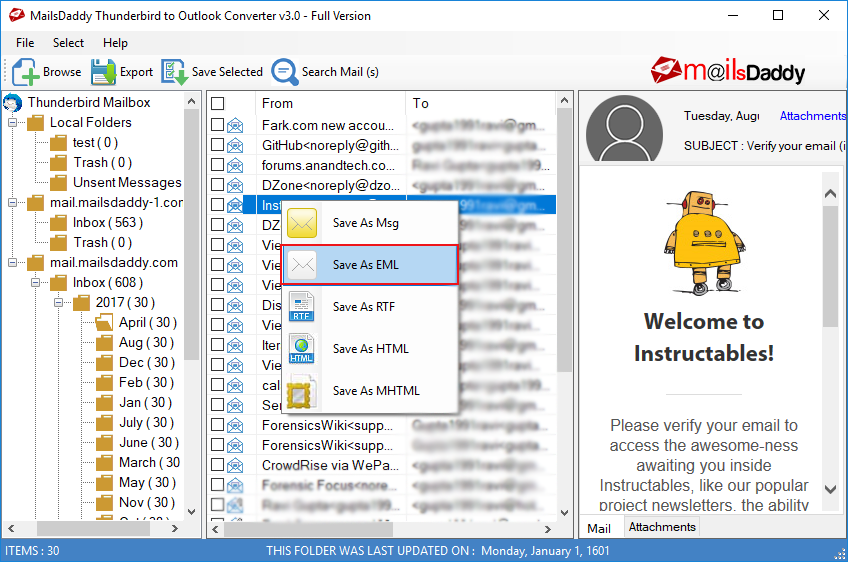
An ultimate solution for those users who wants to convert Thunderbird to Outlook without losing any content. The tool has been professionally developed by MailsDaddy Software Solution, it is an error and hassle-free utility which gives you secure result without any restriction. With this tool, user can see the preview of each selected email and their attachments as well as directly save the email to system drives or folders. This light-weighted tool easily installs and run on all Window OS and it is also produce the compatible PST format for all Outlook versions.


Some highlighted features of Thunderbird to Outlook Converter

#. Automated load button to fetch the MBOX data from Thunderbird default location automatically.
#. After fetching the data, application allow to be scanned the all email files/folder and distributed according to file structure and size.
#. Loaded data is available for the preview where user can check the content of email and its attachments.
#. To extract the any valuable email or data then you can use search email button.
#. Create single or separate PST file for all Thunderbird MBOX data.

Graphcat<

DataNumen PDF Repair 2.3

Type: Freeware
Cost: $0
Size: 2.80 MB
Release date: Nov 11 2019
Platform: Win2000,WinXP,Win7 x32,Win7 x64,Windows 8,Windows 10,WinServer,WinOther,WinVista,WinVista x64
Publisher’s Site:  https://www.datanumen.com
Publisher’s Product Page:  https://www.datanumen.com/pdf-repair/
Country: Hong Kong


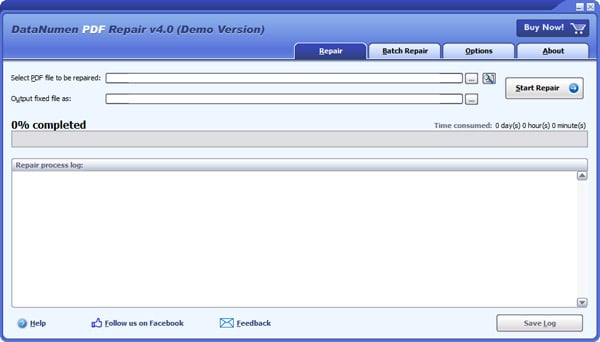
DataNumen PDF Repair

DataNumen PDF Repair (formerly Advanced PDF Repair) is a powerful PDF recovery tool. It uses advanced technologies to scan the corrupt or damaged Acrobat PDF files and recover your data in them as much as possible, so to minimize the loss in file corruption.

Main Features:

1. Support to recover all versions of Acrobat PDF files.

2. Support to recover pages as well as images in the PDF documents.

3. Support to repair different PDF file format errors.

4. Support to repair PDF files that do not comply with the PDF specification.

5. Support to repair PDF files on corrupted medias, such as floppy disks, Zip disks, CDROMs, etc.

6. Support to repair a batch of PDF files.

7. Support to find and select the PDF files to be repaired on the local computer.

8. Support integration with Windows Explorer, so you can repair an Acrobat PDF file with the context menu of Windows Explorer easily.

9. Support drag & drop operation.

10. Support command line parameters.

SharePrep 5.01

Type: Shareware
Cost: $125
Size: 1.19 MB
Release date: Jun 23 2019
Platform: Win2000,WinXP,Win7 x32,Win7 x64,Windows 8,Windows 10,WinServer,WinOther,WinVista,WinVista x64
Publisher’s Site:  http://www.purgeie.com
Publisher’s Product Page:  http://www.purgeie.com/shareprep
Country: United States of America


SharePrep

SharePrep is a utility program that you can use to correct file and folder names in preparation for importing data into Microsoft’s SharePoint.

The file and folder names within SharePoint have more restrictions than for normal Windows operation. SharePrep provides a convenient user interface to allow you to search your file names and folder names for the known SharePoint restrictions and provides a function for automatically renaming the file and folder names to replace restricted characters.

You can define the action to be used by the rename function for each of the restricted characters. For each, you can choose to delete the character, replace with a blank or replace with a character you specify.

Some companies are using SharePrep to correct filenames that cause problems with backups. Others correct filenames for files downloaded from the web.

SharePrep contains a window / set of functions for manually replacing given character strings via the main display window. This provides for replacing stings within Selected items, Displayed items, and All items within the given folder and includes simple Find and Replace functions. You can choose to include SubFolders with the Replace All function. This is designed to simplify your abbreviating common names within your files and folders.