
Category Archives: System Utilities

Automation Tools, Backup & Restore, Benchmarking, Clipboard Tools, File & Disk Management, File Compression, Launchers & Task Managers, Other, Printer, Registry Tools, Shell Tools, System Maintenance, Text/Document Editors

Hashtoolbox 1.0

Type: Freeware
Cost: $0
Size: 8.27 MB
Release date: Aug 23 2017
Platform: Win2000,WinXP,Win7 x32,Win7 x64,Windows 8,Windows 10,WinServer,WinOther,WinVista,WinVista x64
Publisher’s Site:  https://agrtech.com.au
Publisher’s Product Page:  https://agrtech.com.au/hashtoolbox
Country: Australia
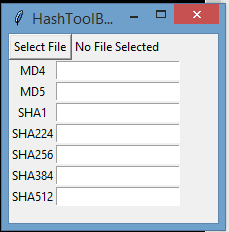

Hashtoolbox

Hashtoolbox is a free software utility to calculate hashes for different files on your computer, hashtoolbox is able to calculate files with common hashing algorithms such as: MD4, MD5, SHA, SHA-256 and SHA-512. This utility aims to make it quick and easy to grab hashes for your files for all popular hash types. In addition the hashtoolbox software is opensource and can help you to verify downloaded files to ensure they do not contain any changes. When downloads get hijacked by malicous adversaries often the file is modified to include malware such as Trojans, spyware, rootkits and other threats. Trusted download portals often include the hashes for the original files, using a hash calculator such as hashtoolbox you can verify the hash of the downloaded file and compare it with the one you have downloaded making sure you have a safe corrupted version.

Graphcat<

Nero TuneItUp Free 2.8.0.84

Type: Freeware
Cost: $0
Size: 15.46 MB
Release date: Jul 19 2018
Platform: Win2000,WinXP,Win7 x32,Win7 x64,Windows 8,Windows 10,WinServer,WinOther,WinVista,WinVista x64
Publisher’s Site:  http://www.nero.com
Publisher’s Product Page:  http://www.nero.com/redir.php?id=12977
Country: Germany


Nero TuneItUp Free

Nero TuneItUp is an optimization, tuning and maintenance tool for Windows PCs which helps you analyze and fix common problems, and optimize system settings.


During startup Nero TuneItUp automatically analyzes all weak spots and problems in your system and lists them. The intuitive interface lets you fix problems while maintaining a clear overview.

The special High Speed Mode lets programs and games run much faster.

The free version lets you do the following:

(1) Delete Unnecessary Files
Temporary files created by programs are often not properly deleted. Completely deleting these files frees up disk space.
The affected folders are displayed in the Details section and can be cleaned separately.
(2) Delete Digital Footprints
Browsers save various types of files in the ‘Browser Cache’ to make surfing faster and easier. The problem is that these files are a threat to your PC security because they often contain personal data such as usernames and passwords. Deleting these digital footprints helps to protect your privacy while surfing the Internet.
This can also lead to increased browser performance and faster surfing when a large number of files is deleted during the cleaning process.
In the ‘Details’ section you can select the files that should be deleted.
(3) Clean Registry
The Windows registration database, a.k.a. the ‘Registry’, is the central configuration file for Windows. The cleaning function removes invalid entries and increases PC stability and performance.
(4) Uninstall Wizard
Unused programs take up space on your hard drive and can slow down your PC. This function removes these unused programs from your PC to help increase performance.
(5) Multimedia Data Manager
The largest multimedia files and folders are easily located and can be deleted to free storage space.

DataKit iOS System Recovery 9.1.6

Type: Shareware
Cost: $28.59
Size: 34.08 MB
Release date: Dec 20 2018
Platform: Win2000,WinXP,Win7 x32,Win7 x64,Windows 8,Windows 10,WinServer,WinOther,WinVista,WinVista x64
Publisher’s Site:  https://ios-data-recovery.com/about-us/
Publisher’s Product Page:  https://ios-data-recovery.com/ios-system-recovery/
Country: United States of America


DataKit iOS System Recovery

Recover iOS System Error With Ease. Fixing your iPhone/iPad with iTunes will take you a lot of time and you may lose your data. DataKit iOS System is super easy to use for a green hand. Just plug your iPhone/iPad to Windows or Mac and it will detect your device automatically. Just select the situation and follow the instruction, you will have all your iPhone/iPad errors gone and fix the iOS system back to normal.

iPhone/iPad Errors That Can Be Fixed. iPhone stuck in recovery mode? iPhone is not responding? iPhone gets trouble into DFU mode. iPhone is in black/blue/red/white screen. iPhone shows the Apple logo. iPhone stuck in headphone mode. iPhone is frozen for some reasons. iPhone is disabled after unlocking failure. iPhone is in the loop of restarting. iPhone is in more abnormal situations. or it just stuck for no reason? iOS System Recovery will fix it for you.

Download iOS System Recovery to fix all these things back to normal. It is very powerful with supporting all iPhone and iPad models including iPhone Xs,iPhone XR, iPhone X, iPhone 8 and iPhone 8 Plus, etc.