
Category Archives: System Utilities

Automation Tools, Backup & Restore, Benchmarking, Clipboard Tools, File & Disk Management, File Compression, Launchers & Task Managers, Other, Printer, Registry Tools, Shell Tools, System Maintenance, Text/Document Editors

RPM Remote Print Manager Select 32 Bit 6.1.0.456

Type: Shareware
Cost: $324
Size: 37.12 MB
Release date: Aug 19 2017
Platform: Win2000,WinXP,Win7 x32,Win7 x64,Windows 8,Windows 10,WinServer,WinOther,WinVista,WinVista x64
Publisher’s Site:  http://www.brooksnet.com/
Publisher’s Product Page:  https://www.brooksnet.com/lpd/comparing-rpm-elite-and-select
Country: United States of America
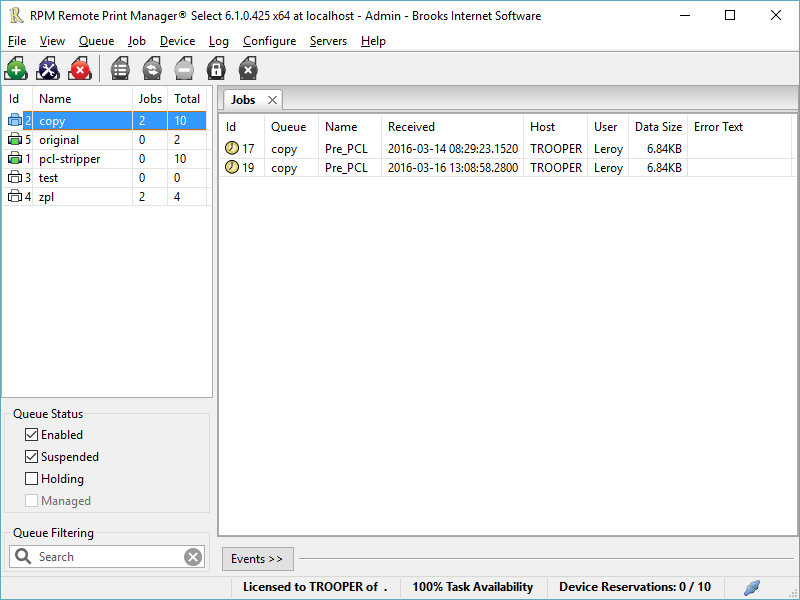

RPM Remote Print Manager Select 32 Bit

Printing should be one click away. but there are so many problems which make printing difficult if not impossible. RPM Remote Print Manager (RPM) has grown through the years from all the print problems our customers have brought to us. We are here to help you solve your printing problems.


RPM is our virtual printer product. Our customers have been using RPM for 20 years!
RPM as virtual printer

RPM does what you expect a virtual PDF printer to do, and more:

convert incoming print jobs to other formats, such as PDF, TIFF and PCL
save multiple documents into a single document
print the same job to multiple printers
in one pass, send to a printer and save to disk
print the same job multiple times, using separate paper trays

RPM as print server

RPM is implemented as a Windows print server. Its core capabilities include:

managing your print workflow
send print jobs to any Windows printer
send print jobs to any printer on your network using core Windows print protocols, or LPR, or direct with port 9100
archive print jobs to local folders, shared folders, or anywhere via FTP
run any local application on your print job
send your print job via email as an attachment or in the message body

RPM also provides extensive data editing, manipulation and translation.

Windows version support

RPM 6.1 supports these versions of Windows: Vista, 7, Server 2008 (including R2), Windows 8 and 8.1, Server 2012 (including R2), and Windows 10. Support for Windows XP and Server 2003 has been dropped, so we no longer test new RPM versions on these older versions of Windows.

Graphcat<

System Mechanic Professional 17.0.1.12

Type: Shareware
Cost: $69.95
Size: 1.14 MB
Release date: Dec 08 2017
Platform: Win2000,WinXP,Win7 x32,Win7 x64,Windows 8,Windows 10,WinServer,WinOther,WinVista,WinVista x64
Publisher’s Site:  http://www.iolo.com
Publisher’s Product Page:  http://www.iolo.com/products/system-mechanic-professional/
Country: United States of America


System Mechanic Professional

System Mechanic Pro uses patented technology to restore speed, power, and stability to your PC. It fixes errors, boosts performance, defends against infections, and proactively prevents problems from reoccurring. This all-in-one solution to complete Windows care also provides online backup, recovers deleted files, securely wipes data, and includes high-performance triple-certified antivirus protection that wont slow you down.

System Mechanic Pro can help you speed up your PC no matter what your experience level. One-click power tools perform vital services, intelligently diagnosing and resolving PC headaches and performance bottlenecks. Advanced tools such as Startup Optimizer and EnergyBooster give gamers and power users the total control they crave to fine-tune their system for maximum speed. Exclusive patented ActiveCare technology automatically maintains the PC when it’s idle, so your computer can run like new for as long as you own it. Weekly Tune-up Definitions updates from iolo Labs ensure that your PC is protected against the latest performance threats and system flaws.

Now with more than 70 features, System Mechanic Pro is engineered to address all root causes of PC slowdown, and can improve your PCs performance in the following critical areas:

-Faster Windows startup
-Faster program launching
-Faster program responsiveness
-Faster internet browsing
-Faster gaming experience
-More available RAM memory
-Prevents crashes and freezes
And more…

Enjoy fast, reliable performance – no computer expertise required.

DataVare MBOX to MSG Converter Expert 1.0

Type: Shareware
Cost: $29
Size: 2.28 MB
Release date: Dec 20 2017
Platform: Win2000,WinXP,Win7 x32,Win7 x64,Windows 8,Windows 10,WinServer,WinOther,WinVista,WinVista x64
Publisher’s Site:  http://www.datavare.com
Publisher’s Product Page:  http://www.datavare.com/software/mbox-to-msg-converter-expert.html
Country: South Africa


DataVare MBOX to MSG Converter Expert

MBOX to MSG conversion is a highly interactive app which performs migration independently. The utility allows you to export not just one but also multiple MBOX files to support batch migration. It interacts with all MBOX files no matter which email platforms you are using to save data. With this smart converter program, you can transfer Thunderbird, Apple Mail, Poco Mail and several other email clients databases to MS Outlook MSG versions. The highly advanced application has capacity to read all sizes MBOX files. It exports all email properties along with attachments to give 100% accurate conversion results. The license of the application is readily available in both personal and industrial version from DataVare at attractive prices. The utility enables super fast conversion. The exported data is saved to a newly built MSG file and at users directed location. Download the demo version