Category Archives: System Utilities

Automation Tools, Backup & Restore, Benchmarking, Clipboard Tools, File & Disk Management, File Compression, Launchers & Task Managers, Other, Printer, Registry Tools, Shell Tools, System Maintenance, Text/Document Editors

010 Editor 8.0

Type: Shareware
Cost: $129.95
Size: 15.83 MB
Release date: Sep 29 2017
Platform: Win2000,WinXP,Win7 x32,Win7 x64,Windows 8,Windows 10,WinServer,WinOther,WinVista,WinVista x64
Publisher’s Site:  http://www.sweetscape.com/
Publisher’s Product Page:  http://www.sweetscape.com/010editor/
Country: Canada


010 Editor

010 Editor is a professional text/hex editor designed to edit any file, drive, or process on your machine. Using our unique Binary Templates technology, 010 Editor allows a binary file to be parsed into a data structure that can be understood. Features an easy-to-use editor with standard Cut, Copy, and Paste commands, support for huge files, and unlimited Undo and Redo for all editing operations. Use the Inspector to easily edit data in a number of different formats. A set of sophisticated editing and analysis tools are included such as Find/Replace, Binary Compare, Histograms, Check Sums, ASCII/EBCDIC/UNICODE Conversions, Find in Files, Replace in Files, Importing/Exporting, Highlighting, Bookmarks, and Printing. An integrated expression Calculator using C syntax is supplied and Scripts may be written to automate many different tasks. Contains an online repository of Templates and Scripts that are available for download.

Graphcat<

QILING Disk Master Professional 4.3.6

Type: Shareware
Cost: $39
Size: 16.30 MB
Release date: Aug 06 2017
Platform: Win2000,WinXP,Win7 x32,Win7 x64,Windows 8,Windows 10,WinServer,WinOther,WinVista,WinVista x64
Publisher’s Site:  http://www.qilingtech.com
Publisher’s Product Page:  http://www.idiskhome.com/main/product_pro.shtml
Country: China


QILING Disk Master Professional

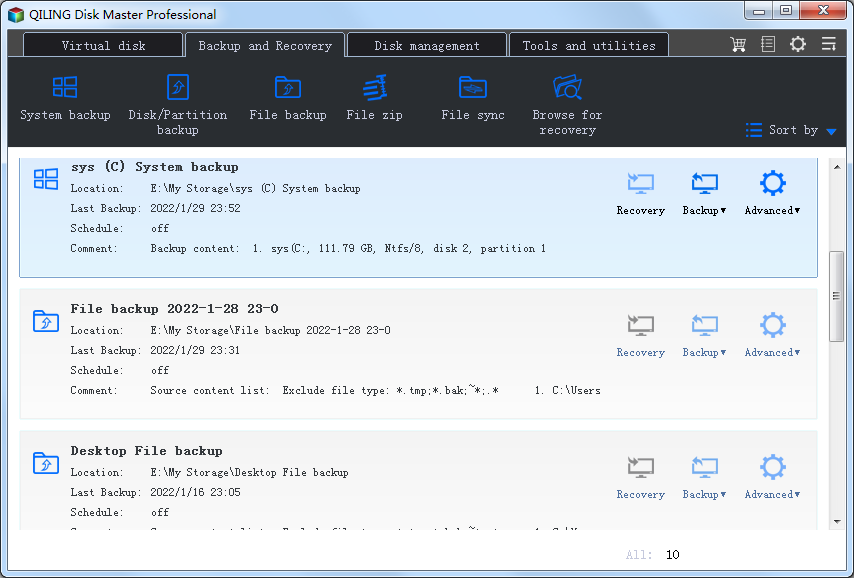
QILING Disk Master Professional is not only a easy-to-use, fast backup and recovery software solution, but also a ramdisk and partition manager software. It aiming to protect your data and improve the performance of your computer. With it, your system, files, folders, videos, music will be in a safe condition within minutes without the help of an IT specialist. It supports system/disk/partition/files/folders backup, restore and clone as well as provides fix boot, wipe data, file shredder, Migrate OS, schedule, incremental, differential backups, backing up to NAS and shared network folder, dynamic disk volumes backup, GPT disk backup, backing and restoring system drive based on UEFI boot, creating Windows PE bootable disk, partition alignment to optimize SSD during restoring or cloning operation, backing up or restoring files from a network to another, editing task options and the directory of backup images, backup logs management, etc. The features of ramdisk can improve overall system performance, one click set the temporary path to ramdisk. QILING Disk Master Professional can checks the hard disk health status and display Temperature of hard disk and view hard disk detailed information. QILING Disk Master Professional can also help you to manage partition, it recover lost or deleted partitions, and test disk sector’s surface.

Acronis Files Connect 10.5.0

Type: Shareware
Cost: $795
Size: 21.00 MB
Release date: Jun 20 2017
Platform: Win7 x32,Win7 x64,Windows 8,Windows 10,WinServer,WinOther
Publisher’s Site:  http://www.acronis.com
Publisher’s Product Page:  https://www.acronis.com/en-us/mobility/mac-windows-compatibility/#section_key-features
Country: United States of America


Acronis Files Connect

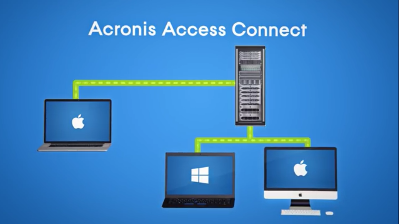
Got Mac users in the office? Because they have different communication protocols, integrating Macs into your Windows IT infrastructure can create application, file access, and network incompatibilities. Acronis Files Connect (formerly ExtremeZ-IP) is the only software that resolves Mac-to-Windows incompatibilities quickly and easily. With 1 simple network installation, give your Mac and mobile device users the power to:
– Access and share files on Windows networks
– Access Windows print servers and NAS servers easily
– Browse and access files from mobile devices (iOS, Android, Windows)
– Perform near-instant Network Spotlight searches
– Avoid file corruption, lost data, and application issues
– Prevent performance degradation and expensive downtime
– Limit related help desk calls by up to 70 percent