Category Archives: System Utilities

Automation Tools, Backup & Restore, Benchmarking, Clipboard Tools, File & Disk Management, File Compression, Launchers & Task Managers, Other, Printer, Registry Tools, Shell Tools, System Maintenance, Text/Document Editors

ORPALIS PDF OCR Free Edition 1.1.14

Type: Freeware
Cost: $0
Size: 29.04 MB
Release date: May 09 2017
Platform: Win2000,WinXP,Win7 x32,Win7 x64,Windows 8,Windows 10,WinServer,WinOther,WinVista,WinVista x64
Publisher’s Site:  http://www.orpalis.com/
Publisher’s Product Page:  http://pdfocr.orpalis.com/
Country: France

ORPALIS PDF OCR Free Edition

ORPALIS PDF OCR software free edition is a very fast PDF to PDF-OCR converter. It offers a productive way to to transform scanned PDF documents to text searchable PDF by running optical character recognition (OCR).


ORPALIS PDF OCR free edition includes a high quality OCR engine built by recognized industry experts. It converts PDF into PDF/OCR single or multi-page documents with great speed and accuracy.
The latest technologies are used to to obtain a high performance layout analysis that allows character recognition regardless of the page orientation.
In the free edition the languages supported by the OCR engine are English, French, Spanish, German and Italian.

The intuitive and productive user interface makes the software user-friendly and time-saving.
The languages available for the interface are English and French.

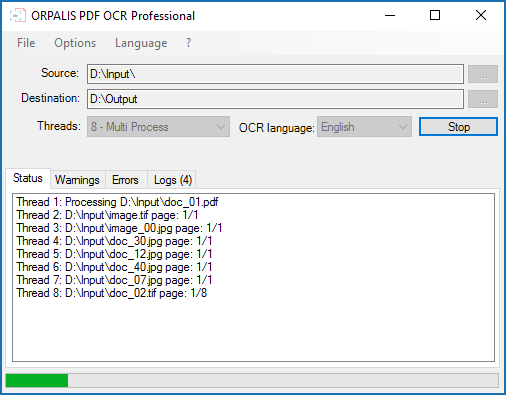
To convert PDF into PDF/OCR it is really simple, only a few steps are required. First the source file (input) needs to be identified. Then the destination of the processed file (output) is specified. The last step is to select the language for the OCR conversion.
Optional parameters settings are available for the input mode that can be either a file or a folder. A convenient drag and drop option is also supported. Folders as well as sub-folders can be processed. The number of pages processed by the engine is displayed in real-time. For each document full log information is provided, as well as warnings and errors if any.
A pop-up window for automatic update notifications can be enabled or disabled.

Graphcat<

WinSleep by MollieSoft 1.4.9.0

Type: Shareware
Cost: $14.95
Size: 1.23 MB
Release date: Apr 10 2017
Platform: Win2000,WinXP,Win7 x32,Win7 x64,Windows 8,Windows 10,WinServer,WinOther,WinVista,WinVista x64
Publisher’s Site:  http://www.molliesoft.com
Publisher’s Product Page:  http://www.molliesoft.com/winsleep
Country: United States of America


WinSleep by MollieSoft

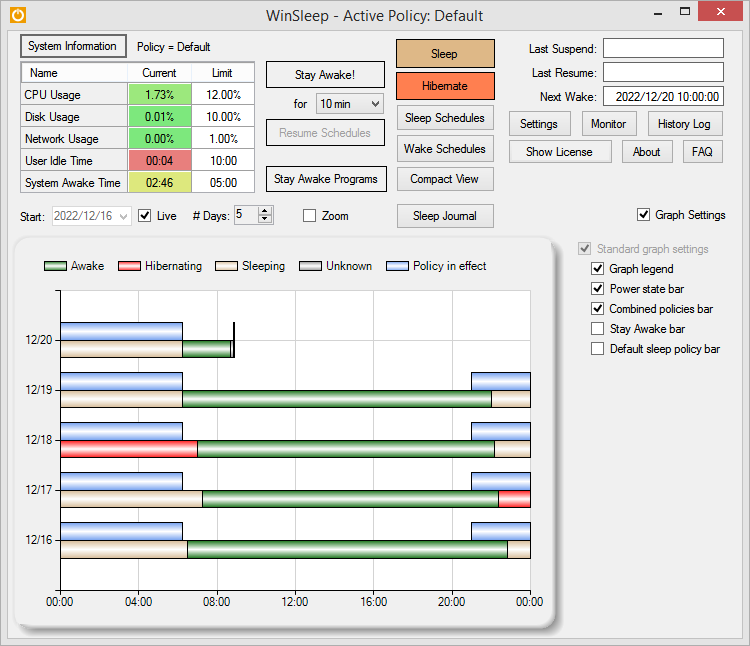
WINSLEEP by MollieSoft keeps your computer asleep (while not too busy) as much as possible during periods you specify.
** Runs on Windows 7, Windows 8.1 or Windows 10.
** Provides a detailed time-line graph showing when your computer was awake, asleep, or hibernating.
** Sleep Journal shows when/why your computer woke up or went to sleep.
** Provides convenient Sleep and Hibernate buttons for manual use when desired.
** Use remote viewer WinSleep Monitor to connect from anywhere!
** Shows the current CPU/Disk/Network usage percentages for your computer.
** Define multiple sleep schedules (daily, weekly, or monthly time slot), each with a designated sleep policy with its own CPU/Disk/Network usage limits.
** Set wake schedules and an optional task (program) to be run at each wake.
** Helps prolong the life of your desktop computer. Your disk drive is not spinning, motherboard is not powered, fan is not running (and accumulating dust inside the computer casing), and your monitors are in standby mode.
** Saves money! A typical desktop uses 250 watts of electricity when awake, but only a few watts while asleep. Power companies (in the US) may bill at say 10 cents per kWH. This is .25 kWH @ 10 cents = 2.5 cents/hr you are saving while asleep. Say WinSleep sleeps your computer for half the day; this is $.30/day = $109.50 per year. The more you sleep, the more you save. (We didn’t even count the power consumption of the computer monitor here.)

Auto Keyboard Presser by Autosofted 1.8

Type: Freeware
Cost: $0
Size: 1.02 MB
Release date: Mar 01 2017
Platform: Win2000,WinXP,Win7 x32,Win7 x64,Windows 8,Windows 10,WinServer,WinOther,WinVista,WinVista x64
Publisher’s Site:  http://www.autosofted.com
Publisher’s Product Page:  http://www.autosofted.com/auto_keyboard_presser/
Country: United States of America


Auto Keyboard Presser by Autosofted

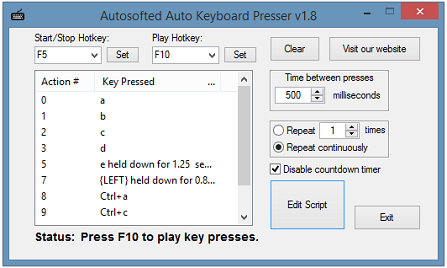
The Autosofted Auto Keyboard Presser and Recorder is a fully hotkey compatible tool, it is also very simple to use. This is a FREE auto keyboard button pressing program which enables you to control which specified keys you want to keep getting pressed repeatedly.

You can also control how any times you want the keys to get pressed and how long you want to wait between each key press.
Instructions (Easy)

1. Select a Start/Stop hotkey and click Set
2. Select a Play hotkey and click Set
3. Press your selected Start/Stop hotkey to Start
4. Do your desired key presses
5. Press your selected Start/Stop hotkey to Stop
6. Press your selected Play hotkey to Play
Features

– Auto key pressing
– Store an unlimited amount of key presses
– Able to setup timing between each key press
– Able to setup how often to repeat the key press
– Fully hotkey compatible