Category Archives: System Utilities

Automation Tools, Backup & Restore, Benchmarking, Clipboard Tools, File & Disk Management, File Compression, Launchers & Task Managers, Other, Printer, Registry Tools, Shell Tools, System Maintenance, Text/Document Editors

DocPad 17.0

Type: Freeware
Cost: $0
Size: 8.96 MB
Release date: Jul 21 2016
Platform: Win2000,WinXP,Win7 x32,Win7 x64,Windows 8,Windows 10,WinServer,WinOther,WinVista,WinVista x64
Publisher’s Site:  http://www.Gammadyne.com
Publisher’s Product Page:  http://www.gammadyne.com/docpad.htm
Country: United States of America


DocPad

DocPad is a free alternative to Notepad. Although it fills the same role, plain text editing, it offers an arsenal of time-saving tools: block indent/unindent, bookmarking, case conversion, customizable toolbar, encoding conversion, file history, jump to line/offset, keyboard macros, print preview, search and replace, skinnable interface, spell checking, statistics, variable pitch font, and much more. It also includes a built-in calculator, calendar, and character map. DocPad is pure freeware, does not display advertisements, and does not install third party apps.

Graphcat<

System Mechanic Free 16.1.0.42

Type: Freeware
Cost: $0
Size: 572.00 kB
Release date: Sep 16 2016
Platform: Win2000,WinXP,Win7 x32,Win7 x64,Windows 8,Windows 10,WinServer,WinOther,WinVista,WinVista x64
Publisher’s Site:  http://www.iolo.com
Publisher’s Product Page:  http://www.iolo.com/landing/smfree/
Country: United States of America


System Mechanic Free

System Mechanic Free keeps your PC running at peak performance and stability with advanced PC optimization, repair and maintenance features. Using 7 safe and effective tools, its exclusive patented technology fixes registry problems, defrags hard drives, cleans up junk files, accelerates downloads, boosts Windows speed and ensures maximum ongoing system stability. Consistently top-rated since 1998, this award-winning performance solution has been used to keep over 75 million PCs worldwide problem-free and running like new.
System Mechanic Free delivers essential features that automatically resolve errors, slowdowns and crashes:
– Registry Tuner: A safe, effective, and highly advanced problem solver and error repair tool, Registry Tuner can diagnose and resolve many common root causes of mysterious freezes, slowdowns, and crashes.
– Startup Optimizer: Automatically eliminates startup bottlenecks that can choke the life out of a PC and make Windows take ages to start. Supercharges boot-times and frees up resources for improved overall performance.
– Memory Mechanic: Reclaims system RAM orphaned by memory leaks and sloppy programs for improved system responsiveness. Optimizes and defragments memory for snappier programs, downloads, and gaming experience.
– PC Cleanup: Performs a system-wide scan for junk and obsolete files left over from messy apps and unexpected restarts. Safely cleans out hazardous system-clogging clutter that accumulates over time through everyday use.
– Drive Accelerator: Performs advanced hard drive defragmentation for accelerated Windows load times, program startup, and overall system speed.
– Shortcut Repair: Finds and automatically fixes broken or corrupted Windows shortcut icons that can represent the root of frustrating problems on an otherwise stable PC.
– Internet Connection Repair: Automatically heals broken and chronically unstable internet connections to get you back online and keep you connected when you most need to be.

WinSleep by MollieSoft 1.3.8.0

Type: Shareware
Cost: $14.95
Size: 1.14 MB
Release date: Oct 31 2016
Platform: Win2000,WinXP,Win7 x32,Win7 x64,Windows 8,Windows 10,WinServer,WinOther,WinVista,WinVista x64
Publisher’s Site:  http://www.molliesoft.com
Publisher’s Product Page:  http://www.molliesoft.com/winsleep
Country: United States of America


WinSleep by MollieSoft

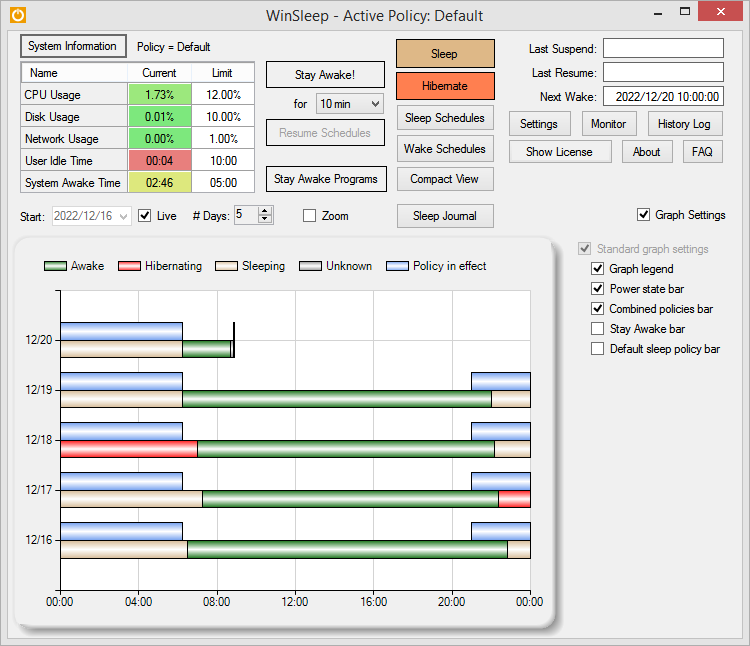
WINSLEEP by MollieSoft keeps your computer asleep (while not too busy) as much as possible during periods you specify.
** Runs on Windows 7, Windows 8.1 or Windows 10.
** Provides a detailed time-line graph showing when your computer was awake, asleep, or hibernating.
** Sleep Journal shows when/why your computer woke up or went to sleep.
** Provides convenient Sleep and Hibernate buttons for manual use when desired.
** Shows the current CPU/Disk/Network usage percentages for your computer.
** Define multiple sleep schedules (daily, weekly, or monthly time slot), each with a designated sleep policy with its own CPU/Disk/Network usage limits.
** Set wake schedules and an optional task (program) to be run at each wake.
** Helps prolong the life of your desktop computer. Your disk drive is not spinning, motherboard is not powered, fan is not running (and accumulating dust inside the computer casing), and your monitors are in standby mode.
** Saves money! A typical desktop uses 250 watts of electricity when awake, but only a few watts while asleep. Power companies (in the US) may bill at say 10 cents per kWH. This is .25 kWH @ 10 cents = 2.5 cents/hr you are saving while asleep. Say WinSleep sleeps your computer for half the day; this is $.30/day = $109.50 per year. The more you sleep, the more you save. (We didn’t even count the power consumption of the computer monitor here.)