Type: Freeware
Cost: $0
Size: 350.00 kB
Release date: Aug 16 2015
Platform: Win2000,WinXP,Win7 x32,Win7 x64,Windows 8,WinServer,WinOther,WinVista,WinVista x64
Publisher’s Site: http://zipsnapng.sourceforge.net
Publisher’s Product Page: http://zipsnapng.sourceforge.net
Country: United States of America
Cost: $0
Size: 350.00 kB
Release date: Aug 16 2015
Platform: Win2000,WinXP,Win7 x32,Win7 x64,Windows 8,WinServer,WinOther,WinVista,WinVista x64
Publisher’s Site: http://zipsnapng.sourceforge.net
Publisher’s Product Page: http://zipsnapng.sourceforge.net
Country: United States of America
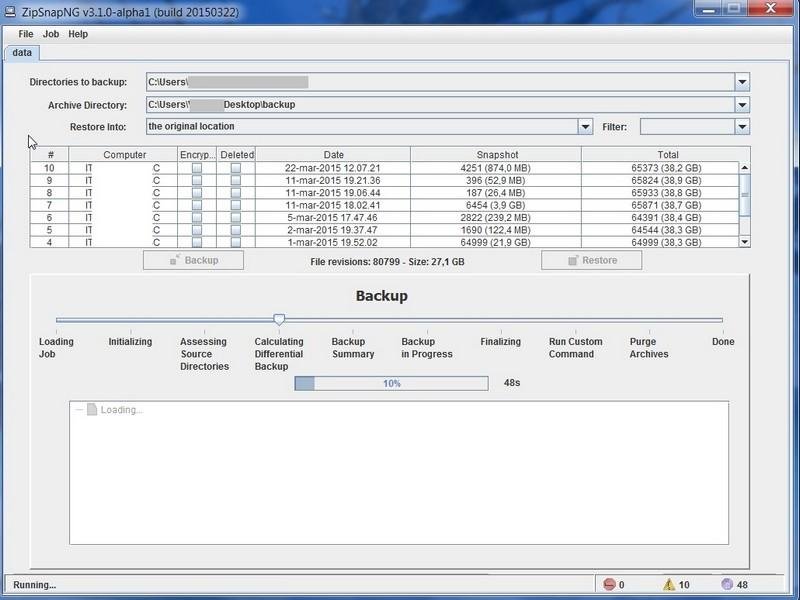

ZipSnapNG is a portable multi-platform backup tool which, despite its simplicity (200Kb and no installation required), provides advanced features such as incremental backup, data deduplication, encryption and configurable retention. It may run through the command line or within a graphical interface.
Key Features – Incremental backup: a new snapshot is created upon each run and only new or modified files are added to it, Binary deltas: only the portion (data slices) of the file that has changed is saved or restored, Data deduplication: across directories/snapshots/computers, prevent storing copied/renamed/moved contents or any data slice already in the catalog, Encryption support: generate password-protected backup sets, Graphical interface: provide a simple graphical interface which exposes all the features, Purge old data: remove from the catalog the oldest snapshots and associated data, Custom action: a custom script can be executed automatically when the backup process is finished, Multiple restore options: original location, different directory or merge with existing directories, Windows Shadow Copy support: integration with Windows VSS to handle opened files, Multi-volumes archive: split the backup archive in multiple, smaller files
Key Features – Incremental backup: a new snapshot is created upon each run and only new or modified files are added to it, Binary deltas: only the portion (data slices) of the file that has changed is saved or restored, Data deduplication: across directories/snapshots/computers, prevent storing copied/renamed/moved contents or any data slice already in the catalog, Encryption support: generate password-protected backup sets, Graphical interface: provide a simple graphical interface which exposes all the features, Purge old data: remove from the catalog the oldest snapshots and associated data, Custom action: a custom script can be executed automatically when the backup process is finished, Multiple restore options: original location, different directory or merge with existing directories, Windows Shadow Copy support: integration with Windows VSS to handle opened files, Multi-volumes archive: split the backup archive in multiple, smaller files
 <
<