
Category Archives: System Utilities

Automation Tools, Backup & Restore, Benchmarking, Clipboard Tools, File & Disk Management, File Compression, Launchers & Task Managers, Other, Printer, Registry Tools, Shell Tools, System Maintenance, Text/Document Editors

Organyze 3.1

Type: Freeware
Cost: $0
Size: 30.89 MB
Release date: Apr 07 2011
Platform: WinXP,Win7 x32,Win7 x64,Windows 8,WinServer,WinVista,WinVista x64
Publisher’s Site:  http://www.organyze.com
Publisher’s Product Page:  http://www.organyze.com
Country: India
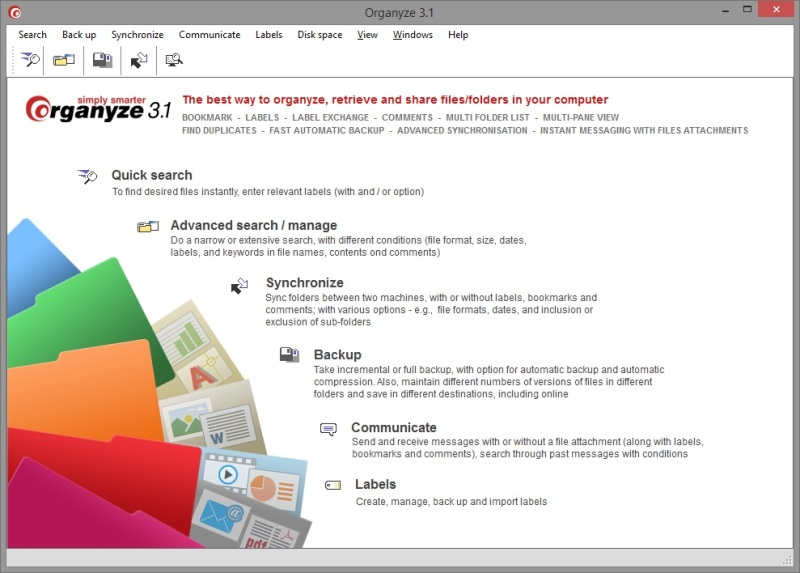

Organyze

Find files fast across folders, drives, disks and machines and emails in MS Outlook, find duplicates. Exchange messages with file attachments. Tag Web pages while downloading. Get a multi-pane view to help organize your files and folders.


Create and attach labels, bookmarks and comments to your files (ANY file format). Double-click on a label to find files INSTANTLY – it doesn’t matter where the files are saved; Organyze finds them in an instant. This way you can find important files or emails you may have forgotten about.

Organyze offers several methods to find the files or folders you need:
– Quick search by selecting multiple labels
– Very fast retrieval by single or multiple labels
– Fast retrieval by using filters (multiple labels, keywords in files, comments or emails, file formats and sizes, file date).
– You can see attached comments and labels without opening files. This helps you find files faster.
– You can also search for files by using keywords used in comments.

These methods are much, much faster than simple keyword searches or manually hunting through folders and sub-folders for files you need. YOU SAVE A HUGE AMOUNT OF
TIME.

Organyze also helps you automatically back up all your files and folders daily. It lets you back up stuff online to keep it doubly safe. Organyze also lets you synchronize your folders with another machine. This is useful if you use the same folders at the office and home.

Organyze makes tagging very, very easy. You can attach labels, bookmarks and comments, in so many different ways:
– A selection of files/folders in the Organyze window
– A selection of files/folders in Windows Explorer
– To MS Office files (Word, Excel, PowerPoint and MS Outlook) while you are working in these programs
– To a Web page while you are saving it to your machine

Attach many labels or comments simultaneously to many files, plus- or use the automatic labeling feature. Also, import ready labels from others. All

Graphcat<

Filecats Standard 2.2.0011

Type: Shareware
Cost: $9.99
Size: 5.86 MB
Release date: Aug 15 2014
Platform: WinXP,Win7 x32,Win7 x64,Windows 8,WinVista,WinVista x64
Publisher’s Site:  http://www.filecats.co.uk
Publisher’s Product Page:  http://www.filecats.co.uk
Country: United Kingdom


Filecats Standard

Do you want a better way to understand your documents? When you receive a hard drive or memory stick with hundreds or thousands of files, how long does it take you to comprehend what is there?

Imagine being able to copy the contents of Windows Explorer into Excel, so that you can then search, filter and annotate files and folders more easily, save the results of your searches, and email them to whoever you want.

Imagine no more. Introducing Filecats Standard, a file cataloger which enables you to harness Windows Explorer in your existing Microsoft Excel program.

With just two clicks from inside Windows Explorer, this software imports the standard Windows Explorer columns into Excel, together with hyperlinks, allowing you to catalogue, investigate, annotate and email the results.

Investigate files that you have just been given, or catalog a CD or hard drive that you are sending out to create a permanent record, helping you with your ISO 9001 requirements.

A Filecats Standard catalog is better than a Windows Explorer search because of:

1. Permanence – creates a permanent record of your hard drive, memory stick or CD.

2. Easy to use, yet powerful – use all the familiar features in Microsoft Excel to aid your searches.

3. Annotate – you can add extra columns to annotate the results of your search, something you cannot do easily in Windows Explorer.

4. Portability – send a copy of your catalogue by email or save it to the network for later retrieval.

5. Speed – especially for multiple searches, the search facility in Windows can be slow. On a fast computer, Filecats Standard can catalogue tens of thousands of files per minute.

Filecats is easy to use, yet powerful enough to save you so much time and frustration.

Try it for yourself for free. Save time and increase efficiency. Create analyses – see our website for many articles. For more features, try Filecats Professional, a metadata extractor with several hundred additional columns.

Kaspersky QR Scanner 1.0

Type: Freeware
Cost: $0
Size: 145.00 kB
Release date: Feb 03 2015
Platform: iPhone,iPod,iPad
Publisher’s Site:  http://www.kaspersky.com/?cid=acq_pad
Publisher’s Product Page:  http://www.kaspersky.com/qr-scanner?cid=acq-pad
Country: United States of America


Kaspersky QR Scanner

QR codes are everywhere. We scan them in shops, on public transport, in museums or in magazines so we can get the latest news or special offers.

– Simple & Free
It’s quick and easy to scan QRs to access websites, images, text, contact details & more.

– Stay safe from scams
QR codes can conceal online threats. See the real link before you open it. Check it automatically with Kaspersky Security Network.

– Easy Wi-Fi Connection
Connect safely to Wi-Fi. It only takes a second to get the credentials by scanning the QR code.

– Save a contact
Put the details on a business card straight onto your device – no need for manual input.

Power to protect you from bad QR codes. FREE.

Stop reading. Start using.