
Vivaldi for Windows 64 5.7

Product Page: http://vivaldi.com
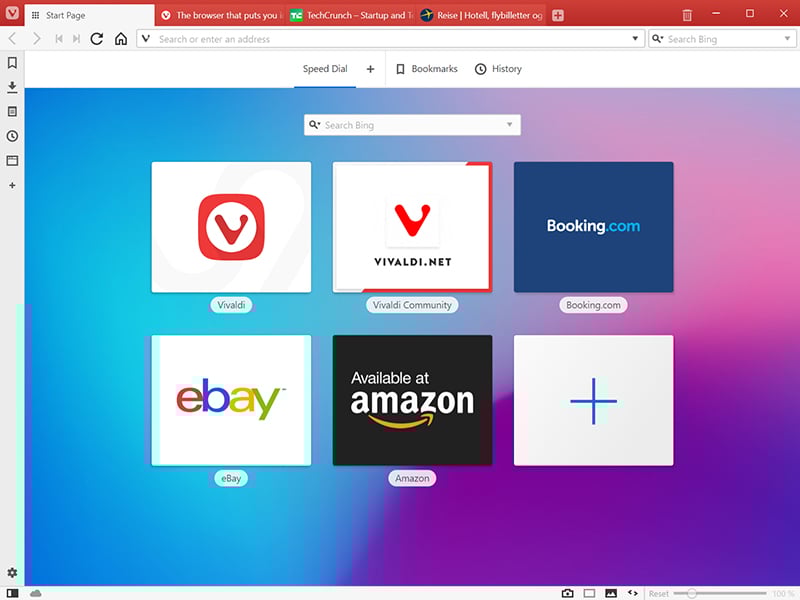
win001.jpg

The Vivaldi browser does not track its users and offers more features than any other modern browser. Steered by Jon von Tetzchner (co-founder of Opera browser), Vivaldi is driven by the real needs of users today and ensures that they have the best tool to browse and do the job.

Users can tailor Vivaldi to suit their browsing needs with no limit to customization options. Vivaldi takes browsing to the next level with its numerous features that give users a more dynamic experience of the web. Vivaldi demonstrates that a browser can be the most useful tool to enhance time spent online and not just a means of accessing web pages.


Some of the highlight features that make Vivaldi a personal, do-it-your-way browser include:

Advanced tab management ability to group, tile, move and pin tabs.
Private and Secure Syncing across computers with end to end encrypted Synchronization.
Side Panel with easy access to bookmarks, downloads, tree-style tab manager, notes, browsing history and websites of users choice.
Built-in functionality such as the screenshot Capture tool, Notes and Image Properties.
Powerful History overview that lets users explore their browsing patterns.
Unique and customizable look and feel of the browser interface with custom Themes and more.
Keyboard Shortcuts and Mouse Gestures for quick browser commands.
Built in e-mail client and calendar.
Built in ad-blocker

For more details, visit https://vivaldi.com

Graphcat<

Tipard MKV Video Converter for Mac

Product Page: https://www.tipard.com/mkv-video-converter-for-mac.html

load-mkv.jpg

Tipard MKV Video Converter for Mac provides the function of converting MKV to various popular video formats for Mac, including MPEG-4, H.264/MPEG-4 AVC, MOV, AVI, VOB and so on. It can also help you get many audios, like AAC, AC3, AIFF, OGG, WAV, WMA, MP3, etc. This software also has powerful editing functions such as cropping the video play region to suit your players, merging several video clips into one file. Key functions: 1. Powerful converting function Tipard MKV Video Converter for Mac can help you in converting MKV to many popular video and HD video formats, like AVI, DivX, XviD, ASF, WMV, MPEG-4, H.264/MPEG-4 AVC, FLV, SWF, VOB, etc. video and HD H.264, HD AVI, HD MPG, HD TS, HD WMV, etc. HD video formats. 2. Get audio formats from MKV Tipard MKV Video Converter for Mac can help you get various popular audios from MKV video, including AAC, AC3, AIFF, AMR, AU, FLAC, MP3, etc. 3. Set video effects Tipard MKV Video Converter for Mac enables you to adjust video effects like Brightness, Contrast, and Saturation. And the Deinterlacing function can help you improve the video quality by converting the interlaced video to a progressive one. 4. Powerful editing functions It offers powerful editing functions for you to use. The ‘Crop’ function can help you crop the video frame to remove the unwanted playing areas and the black edges to fit your player’s screen. And you can also trim video length and merge several video clips into one file. 5. Multiple conversions simultaneously In order to save your time, it provides you with the function of converting multiple files at a time.

MathML Kit for Adobe Creative Suite 1.0.8

Product Page: https://scand.com/products/mathml-kit/

mathml_screen1.png

MathML Kit for Adobe Creative Suite.

This is simple support of math equations for Adobe InDesign Server, Adobe InDesign, and Adobe InCopy in the MathML format. MathML Kit provides the native placement of MathML files without any extra conversions. From the Adobe InDesign side, a MathML file is a vector shape and it is placed as a vector in the EPS, PDF, or other formats.

MathML Kit has been designed primarily for one function: the high-quality printing of the mathematical formulas on paper. The major browsers support the MathML format and overall, this format is quite popular. But for printing, it should be converted into the vector (EPS or PDF) or raster formats. As a result, the converted images are no longer maintainable and in many cases have a poor quality.

We have created our own implementation of the SVG format support named SVG Kit for Adobe Creative Suite, and currently, we introduce the MathML basic format support in addition to SVG.

Our solution does not ensure any MathML editing capabilities; it just provides you with an ability to place MathML formulas into the InDesign documents manually or in an automated way.