Total Network Inventory 6.0.0

Product Page: https://www.softinventive.com/products/total-network-inventory
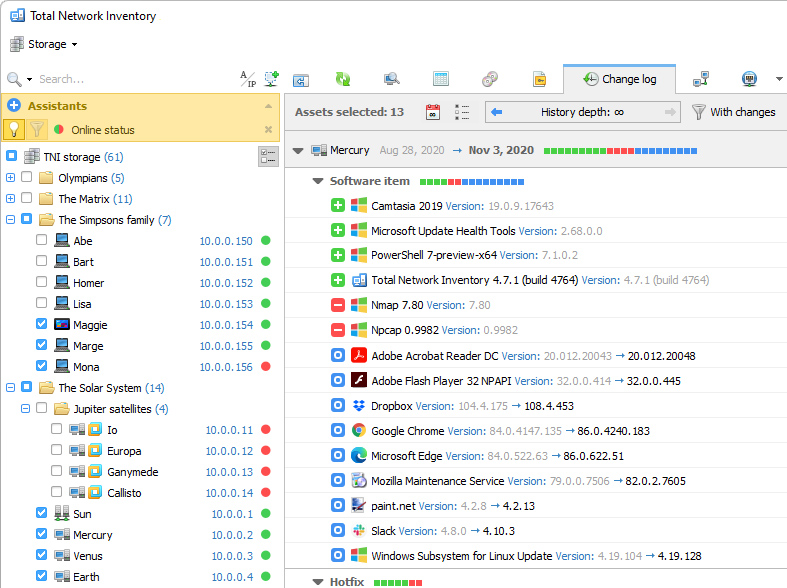
screen.jpg

Build an inventory of your entire network without leaving a chair! Total Network Inventory will scan your entire network, query all servers, workstations and appliances discovered, and record important information about every piece of hardware found on your network. Create a perfect, effortless, hassle-free inventory. The network inventory builder is able to query all network devices no matter how large or diverse your network is!

Do you know the number of workstations still running Windows 7 or missing the latest updates? Total Network Inventory obtains essential information about each and every computer on your network in real-time including information on all service packs and hotfixes applied. The network inventory builder will store and organize information, providing you with a comprehensive report on a chosen subject in just a few clicks. With Total Network Inventory, all information about your network equipment is right at your fingertips!


Have a budget to spend on hardware upgrades? With Total Network Inventory, it’s easy to figure out the oldest computers on your network. Just run Total Network Inventory, let it scan your network, and click to generate a comprehensive network inventory report detailing equipment used in each and every PC on the LAN. Click once more, and you’ll see the oldest PCs appear on top of the list. It’s just that simple!

Total Network Inventory can scan your entire network remotely, without you having to leave a chair or installing anything onto the PCs being scanned. Using Total Network Inventory is safe and secure; no data will ever leave corporate premises.

Thanks to the step-by-step Scan Wizards, scanning your entire LAN to make a network inventory is as easy as clicking ‘Next’. Detailed reports are easy to create and a breathe to read, providing important information about your network inventory presented in a simple way.

Graphcat<

Aiseesoft Blu-ray Creator

Product Page: https://www.aiseesoft.com/

icon-321.png

Aiseesoft Blu-ray Creator is a professional Blu-ray burning program, whether you want to create a Blu-ray disc, Blu-ray folder or ISO file, it can do you a big favor with ease. You can create Blu-ray disc with any video files you have, no matter its recorded by your camcorder or downloaded from websites. Key functions: 1. Create Blu-ray with any video You can burn any video files (HD videos included) to Blu-ray disc/folder/ISO file, the supported video formats include TS, M2TS, TP, TRP, MPG, MPEG, M4V, MP4, VOB, WMV, MXF, etc. Plus, if you want to create a Blu-ray disc, there are two Blu-ray types for you to choose from, BD-25 and BD-50. The burned Blu-ray disc can be played on popular Blu-ray players like PS3, Sony BDP-S5, Samsung BD-F, LG Electronics BP, etc. 2. Edit video effects before burning Aiseesoft Blu-ray Creator is also equipped with a video editing feature, it enables you to customize your Blu-ray at will. You can clip the video to any time length segments by setting the start and end time, cut off unwanted playing areas of the video to fit different portable players, personalize the video with the image or text watermarks, even adjust the video effect such as brightness, saturation, contrast and hue. 3. Customize profile settings You can also adjust output Blu-ray parameters by setting video encoder, frame rate, bitrate, audio channel, etc. 4. Add personal menu There are menus of different themes with editable buttons, texts, etc. for you to choose your choice to create a personalized Blu-ray disc.

Aiseesoft iPhone Unlocker for Mac

Product Page: https://www.aiseesoft.com/

icon321.jpg

There are various reasons for which you lose control of the lock screen passcode. If you are bothered how to bypass the lock screen when you forgot your iPhone passcode, or if you forgot the password connected to your Apple ID, or you want to remove the restrictions in Screen Time, Aiseesoft iPhone Unlocker for Mac can do you a great favor. Key features: 1. Wipe iPhone passcode If you are locked out of your iPhone because you forgot the passcode, whether your passcode is 4-digit, 6-digit, Touch ID and Face ID, Aiseesoft iPhone Unlocker for Mac can help you remove the passcode and unlock the iPhone easily. 2. Remove Apple ID If you forgot your Apple ID or password, you would lose access to many Apple services. If your iOS device is activated and configured well, this iPhone Unlocker tool allows you to remove the forgotten Apple ID and let you change a new Apple ID account to activate your iPhone. 3. Recover/Remove Screen Time Passcode If you received a pop-up message saying that you have reached your limit on XX on your iPhone, you should enter the Screen Time passcode to change the settings. But what to do if you forgot the restriction passcode? As long as the Find My iPhone/iPad feature is disabled on your device, you can use this iPhone Unlocker for Mac to recover the passcode and remove passcode without data loss on iPhone or iPad.