TSplus Advanced Security 6.4.3

Product Page: https://tsplus-advancedsecurity.com/
Advanced-Scurity-Graph-800x600.png

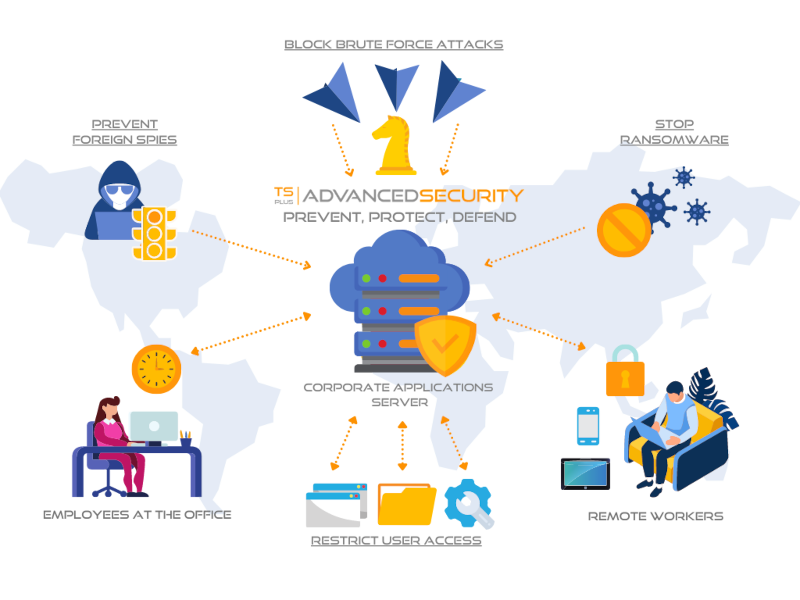
TSplus Advanced Security is the must-have cybersecurity software to detect attacks on remote connections, protect servers and improve your network security. Cyber criminals know you use Remote Desktop Protocol to work remotely. And you need to know your network vulnerabilities to mitigate your risks. The TSplus approach combines smart cybersecurity technologies and the expertise of our remote desktop security specialists to deliver advanced threat protection for your servers and remote workers. Try it now for free! TSplus Advanced Security Ultimate Protection will be your secret shield against the increasing number of cyber criminals who try to take advantage of home office workers. Easy-to-use and comprehensive antivirus, it is extremely efficient from the start. It will provide a solid protection for your RDS Servers and sensitive data by fighting against hackers and malicious people with seven powerful security features:

Prohibit employees to connect at night with time-based control access: with Working Hours Restriction, you can specify what times and days each of your users or groups can open sessions.


Use Homeland Protection to block any IP address which is not in your list of allowed countries and thus protect your servers from potential foreign attack.

Block brute-force attacks thanks to a powerful Defender.

Inspect Windows files permissions at one sight and modify them in a click.

Detect and stop Ransomware on time and back-up data in a safe place.

Restrict access to specific devices.

Review all security events in real-time and durably improve your network defense system. Step into a more secure world! TSplus Advanced Security makes it so easy to reenforce your security policies and allow safe remote working.

Moreover, it can be used as a partly integrated, fully compatible add-on to TSplus Secure Remote Access for a complete remote office solution. Download the right shield for your servers now!

Graphcat<

Aiseesoft 4K Converter for Mac

Product Page: https://www.aiseesoft.com/

interface.jpg

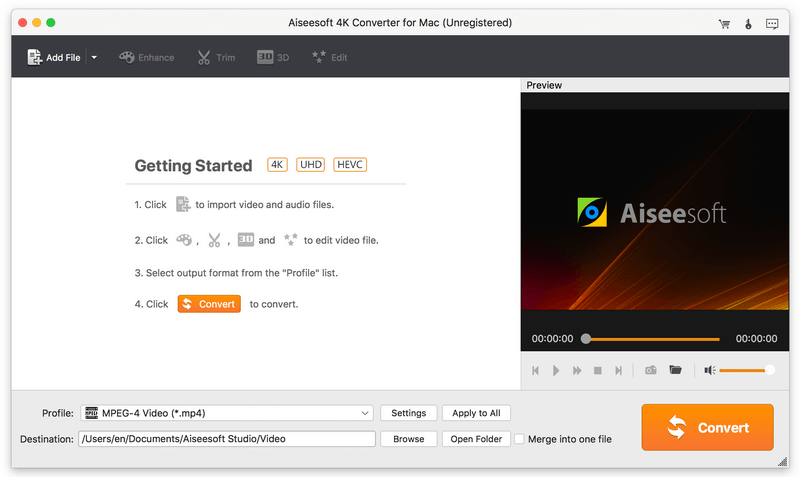
As 4K media player is not as popular as other sort of media players which can support any HD/SD videos but 4K videos, you might need to convert a favorite 4K movie to the video with lower resolution when you want to play it on your mobile phones, HD TVs, tablets and other portable devices. At this time, Aiseesoft 4K Converter for Mac is the best option for you. Key functions: 1. Convert 4K video from/to 1080p/720p HD, SD video on Mac Aiseesoft 4K Converter for Mac is specialized in handling 4K videos on Mac. You can easily convert 4K video to 1080p/720p HD and SD to make them more playable with many media players like iPhone, iPad, Android phone, HD TV, and PSP. Meanwhile, it is able to convert 1080p/720p HD, SD video to 4K video to play them on your 4K TV. 2. Convert 4K video from one format to another This 4K video converter supports six 4K video formats. They are MP4, AVI, MKV, WebM, and TS. And the program does well in converting 4K videos from one video format to another, like 4K MP4 to 4K TS, 4K AVI to 4K FLV, and 4K MKV to 4K WebM. 3. Edit 4K video professionally The powerful built-in editing function makes the converter a professional 4K video editor as well. It enables you to edit your 4K video by adjusting brightness, contrast, saturation and hue to improve video performance. You can also merge, cut, and add watermark to the video to customize your own 4K film. 4. Time-saving and user-friendly It supports batch 4K conversion to save your time. And the whole converting process is very fast and efficient. Moreover, it is user-friendly and easy to use. The simple interface and clear instruction make your 4K conversion easy and fast.

TSplus Server Monitoring 5.3.3

Product Page: https://tsplus-servermonitoring.com/

Server-Monitoring-Graph-1-800x600.png

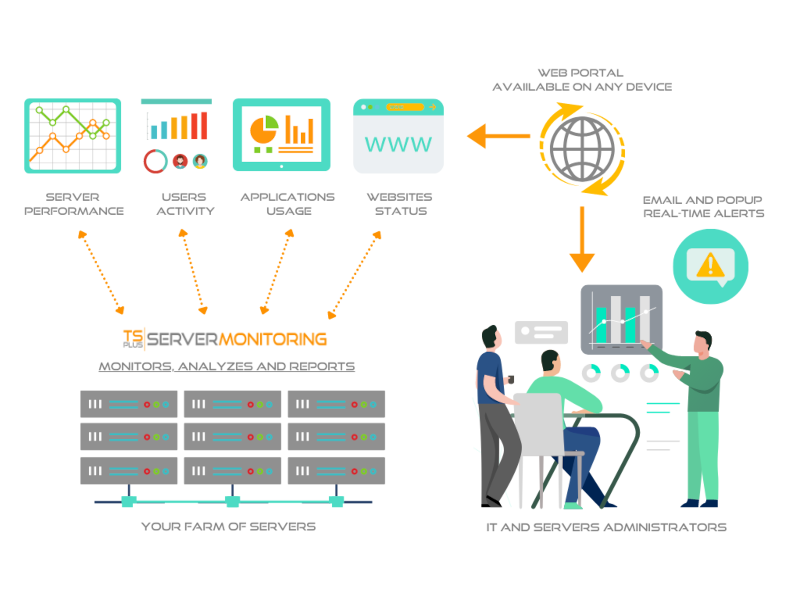
Server Monitoring is the smart monitoring and reporting solution to set up on your server(s). It tracks, records and analyzes users activity in every application, over Remote Desktop and Terminal Services connection method. With session recording, Server Monitoring records all user activity from the moment a user logs into a Windows machine via RDP or Terminal Server. It captures all activity taking place in the opened session over the time. Server Monitoring performance and applications’ analytics instantly alert IT teams to abnormal or suspicious user activity. It delivers an enterprise-scale porting of all terminal servers sessions, Citrix session and other standard remote control software in a compressed and searchable format. It checks websites performance, visits and stability and send real-time alarms in case of suspicious event that could lead to a failure. The result is a complete solution for identifying and managing your production’ environment. You can see the details of all Windows sessions, sorted and grouped according to each server. In many cases, this report list is already enough information for your auditing and troubleshooting needs. You can set customizable alerts regarding any sensitive, unusual, suspicious threshold you fixe and get proactive warnings to troubleshoot important issues faster. By making important events visible in real time, it is possible to quickly and effectively respond to any deliberate or inadvertent threats to IT security, system integrity, regulatory compliance or company policies. Overcome employee idleness with user activity monitoring. Never find yourself over- or under-licensed with license usage reports. Understand, Predict and avoid incident on yout servers at a glance: download Server Monitoring now for free!