Coolcut 2.0.0

Product Page: https://www.coolcut.tv/index/advertise3.html?c=21

intro_04_800x600.png

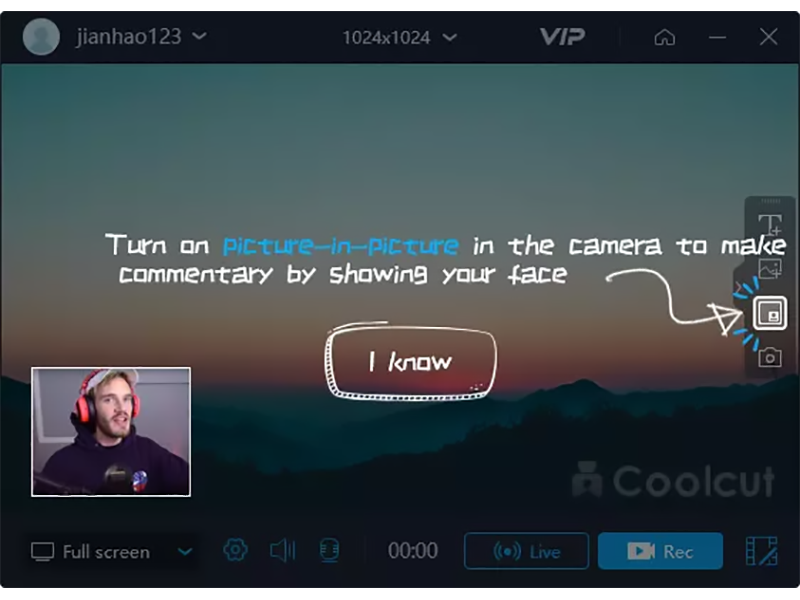
A combination of two powerful utilities, Coolcut is both an outstanding video editor and an excellent screen capture and live video recording tool. With Coolcut you can produce high-end tutorials, take screenshots of your desktop, and embellish your new videos with all kinds of transitions, effects, filters, multiple soundtracks, and audio effects, watermarks, etc., all in a convenient and intuitive timeline-based workspace and at no cost for you.
The desktop recording tool is extremely flexible, allowing you to take screenshots of your desktop and make high-quality recordings of anything taking place on your desktop. This flexibility allows you to produce tutorials and dynamic presentations, make online video and audio recordings, and save conferences, workshops, business meetings, etc., as convenient video files for later use. It comes with all the features you would expect from a professional screen recorder, with tools to add text and images to your presentations and a full set of settings to customize the quality of your recordings.
The video editor is in itself a professional tool with all the knots and bolts you find inexpensive video editing tools. Its timeline will let you place and move all kinds of media and related tracks (such as text), so you can combine and overlap them in the most convenient way just by dragging them with your mouse. The video player embedded in its interface will let you check, modify, and correct all of the changes you perform on your videos. Transitions, soundtracks, filters, text-to-speech capabilities, green screen, dubbing, speed change, and the most common editing features are all part of this impressive editor.

C# HTML to PDF 2022.11.10347

Product Page: https://ironpdf.com/tutorials/html-to-pdf/

html-string-to-pdf-in-csharp-screenshot.jpg

C# HTML to PDF – How to generate PDF files from HTML in C# .Net Applications and websites.
This developer software download contains a C# PDF generation and editing library in addition to a full tutorial on how it may be used. PDFs may actually be rendered from HTML with full CSS3 and Javascript support with pixel-perfect embedded chromium rendering using the IronPDF C# pdf generator.

C# PDF Library – The source code relies upon IronPDF which is a popular Library for PDF development and editing for the Microsoft .Net Framework https://www.nuget.org/packages/IronPdf/


C# HTML to PDF Compatibility – This project is for use within any VB.Net, C# or other IL compatible .Net language supporting Microsoft .Net Framework version 4 or later to create:
– console applications
– ASP.Net Web Forms websites
– MVC Web applications
– Razor Views
– Windows Forms Desktop Applications
– WPF Layout Applications
– Server applications and Windows Servers

C# PDF Tutorial Package Contents – The C# source-code contains .Net Examples and Tutorials for:
– C# PDF Library setup and installation
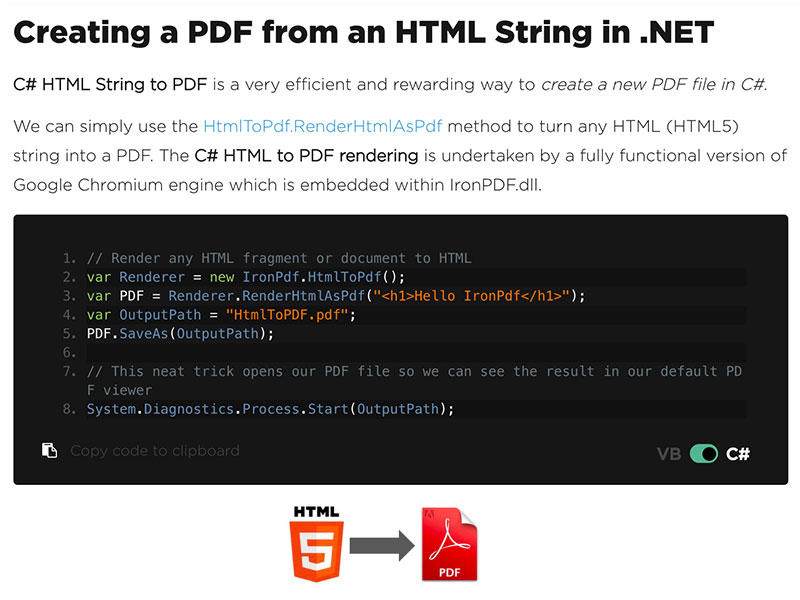
– Html Strings to PDF in C#
– Generating PDFs from existing URLS
– PDF File Generation from html files including assets, CSS and Javascript
– Adding PDF File Headers And Footers (including C# and VB.Net support for HTML Headers and Footers)
– HTML Templating using .Net Strings and Handlebars.Net
– Useful hints and tips such as responsive CSS & Page-Breaks in CSS and HTML5

For a detailed overview with code samples please visit https://ironpdf.com/tutorials/html-to-pdf/

Going Forwards developers may also learn to:
– Encrypt and Unlock PDF documents using 128 bit encryption
– Edit PDF documents using HTML and C#
– Add HTML Headers, Footers and Watermarks to PDF files
– Enhance PDFs with foreground and background images
– Merged, joined, truncated and spliced PDF files as if they were arrays of pages using .Net code
– Extract text strings and images from any PDF file