VB.Net PDF 2022.11.10347

Product Page: http://ironpdf.com/tutorials/vb-net-pdf/

VB.Net-PDF-Screenshot.jpg

How to Create PDF and Edit PDF Documents using the VB.Net Programming Language.

A software tutorial with code examples for VB Dot Net developers.


VB.Net: Create a PDF file
This Visual Studio project covers the comprehensive creation of PDF documents from using VB.Net and HTML as a design language. Using HTML to design a PDFs contents ensures that .Net developers do not have to learn proprietary APIs and complex low-level PDF file format as they might do if using alternative PDF libraries for C# and VB.Net such as iTextSharp.
The tutorial is self contained as a Visual Studio Console application, but works equally well for ASP.Net, Console Applications and Windows Services.

Dot Net Pdf Tutorial Contents:

1. VB.Net Pdf library Installation
The library used to extend Visual basic.Net to incorporate PDF functionality in this tutorial is IronPDF – Which can be downloaded using the NUGET package manager from: https://www.nuget.org/packages/IronPdf

2. Quick Start – Create your first .Net PDF
The IronPdf.HtmlToPdf class may be used for ‘.net to pdf’ functionality using HTML to design the PDF. We may also render PDF documents from existing ASP.Net web pages, static HTML files and from live URLS.

3. Dot Net PDF Styling
Using Images, CSS and Javascript we can render PDF documents in VB.Net easily. The use of an embedded version of the Chromium web browser into IronPDF ensures perfect standards compliant rendering.

Source code can be downloaded from https://ironpdf.com/tutorials/vb-net-pdf/

4. .Net PDF file Headers And Footers
VB code can be used to ad attractive headers and footers to PDF files.

5. How To create PDFs with Dynamic Content using VB.NET
This can be achieved using String templating or advanced libraries such as handlebars.Net

The tutorial ends with additional code samples to:
* Merge PDF in VB .Net
* Add and remove PDF pages
* Add page breaks
* Encryption PDF documents
* Edit and watermark existing PDF documents

Graphcat<

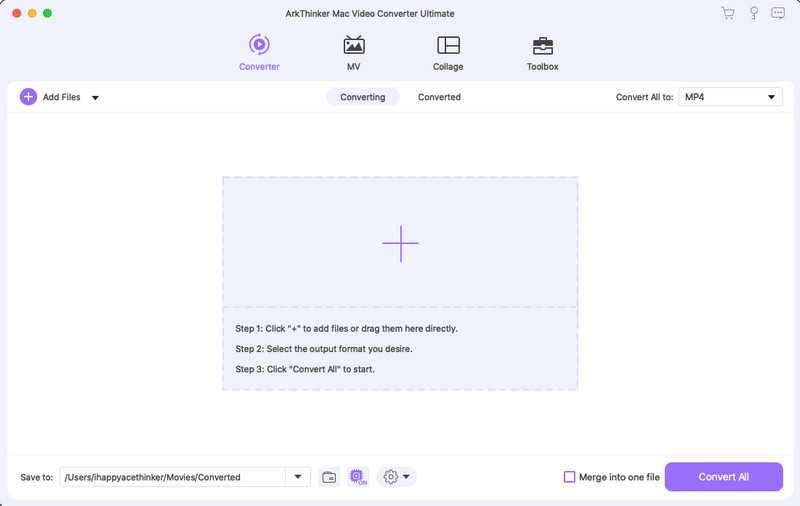
ArkThinker Mac Video Converter Ultimate

Product Page: https://www.arkthinker.com/video-converter-ultimate/

mac-converter-main-interface.jpg

ArkThinker Mac Video Converter Ultimate is a powerful video converter. It is able to convert any video/audio to other formats including AVI, WMV, MOV, MP4, MP3, FLAC, etc. It contains many additional editing functions like Media Metadata Editor, Video/Audio Compressor, GIF Maker, Audio Sync, etc. Key functions: 1.Convert video/audio to many formats with high speed ArkThinker Mac Video Converter Ultimate can convert videos to many formats, like AVI, WMV, MOV, MP4, TS, etc. For audio, you are able to convert your audio to MP3, M4A, FLAC, etc. For this area, you can convert your video/audio without quality loss. 2.Powerful editing functions With ArkThinker Mac Video Converter Ultimate, you can easily trim/crop/merge/rotate video, adjust video effect and add/remove watermark, it also supports to increase adjust audio by Audio Sync and Volume Booster. You are able to edit ID3 tag and file name, genre, etc. of your audio/video files by its Media Metadata Editor. With Video/Audio Compressor, you can compress your video and audio. ArkThinker Mac Video Converter Ultimate facilitates you to make a GIF image and make a 3D video via GIF Maker/3D Maker. If you have many videos to be converted, you can also use this to finish the conversion in batch. 3.Make an MV or a sideshow from video clips and pictures You can use this function to make an MV or a sideshow from video clips and pictures. You also can add background music to your MVs in this feature.

ACDSee Gemstone Photo Editor 12.1.0.353.3

Product Page: https://www.acdsee.com/en/products/gemstone-photo-editor/

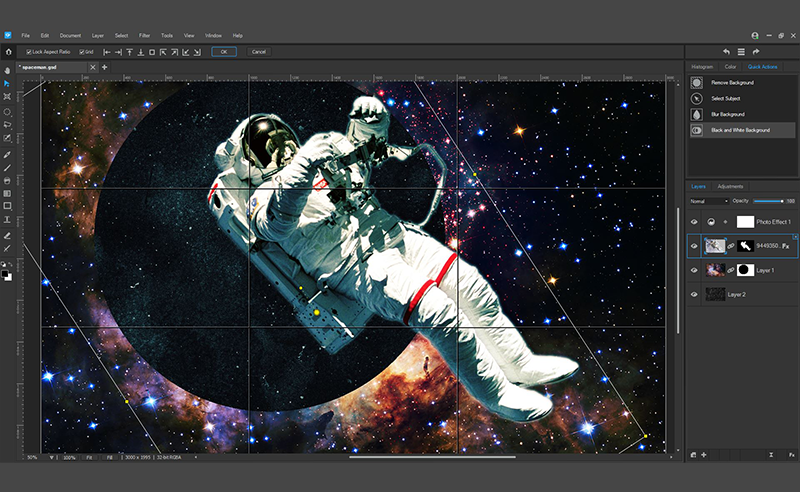
screenshot.png

A new photo editor is on the prowl
The powerful image creator you’ve been waiting for is finally here. ACDSee Gemstone Photo Editor 12 has all the artistry and layered prowess you need to satisfy your photo editing desires, no matter how complex the composition. For maximum productivity, the MDI (Multi-Document Interface) layered editor allows you to carve your images into full spectrum splendor. Let sultry tone curves and spinning color wheels feed your imagination as you whip through Gemstones non-destructive RAW image processor, ACDSee RAW, and layered graphic editor. With an intuitive design, and presets for everything from creating files to fine-tuning colors, the Gemstone Photo Editor will polish your design workflow.

Limitless layered editing
Build the magical image compositions you’ve been dreaming of using Gemstones GPU-accelerated layered editor.

Graphic Design Tools
Layer Effects, Masks, Adjustment Layers, Text Tools, Lasso & Shape Tools, Liquify, Frequency Separation, Pixel Targeting, Distortion & Perspective Correction, Layer Blend Modes & Opacity

Color Tools
Color Wheel, Tone Wheels, Color EQ, White Balance, Color LUTs

Efficiency Tools
Edit History, Snapshots, Navigator, Histogram

Photography Tools
High-Dynamic Range (HDR), Focus Stacking, AI Background & Subject Selection, Advanced Lighting Correction, Watermarks

Repair & Restoration Tools
Smart Erase, Skin Tune, Blended Clone, Heal, Dehaze, Noise Reduction, Sharpen

Artificial intelligence meets artistry
Let Gemstones AI-powered selection tools do the heavy lifting so you can focus on the delicate details.

Select your subjects with a click
Quickly remove unwanted backgrounds in photos
Blur image backgrounds with ease
Instantly turn the background of your photo Black and White

Pixel perfect ACDSee RAW power
Flex your editing muscle using ACDSee RAW; a non-destructive RAW photo editor built right into Gemstone.