
PDF-Tools 9.5.366

Product Page: https://www.tracker-software.com/product/pdf-tools
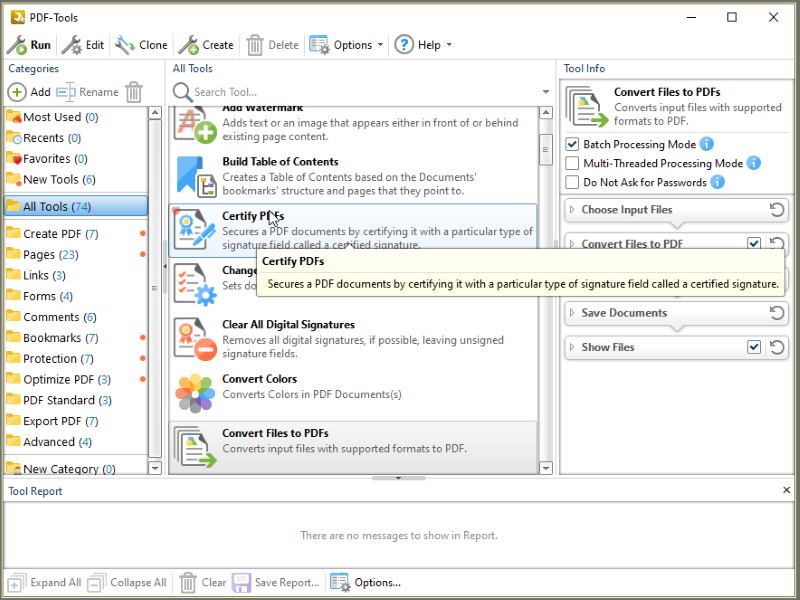
ToolsV9.png

Create new PDF files from the output of any Windows app
Create and Edit Fillable PDF Forms; Dynamic Stamps; Interactive Adobe AcroForms
View Image and MSOffice files natively and convert to PDF automatically
Google Drive Support; OFFice2PDF
Convert PDF to MSPowerPoint format
Improved image and image text character conversion
ISO PDF/A 2a, 2b, 2u(RGB) format support
Supports Revision 6 of Acrobat X password security handler
World leading compression and optimization technology
ISO PDF/A 1a & 1b
Serity/Sign/Secure PDFs
PDF writer Optimization/Compression Controls
Advanced Memory Management
Convert Image files to PDF and back; .RTF & .DOC to PDF
Append/Prepend Pages from one PDF file into another PDF file
Scan Direct to PDF
OCR – searchable layer
Manipulate and Modify PDF files
Extract / Import Content from PDF to Text/Image/PDF formats
Export PDF to many file formats
Add/Edit/Modify/Export Bookmarks
Split/Merge/Delete/Crop/Rotate PDF pages
Re-Order Pages within a PDF file
Optimize PDF
Paper Settings & Custom Forms options
URL links embedded
MS Office Table of Contents
n-UP Printing mode automatically mounts/rescales pages to a single page and calculates correct page positions
Enhanced visual layout previewer resizes pages
Brochure/Booklet/Mirrored Printing
Flexible DPI output 50 – 2400DPI
CJK fonts/character set support
Add Watermarks or Overlay PDF pages to new PDF
Auto Bookmark/Auto Header/Footer generation
Graphics Downsampling embedding options
Extended Font embedding options
Create specific printer preferences and save to Profiles for future use.
MAPI/SMTP Automated Email integration options
Developers API available
Multi-language UI support
Citrix Metaframe/Terminal Server Certified.
‘Macro’ based Auto file naming/location – with JS rule based
Comprehensive Digital Signature and Security
Autosave
Merge pages
Timestamping
Touch/Mouse screen mode
Multilanguage support
Google Drive, SharePoint,
Ribbon/Classic UI


Graphcat<

C# QR Code Generator 2022.11.10702

Product Page: https://ironsoftware.com/csharp/barcode/tutorials/csharp-qr-code-generator/

Generating-QR-Codes-with-C-Sharp-Screenshot.jpg

Iron Barcode is an example of a high-quality QR code library for C# and .NET. It is available on NuGet Package Manager under the name Barcode (https://www.nuget.org/packages/barcode). Iron Barcode can read QR codes from native System.Drawing.Image and Bitmap objects in addition to any modern image formats, scans, photographs, and PDF documents – https://ironsoftware.com/csharp/barcode/tutorials/csharp-qr-code-generator/

IronBarcode provides unique functionality for styling QR codes in .NET. Using a fluent API, we can style a QR code: re-scale, add margins, annotations, and change all of the colors, in a single line of code.


Iron Barcode also provides functionality for .NET developers to: specify exactly the error correction rate within a QR code, add a logo to the QR code (automatically snapped to grid), all using the QR Code Writer class in the Iron Barcode namespace.

Typically we read QR codes when processing a batch of documents, uploaded document, mobile phone camera photo, or webcam scan. When we write QR codes, we output them as images – Iron Barcode also offers the option to output them to screen, PDF, and even HTML.

IronBarcode (https://ironsoftware.com/csharp/barcode) is quite possibly the most sophisticated QR writing library for .NET. It provides advanced styling options, allowing developers to add logos and recolor their barcodes and QRs. In addition, Iron Barcode has advanced functionality, allowing System.IO.Stream data and binary data in byte arrays to be encoded and decoded in QR, which is not supported by many .NET QR libraries.

Iron Barcode is unique in that it brings everything into a single place QR reading and writing from a single library with high fidelity. Its unique features include: fault tolerance; the ability to read corrupted or low-resolution scans; the ability to stylize QR images; the ability to color QR images; and the ability to output in a wide range of formats, including HTML, HTML tags, PDFs and Images.

GlassWire Firewall 3.0

Product Page: https://www.glasswire.com

pad_UI.png

GlassWire’s free firewall software helps protect your privacy & security by monitoring your network activity for suspicious activity. You’ll be shocked by how many applications on your computer are sending your private data over the Internet without you knowing. Once suspicious activity is detected you can block the potential threat with GlassWire’s built in firewall management tool. GlassWire visualizes all your network activity on an easy to use graph. Click anywhere on the graph to see what applications and hosts are accessing the network from your computer. Our software automatically resolves host names so it’s easy to see who or what your computer is communicating with over the Internet.Go to the Firewall tab to see what applications have accessed the Internet and block any that are suspicious, violating your privacy, or wasting your bandwidth. GlassWire uses Windows built in firewall so no instability is introduced into your system by third party firewall drivers. Download GlassWire now to start adding extra protection and privacy to your computer, plus potentially save money by avoiding bandwidth fees.