SAM Broadcaster Cloud 2022.4.1

Product Page: https://spacial.com/sam-broadcaster-cloud/

samvibe-screen.png

Start your own online radio station with SAM Broadcaster Cloud – Go from zero to pro in 10 minutes!

SAM Broadcaster Cloud is a powerful cloud Internet radio broadcasting solution that allows you to broadcast from anywhere using just a computer with Internet access!


Have fun while sharing your passion for music or spread your message. Be in control. Upload your own music, news, jingles, station imaging, promos, weather, sports, podcasts, voice tracks or any other unique content you might have, set rotation rules and relax.

Quick specification:

– Automation scheduling: SAM Broadcaster Cloud is keeping your station running 24/7 even if you are not around to operate it. No servers or staff necessary! It’s the easiest way to create a radio station.
– Cloud/No hardware issue: Broadcast from anywhere using just a computer with Internet access!
– Live source switching: Stream live shows using SAM Broadcaster Live DJ.
– Multi DJ: share the station management with friends or hire multiple DJs to run a live 24/7 radio station
– Manage multiple radio stations easily from one single music database. Give permission access to your station managers and DJs.
– Music Library: up to 50GB of storage (or even more) in the Cloud to organize large music libraries quickly into multiple categories.
– Web Integration: easily embed your radio station player or included web widgets on your website.
– Streaming: every SAM Broadcaster Cloud station comes with 40 listener slots. No complex encoder to setup, no need for IP address, port number and whatever complex configuration. Also compatible with Shoutcast v1 and Icecast v2 streaming servers.
– SAM Broadcaster failback option.

SAM Broadcaster Cloud has all the professional broadcasting features you need and is by far the easiest way to start your own Internet radio station.

Try Our 14 Day Trial https://spacial.com/sam-broadcaster-cloud-free-trial/

Graphcat<

CADopia 22 Standard 21.2.1.124427

Product Page: http://www.cadopia.com/compare-versions/

render.jpg

CADopia 22 Standard (PERPETUAL license) is a full-featured CAD solution. The advanced features in this edition include ACIS 3D solid modeling, customization tools, PDF to DWG conversion, voice notes, and support for DGN files as underlays in addition to all standard drawing and drafting functions.

The following new features and refinements are included in CADopia 22 in addition to the complete set of standard drafting features of previous releases of CADopia.

Drawing Comparision
Data Extraction Wizard
Associative hatching
Improved batch printing
Layer support in PDF import
Security enhancements

The major features supported in CADopia Standard are:

Powerful CAD functionality:
AutoCAD 2.5-2018 DWG Support
Export Adobe Acrobat (PDF) files from your drawings
Import PDF files and save as DWG file
Microstation DGN file Underlays
A comprehensive suite of drafting, design, and detailing tools
Supports standard CAD commands
Supports standard menu (.MNU) files
Optional Dark User Interface
Support for Digital Signature
New Layer Manager and Palette
2D Spiral
Redefine base point of a block
Edit block attribute properties
Dynamic custom coordinate system
Formulas in tables and export to Excel
Multileaders
Raster Image insertion and editing
Clipping support for references, images, and viewports
Quick input
Dimensioning an annotations
Annotation scaling
Pattern hatch
Curved text
Drawing tab
Heads-up display toolbar
Layer state manager
Polar tracking
Ribbon interface
Design Resources
Quick grouping and ungrouping
Drawing standards verification and support for DWS files
Complex Linetype
Dimensioning and annotations
Smart Dimensions
Dimensions on Sheets to Model Geometry
Attributes, text, multiline text
Template files
TrueType Fonts & more.

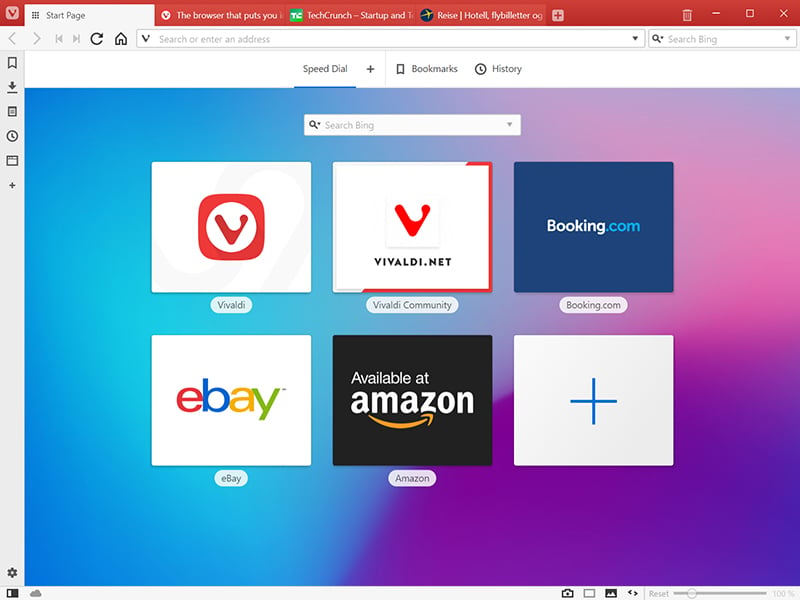
Vivaldi for Windows 64 5.6

Product Page: http://vivaldi.com

win001.jpg

The Vivaldi browser does not track its users and offers more features than any other modern browser. Steered by Jon von Tetzchner (co-founder of Opera browser), Vivaldi is driven by the real needs of users today and ensures that they have the best tool to browse and do the job.

Users can tailor Vivaldi to suit their browsing needs with no limit to customization options. Vivaldi takes browsing to the next level with its numerous features that give users a more dynamic experience of the web. Vivaldi demonstrates that a browser can be the most useful tool to enhance time spent online and not just a means of accessing web pages.

Some of the highlight features that make Vivaldi a personal, do-it-your-way browser include:

Advanced tab management ability to group, tile, move and pin tabs.
Private and Secure Syncing across computers with end to end encrypted Synchronization.
Side Panel with easy access to bookmarks, downloads, tree-style tab manager, notes, browsing history and websites of users choice.
Built-in functionality such as the screenshot Capture tool, Notes and Image Properties.
Powerful History overview that lets users explore their browsing patterns.
Unique and customizable look and feel of the browser interface with custom Themes and more.
Keyboard Shortcuts and Mouse Gestures for quick browser commands.
Built in e-mail client and calendar.
Built in ad-blocker

For more details, visit https://vivaldi.com