ACDSee Photo Studio Ultimate 16.0.3.3188

Product Page: https://www.acdsee.com/en/products/photo-studio-ultimate

screenshot.jpg

The ultimate file manager, RAW photo editor & layered editor.
ACDSee Photo Studio Ultimate 2023 is the all-in-one solution for anyone who takes and edits a lot of photos, and wants to keep them organized.

Easily Retouch Faces
There is no one-size-fits-all when it comes to portrait retouching everyone is unique. That is why Ultimates new Artificial Intelligence (AI) powered Face Edit analyzes faces and gives you full control over the edits. You can adjust the shape of facial features and much more to enhance your subjects natural beauty. Turn up the drama and push the sliders to the max, or add makeup. Are you retouching the same person on multiple photos? No problem! Save your adjustments as a custom preset and apply it to multiple images at the same time to speed up your workflow.


Simplified Photo Merging
Utilize the Photomerge tools to effortlessly combine multiple images into one. Use the new Panorama Stitching tool to make wide panoramic shots, run High-Dynamic Range (HDR) to produce highly detailed photos, or apply Focus Stack to create an image with unparalleled depth of field.

Select Your Subject, Sky, and More
Photo Studio Ultimate 2023s new AI Actions allow you perform complicated procedures like removing or blurring the background, selecting the subject or the sky, or giving your subject a black and white background with a single click.

Selections, Evolved
With curves like these, what other tool could you need? The Polygon Selection tool has evolved into the Shape Selection tool, giving you more refined selections. Youll be able to perfect curved and cornered selections, making it easier than ever to select and tweak your favorite images.

A Painless Search Pane
Make the challenge of hunting for files a thing of the past with the new Advanced Search feature. Choose from numerous search criteria, including ACDSee Metadata and EXIF & IPTC fields. Built-in logic for AND/OR states let you narrow down results to a microscopic level.

Graphcat<

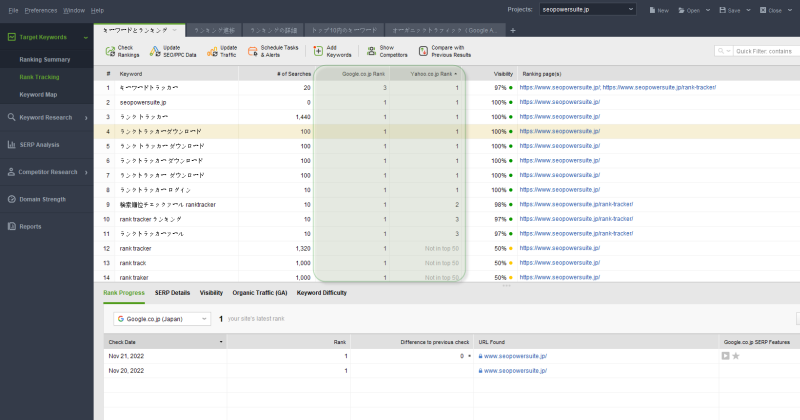
Rank Tracker 8.44.5

Product Page: https://www.seopowersuite.jp/rank-tracker/

rank-tracker-pro.png

Tired of rank trackers that give inaccurate results? Tired of SEO software providers limiting the keywords you can add and the checks you can perform?
Then get yourself Rank Tracker by SEO PowerSuite – and get accurate data with no limits!
Rank Tracker is the most robust rank tracking and keyword research solution in the market. That’s because it allows you to:
-Track keyword ranking in 400+ search engines
-Add an unlimited number of keywords to the project
-Create an unlimited number of projects
-Perform an unlimited number of scheduled or real-time checks
-Add competitors and track their rankings along with yours
-Use 20 keyword suggestion and research mechanisms
-Calculate the Keyword Difficulty of each keyword (the SEO difficulty of the top 10 for it)
-See CPC and other PPC-related estimates
-Get traffic and bounce rate statistics from Google Analytics
Besides, Rank Tracker allows you to create SEO reports you can view within the program or print out and bring to a meeting!
So, why wait? Try the Free version of Rank Tracker today – hit the Download button on this page!

C# Excel Worksheet 2022.11.10251

Product Page: https://ironsoftware.com/csharp/excel/examples/copy-an-excel-worksheet

csharp-excel-worksheet-screenshot.png

It can be very frustrating trying to use the same familiar Excel-like features of a spreadsheet when you do not have a reliable system in place. Considering how many businesses rely on spreadsheet management as part of their processes, adding a simple and easy-to-understand integration into your project seems like the perfect solution.

With C# Excel Worksheet you can edit, copy, manipulate, format, create, and read spreadsheet data inside of your C# VB.NET project. There is no need to deal with time-consuming errors in open-sourced solutions that tie up your team’s resources for weeks. You also do not have to pay expensive subscription fees to Microsoft Azure. C# Excel Worksheet is a clean, powerful alternative to Microsoft Excel and Excel Interlop with extensive support documentation available at https://ironsoftware.com/csharp/excel/examples/copy-an-excel-worksheet/.

With this enhancement, your end users will be able to utilize the well-known features of Excel, including cell formatting, numbers, dates, currencies, formulas, colors, patterns, and more, without having to jump between your product and another application. This adds exceptional value to your project because it cures two of the main problems consumers face – time efficiency and easy-to-use solutions.

C# Excel Worksheet is based on spreadsheets as System.Data.DataSet and System.Data.DataTable objects. This makes it easy to export or import data based on common formats like XLS, XLSX, JSON, CSV, TSV, and more. This solution fully supports .NET 5, Core, Standard, Framework, and Azure and is available for download at https://ironsoftware.com/csharp/excel/.

Best of all, you do not need to make any payments while you are in development mode. IronSoftware made sure to make C# Excel Worksheet free to use until you are ready for deployment. This gives your team more room to create a fantastic end product your target market will enjoy. Pick up C# Excel Worksheet today and get started!