Sheet Lightning Pro 6.21.0.5

Product Page: http://www.revcad.com/index.html

SLPro6ScreenShot.gif

Sheet Lightning is a specialised engineering 2D/3D CAD System for creating and unfolding sheet metal designs for fabrication or manufacture. It handles everything from simple cylinders, cones, rectangular ducts and ovals, to adapters, adapting any of these section types, interections between any of these types and multi-intersections of any of these types. This enables it to handle breeches, lobster-back or segmented bend and very unusual or complex one-off designs. All pieces can have centre line offset and oblique or skewed sections. Simple designs are handled with ease through a second ‘parametric’ environment that requires only the typing of key dimension values to modify the design. A library of standard designs is included. Futhermore all designs created using the full 3D system can be automatically analysed and converted to a parameteric form, then saved as extensions to the existing library. The software integrates to general CAD systems via seamless DXF transfer, exporting both 2D patterns and 3D models. The product has been provensince the earlienst version in the worldwide market place since 1990, offering truly unique design capability.


Graphcat<

PST Viewer

Product Page: http://www.mailconvertertools.com/pst-viewer/

mail-converter-tool-1.png

Free Outlook Data Reviewer is profound enough to open the PST file without the Outlook application. An individual can easily read all the relevant descriptions of the PST file, like Journals, Tasks, Contacts, and Emails, along with their Attachment Files. The utility lets you view the meta properties of the corrupt .pst file. It validates an option to scan the PST files using three modes of scanning according to the level of corruption i.e., Standard, Advanced, and Deep. The standard model can be used for minimal corruption, the Advanced mode can be used for moderate corruption, and the Deep mode can be used for severe corruption. Outlook PST File Reader has a migrating feature that allows exporting all the PST file-related items like Emails, Contacts, Calendars, Task, etc., into a new HTML file format. The resultant HTML file can then be saved into the user-defined location. Moreover, Outlook Data File Reviewer is widely compatible with all MS Outlook renditions. The tool also works smoothly on all major renditions of Windows OS. It not only reads and views the delicate PST files but also allows an individual to open, read, and view the corrupt PSTs. To do so, one must install the PST File Reader, which can open the corrupt PST File without hassle. If the Outlook data file is restored from the corrupt media, it is normal to have misalignment issues. One can utilize this PST viewer, maintains the data misalignment issues, and repair them while scanning the file. The data of the chosen Outlook PST file will affirmatively erupt before accessing any other mailbox items. It mainly comprises information relevant to the Outlook data file, whether Unicode or ANSI.

PDF Extra 7.50

Product Page: https://www.pdfextra.com/

1.png

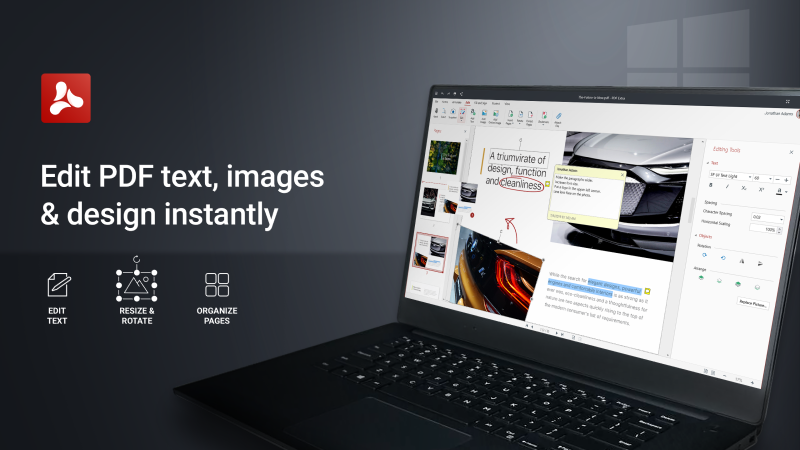
PDF Extra is the all-in-one PDF tool read, edit, create, annotate, fill, sign, convert share PDFs.
With familiar user interface and all PDF features that you need for everyday PDF handling PDF Extra is an easy choice for Adobe Acrobat Pro replacement.
PDF Extra focuses on user experience and simplicity of use.

START WORKING RIGHT AWAY WITH THESE PDF EXTRA FEATURES:
Read and Comment
Enjoy advanced reading and choose between different layouts with PDF viewer and reader
Make comments on PDFs using sticky notes and drawing tools
Highlight and markup text with classical annotation tools


Edit PDF files
Edit PDFs with advanced editing tools modify text and images
Feel free to insert, remove or modify any document aspect you want pages, signatures, comments, drawings, certificates and more

Convert PDFs
Convert PDFs to Word, Excel, PowerPoint or ePub while keeping the original layout and formatting
Convert PDFs to/ from images
Save Word, Excel and PPT files as PDFs and share them with ease

Combine PDFs
Make your life easier by merging multiple PDFs into one
Rearrange the images of the new PDF to your needs
Combine images and PDFs into one

Create PDFs
Use multiple options to create PDFs from scratch
Easily scan and digitize your paper documents into editable PDF files
Create blank PDFs
Convert from Office 365 formats
Convert from image

Fill and Sign
Fill out and share forms on the go
Sign documents by directly drawing your signature on the document
Advanced support for fillable PDF forms allows you to make all the changes you need

Protect PDFs
Protect your sensitive documents with passwords to lock, encrypt and restrict access to them
Work with advanced PDF digital signatures to validate their authenticity
Use time stamps

Organize pages in PDFs
Take full control of your PDFs structure with the advanced Pages tool
Rearrange, insert, delete and rotate pages to create perfectly organized PDF documents