Vidmore Screen Recorder

Product Page: https://www.vidmore.com/screen-recorder/

screenshot.jpg

Do you have trouble in saving some video or audio files? With Vidmore Screen Recorder, you are able to record the video and audio files played on your computer. And you could select the area you want to record according to your need.

Key functions:


1. Record video and audio files
Vidmore Screen Recorder is good at recording any video and audio files. With this powerful recording software, you could save any precious video or audio files as you like. In addition, the audio recorder function also allows you to record the system and microphone sound.

2. Game recorder, record webcam, record your phone
If you are a game lover, you should not miss Vidmore Screen Recorder, its game recorder function lets you record 2D/3D games, flash games and online games on your computer easily. In addition, it could also record your webcam with high output quality. Moreover, you are able to mirror your Android phone or iPhone to computer, then capture the content on your phone.

3. Trim recordings and task schedule
If you want to cut the recorded part after you finish the recording, the trim function could help you solve this problem. You could choose the start and end time of your recorded clip rather than recording it again. With the task schedule function, you just need to set the starting time, ending time and the duration, it will record automatically.

4. Editing function
With the powerful editing function, you could add text, arrows and shapes to your recording or screenshot. You can also set video format, video codec and video quality as you like. In addition, adding mouse click and mouse area effects while recording are also possible.

Graphcat<

Apeaksoft Video Converter Ultimate for Mac

Product Page: https://www.apeaksoft.com/video-converter-ultimate/

interface.png

Apeaksoft Video Converter Ultimate for Mac is able to convert media files to other popular formats like MP4, MOV, AVI, MP3, so that you can enjoy your videos on portable devices. Before conversion, you could edit video effects as you like.

Key functions:

1. Convert various media files and home-made DVD movies
Apeaksoft Video Converter Ultimate for Mac could convert all kinds of media files to other formats such as MP4, AVI, MKV, MOV, MXF, AAC, FLAC, M4A, WAV, etc. Moreover, it supports many portable devices, like Samsung, iPhone, etc. In addition, it could convert your home-made DVD disc/folder/ISO files to videos so that you could view them easily.

2. Make MV and Collage
The MV function in Apeaksoft Video Converter Ultimate for Mac enables you to make customized MV with various themes and edit the MV before exporting. The Collage function allows you to create collage with at most 13 videos and images.

3. Edit your videos before conversion
Apeaksoft Video Converter Ultimate for Mac is not only a video converter but also a video editor. With the powerful video editing function, you could rotate/crop/merge/trim your videos, adjust brightness, contrast, saturation and hue, select suitable filter, add watermark, choose audio track, add/edit subtitles, etc.

4. Edit media metadata, compress file, enhance video, make GIFs and 3D files
Apeaksoft Video Converter Ultimate for Mac also provides some useful tools for users. You are able to edit the ID3 tag, compress large files to smaller size, enhance your videos. In addition, you could also make wonderful GIFs and create your own 3D files.

Aiseesoft FoneEraser

Product Page: https://www.aiseesoft.com/iphone-data-eraser/

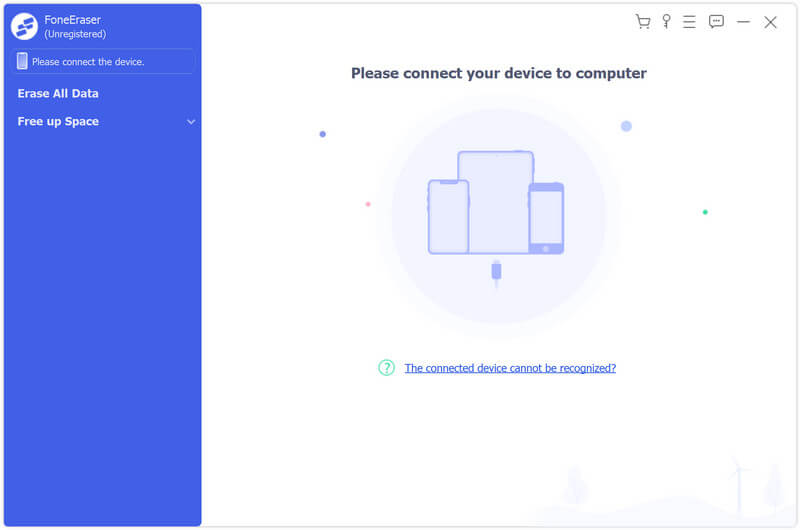
screen.jpg

Aiseesoft FoneEraser enables iOS users to wipe all contents and settings from iOS devices permanently and thoroughly, or clear unwanted files to free up iPhone storage and speed up iDevice. It supports the latest iOS versions and devices.

Key features:

1. Erase all content and settings on iOS devices
Aiseesoft FoneEraser can erase all data and settings on your iOS devices. The contents include Text contents (Contacts, Text Messages/iMessages, Call history, Calendar, Notes, Reminder and Safari bookmark) and Media (Music, Videos, Photos, iBooks, Podcast, iTunes U, TV Shows, Music Videos, Ringtones, Audio Books, Voice Memos), App, documents and settings.

2. Optional erasing level
Three erasing levels can be chosen. They are Low level, Medium level and High level. At the Low level, FoneEraser will overwrite all data once on device. And at the Medium level, the software will overwrite all data twice. The High level will destroy data thoroughly with overwriting data three times. If time allows, it is a smart choice to select the High level.

3. Clean up iPhone storage
We newly added storage cleanup feature in this upgrade. Now Aiseesoft FoneEraser enables users to delete unwanted files and uninstall apps selectively to free up iPhone storage and speed up the device. It also allows users to manage photos with 2 handy features: backup & Compress and Export & Delete. You can choose one at your demand.

4. Multiple iOS devices erasing simultaneously
Aiseesoft FoneEraser is a time-saving and efficient tool, which can erase data on multiple iOS devices simultaneously.