Apeaksoft iPhone Eraser

Product Page: https://www.apeaksoft.com/iphone-eraser/

device-connected-status.jpg

As one of the most professional iOS data erasing tools, Apeaksoft iPhone Eraser could help you get more free space in your iOS devices. With it, you could remove large files, uninstall apps you do not want or wipe all the data in your devices.

Key functions:


1. Erase junk files and large files
Apeaksoft iPhone Eraser allows you to erase junk files like image cache, iTunes cache, invalid files, crash log files, etc. And you could also see which files occupy large space in your devices, then you are able to delete them.

2. Uninstall applications
As it is known to us, installing too many applications will slow down our devices. So if you want to uninstall the applications you no longer use, Apeaksoft iPhone Eraser is your best choice. With it, you could see all the application you have installed and choose which one you want to uninstall.

3. Clean up photos
The photos clean-up function enables you to manage all the photos in your devices simply. You could back up and compress these photos to your computer. Or you could choose to export these photos to your computer then delete them from your iOS devices.

4. Wipe all the data in your devices safely
If you want to wipe all the data in your iOS devices completely and permanently, you should choose Apeaksoft iPhone Eraser. You could erase all the data in your iOS devices permanently just in one click. And it provides three security levels, users could choose the one according to their need. And it has fast erasing speed, so you do not need to wait long for the erasing process.

Graphcat<

Check Printer Basic 2.01

Product Page: https://checkwriter-printer.com/indexioscp.html

check800x600.png

This app prints business size checks in the middle of the page. It is is possible within the app more features.

Print checks directly from your iOS device with this easy to use check printing application : enter the order (payee), the Dollar amount, and voila ! Check Printer Basic will automatically generate the word amount so you do not have to worry about spelling it out. You can also print blank checks to take with you.

Keep track of all your expenses and deposits with the built-in electronic record book (Register). Balance is calculated automatically. Reconcile with your bank statement just as easily as you would with a paper record book. Save, load data and settings to use different accounts. Set different fonts to print your name on checks.

Check Printer Basic, will sign your checks automatically with your own picture.

You can add your logo next to your name and address.

All elements of the check can be moved to perfectly fit your needs, and you can decide which elements will be printed (convenient for pre-printed paper).

Print as many blank checks as you want to use them like regular checkbooks.

Extremely accurate MICR E13B technology is used to print special characters at the bottom of checks so they are recognized by bank processing. This font is used daily by regional and nationals banks.

The Register can be printed in spreadsheet format. Search easily throughout the register content: date, number, memo, amount.

Print immediately on the middle of the page. Checks can be printed on regular letter-size paper, plain white or color, as well as on professional looking check refill paper available from fine office supply stores. Also, Versacheck #1000, #1001, #1002, #3000, and Personal # 3001.

QuickBooks or Quicken paper stock can be used as well. Likewise, using the Blank Checks feature without lines, you can print check paper for QuickBooks and Quicken

The height of checks can be set in Preferences, for non standard paper.

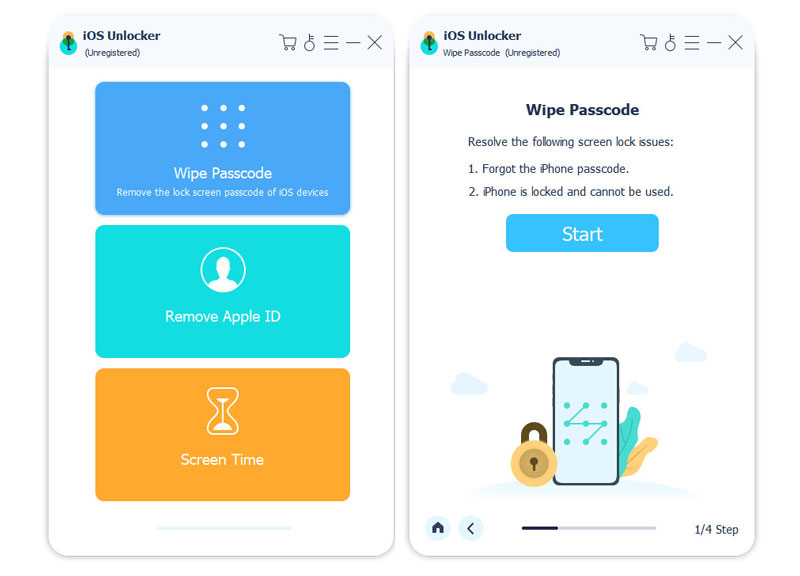
Apeaksoft iOS Unlocker

Product Page: https://www.apeaksoft.com/ios-unlocker/

screen-800.jpg

Do you have trouble in unlocking your iOS device when you forget the lock-screen passcode? Do you want to remove your Apple ID? Do you want to remove the restrictions in Screen Time? Apeaksoft iOS Unlocker could do you a favor.

Key functions:

1. Wipe iOS devices passcode easily
Apeaksoft iOS Unlocker could help you unlock your iOS devices if you forgot your iOS devices’ lock-screen passcode or your devices are disabled due to many times of incorrect passcode attempts, etc. It could remove various kinds of lock-screen passcode like 4-digit, 6-digit, Touch ID and Face ID and unlock your device easily.

2. Remove Apple ID in seconds
As it is known to us, if you forget your Apple ID, you will lose access to many Apple services. So it is important for us to remove the Apple ID when you forget your Apple ID passcode. If you are facing this trouble now, Apeaksoft iOS Unlocker could help you remove the Apple ID in seconds and let you access Apple service again.

3. Recover and remove Screen Time passcode quickly
Do you want to recover or remove your Screen Time passcode if you forgot it? If your answer is yes, Apeaksoft iOS Unlocker could be your top choice. It could recover your Screen Time passcode without losing any data. And it could also remove your Screen Time passcode just in few steps.