ACDSee Gemstone Photo Editor 12.1

Product Page: https://www.acdsee.com/en/products/gemstone-photo-editor/
screenshot.png

A new photo editor is on the prowl
The powerful image creator you’ve been waiting for is finally here. ACDSee Gemstone Photo Editor 12 has all the artistry and layered prowess you need to satisfy your photo editing desires, no matter how complex the composition. For maximum productivity, the MDI (Multi-Document Interface) layered editor allows you to carve your images into full spectrum splendor. Let sultry tone curves and spinning color wheels feed your imagination as you whip through Gemstones non-destructive RAW image processor, ACDSee RAW, and layered graphic editor. With an intuitive design, and presets for everything from creating files to fine-tuning colors, the Gemstone Photo Editor will polish your design workflow.

Limitless layered editing
Build the magical image compositions you’ve been dreaming of using Gemstones GPU-accelerated layered editor.


Graphic Design Tools
Layer Effects, Masks, Adjustment Layers, Text Tools, Lasso & Shape Tools, Liquify, Frequency Separation, Pixel Targeting, Distortion & Perspective Correction, Layer Blend Modes & Opacity

Color Tools
Color Wheel, Tone Wheels, Color EQ, White Balance, Color LUTs

Efficiency Tools
Edit History, Snapshots, Navigator, Histogram

Photography Tools
High-Dynamic Range (HDR), Focus Stacking, AI Background & Subject Selection, Advanced Lighting Correction, Watermarks

Repair & Restoration Tools
Smart Erase, Skin Tune, Blended Clone, Heal, Dehaze, Noise Reduction, Sharpen

Artificial intelligence meets artistry
Let Gemstones AI-powered selection tools do the heavy lifting so you can focus on the delicate details.

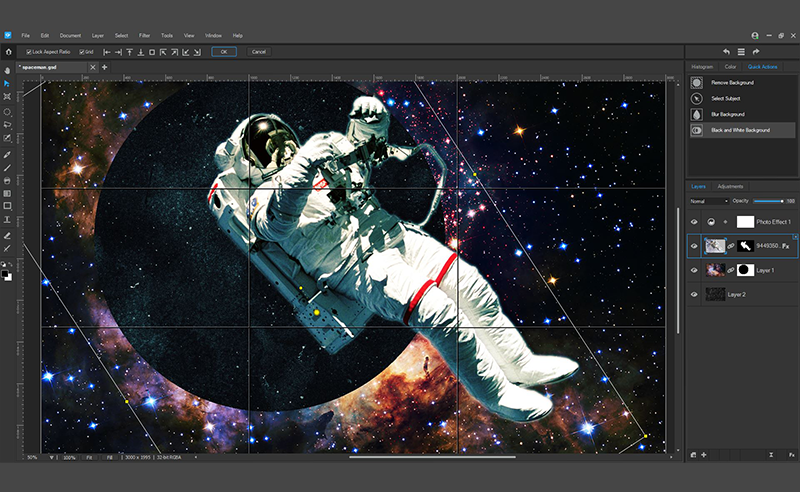
Select your subjects with a click
Quickly remove unwanted backgrounds in photos
Blur image backgrounds with ease
Instantly turn the background of your photo Black and White

Pixel perfect ACDSee RAW power
Flex your editing muscle using ACDSee RAW; a non-destructive RAW photo editor built right into Gemstone.

Graphcat<

ASP.NET Maker 2022.5.0

Product Page: https://aspnetmaker.dev

screenshot.png

ASP.NET Maker is a powerful automation tool that can quickly generate an ASP.NET Core 5 MVC web application in C# from a Microsoft SQL Server, MySQL, PostgreSQL, Oracle, SQLite or Microsoft Access database. ASP.NET Maker can also create summary reports, crosstab reports and dashboards with JavaScript (HTML5) charts (column, bar, line, pie, area, doughnut, multi-series and stacked chart) to summarize and visualize your data. Using ASP.NET Maker, you can instantly create websites that allow users to view, edit, search, add and delete records. ASP.NET Maker is designed for high flexibility, numerous options enable you to generate web applications that best suits your needs. The generated codes are clean, straightforward and easy-to-customize. ASP.NET Maker can save you tons of time and is suitable for both beginners and experienced developers alike.

LoMag Inventory Management 7.1.9

Product Page: https://www.LoMag.eu

LoMagScreenshot.jpg

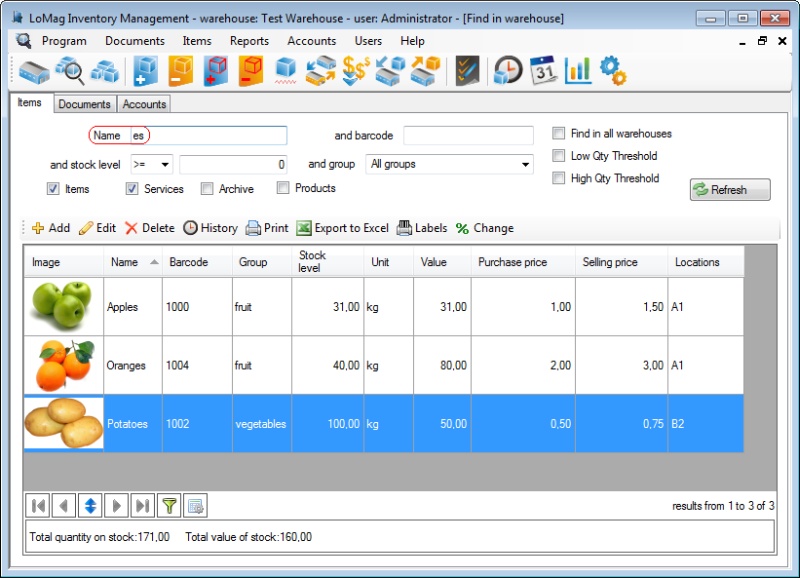
LoMag Warehouse Management is a simple intuitive tool, prefect for the management of a small or medium-sized enterprise. It allows you to manage any number of warehouses, makes creating warehouse documents easy and offers you the option of working on several computers at the same time. Working with LoMag is fast and safe.
Simple, intuitive user’s interface:
The program puts great emphasis on user-friendliness. It employs the standard Windows components: menus, tool bars and other typical controls. Thanks to this approach, you can start working very fast without any training.
Adjusting the configuration to your needs:
In LoMag the support of prices and accounts is optional. If you don’t need to manage accounts, you can mark this option and the windows in the program will not display the accounts or ask you to type them in. You may also adjust the composition and content of all tables in the program, e.g. hide the unneeded columns in the report or add your own. If you need to describe a given item, you may add your own description fields or columns, e.g. weight, length.
Designing your own document templates and labels:
We also offer you a visual designer of documents, in which you may create your own printouts, e.g. with your own logo. The editor allows you to use barcodes for any of the program fields, e.g. you can add a barcode to any given field in a table with a list of issued items, so that you do not have to enter any values manually. You may also add photos of the items to the printouts. The advanced label designer even allows you to create complex labels of various sizes. You can also print out many small labels on one page, e.g. 10 labels on one A4 sheet (5 rows, 2 labels each).
Support of barcode readers and label printers:
The advanced label designer supports almost all label printers and label sizes. The program supports both stationary barcode readers, as well as wireless data collectors.