
Outlook4Gmail 5.4.0.1

Product Page: https://outlook4gmail.scand.com/
screen2.png

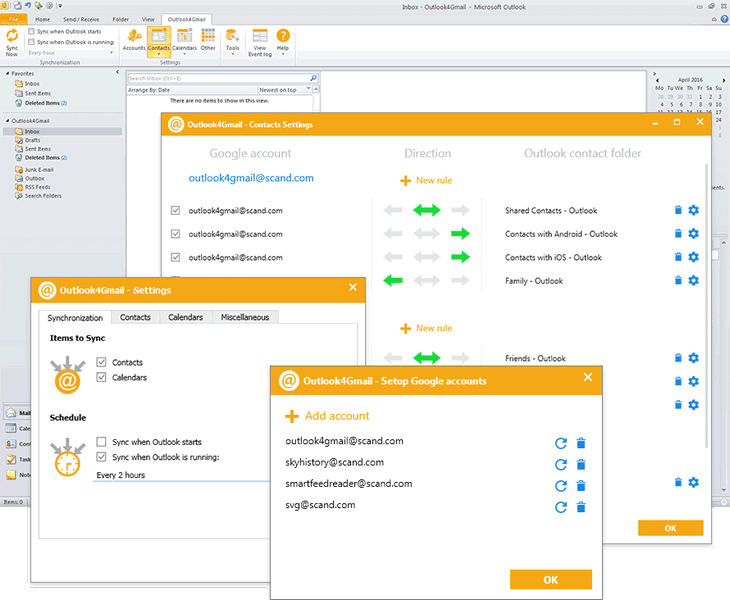
Outlook4Gmail is an Outlook add-in that helps you to perform Google calendars sync with Outlook as well as the contacts and tasks sync. It is a perfect syncing tool for Outlook users who have one or multiple Google accounts.

This plug-in supports synchronizing of Outlook and Google contacts with maximum details: Name, Company, Phones, Emails, Addresses, Dates, Persons, Notes, Contact Picture, Categories and Google Groups, etc.


Outlook4Gmail provides various ways of syncing Calendars: Import a calendar from Google into Outlook, Export an Outlook calendar to Google, Syncing existing calendars, Creating new calendars, etc.

In addition to contacts and calendars syncing, Outlook4Gmail also provides the synchronization of Google tasks with Outlook tasks folders. You could sync multiple Outlook tasks folders and subfolders with Google task lists. Synchronization of Outlook recurrent tasks is also supported.

Outlook4Gmail allows to automate synchronization with help of automatic check-up for contacts updates by time interval (every 30 minutes, every hour or every 2, 4, 8, 12, 24 hours). All you need is to configure the settings just once and that would be enough for the add-in to update your contacts information automatically without any efforts from user.

What’s more, Outlook4Gmail supports synchronizing of multiple Google accounts. Apart from synchronization of Google contacts and calendars, the add-in synchronizes Outlook contacts and appointments to Google as well. When you select two-way synchronization, the data will be read in two iterations and contacts will be synchronized both for Outlook and Google accounts.

If you use Outlook for more than one work and personal stations you can easily synchronize all clients by completing of two-way synchronization of Outlook clients with the required number of Google accounts.

Graphcat<

AVAide MKV Converter for Mac

Product Page: https://www.avaide.com/mkv-video-convert.html

screenshot.jpg

Do you want to convert MKV files to other formats? Do you want to edit your videos? Do you want to make GIFs and 3D files? AVAide MKV Converter for Mac can help you complete all of these. It is not only a video converter but also a video editor.

Key functions:

1. Convert various video files
AVAide MKV Converter for Mac provides a fast way for you to convert video files with high output quality. It can convert MKV files to any other popular formats or convert other formats to MKV. It supports iPhone, iPad, Android phone, Apple TV, Xbox, PS4, etc. and all kinds of input/output formats.

2. Extract audio track from video file
With a few clicks, you can extract the audio track from a video file and save in MP3, AAC, AC3, OGG, WMA, or other popular audio formats. It lets you change bit rate, codec and channel of the output audio file.

3. Edit videos
AVAide MKV Converter for Mac allows you to edit videos as you like, such as trimming/cropping/merging/rotating videos, editing subtitles, removing watermark from videos or adding watermark to videos. It also allows you to change encoder, resolution, frame rate, bit rate, etc.

4. Compress videos, make GIFs and 3D files
With AVAide MKV Converter for Mac, you can compress large video files to smaller size. You can also make GIFs and 3D files, enhance video quality, speed up or slow down your files or adjust and sync the audio with the video.

QuickMove 3.5.0

Product Page: https://www.thecodeline.com/products/quickmove/

QuickMove_Homepage800x600.png

Move Files with a Simple Right-Click of your Mouse!
Always cutting and pasting the same types of files to the same folders?
Always navigating deep folder structures to archive the same types of files?
Wish you could just be prompted for a list of your favourite target folders?
Wish that you could just ‘right-click’ on a file and see it automatically moved based on rules learnt?
QuickMove has the solution!
Now with an Automation Plugin that moves new files from watched folders automatically.
Pro users of the ShareWatcher product can also pair with QuickMove to watch for new files and run a QuickMove rule-based action.