SAM Broadcaster PRO 2022.4

Product Page: https://spacial.com/sam-broadcaster-pro/

sam-broadcaster-screen.gif

Start your Internet radio station with SAM Broadcaster, the number one Internet Broadcasting Solution since 2003

Sound Professional: Advanced audio features like cross-fade detection, gap killer, volume normalization and 5-band compressor and limiter.


Stream in multiple formats: Formats include AAC, aacPlus, AAC-HE, MP3, mp3PRO, Ogg and Windows Media. Servers include SAM Broadcaster Cloud, CheapestStream.com, SpacialNet.com, Shoutcast v1, Shoutcast v2, Icecast and Windows Media.

Web Integration: Give your station website a pro look with our easy to integrate web widgets. Keep your listeners engaged, show them now playing info, let them browse your media library and even request their favorite song!

Listener Statistics and reporting: See in real-time how your audience is growing. Access data logs for performance reporting and other useful reports on your station playback history.

Media Library: Organize large music libraries quickly into multiple categories, import information from tags and automatically look up track information via Amazon.com.

Dual deck players: Dual Deck players allow you to queue and position the next song while another song is playing – or let Auto DJ take care of it for you. Also allows for professional sounding cross-fading between tracks. The cue channel allows you to preview the songs over headphones before you play it live to the audience.

Crossfader and gap killer

Our smart crossfader will automatically detect the very best point to start fading tracks, or you can manually specify the best point. The Gap killer will make sure there is no silence between tracks – providing uninterrupted music all the time.

– Multi DJ management
– Integration with SAM Cloud solution
– Automatic failback to SAM Broadcaster Cloud
-Includes, SAM Cloud integration, upgrades and support for 12 months

Try Out Our 14 Day Trial

Graphcat<

XLRISK 6.1.3.2

Product Page: https://www.xlstat.com/en/solutions/xlrisk

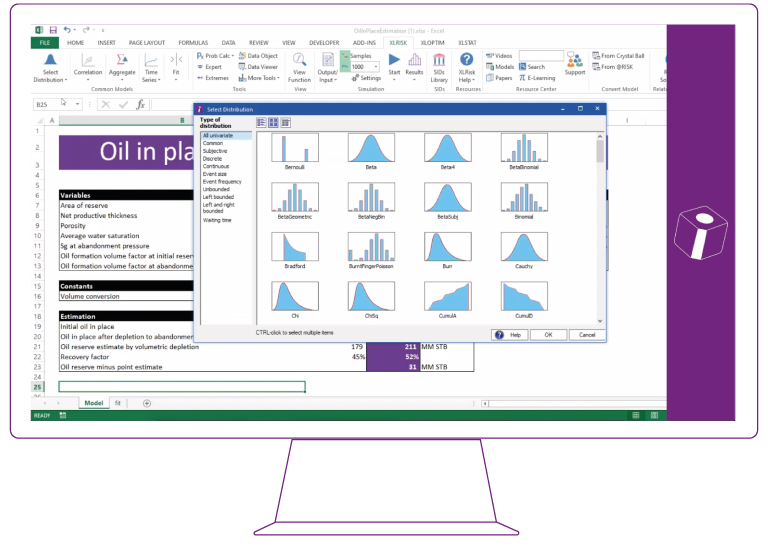
7b43f3d6241b2307b7d3543f86eb7b80ea5bdeed.png

XLRISK, a powerful Monte Carlo simulation Excel add-in.
XLRISK, developed by Vose Software, introduces many technical Monte Carlo method features that make risk models easier to build, easier to audit and test, and more precisely match the problems you face.

An XLRISK user replaces uncertain values within their Excel model with special XLRISK quantitative probability distribution functions that describe the uncertainty about those values. XLRISK then uses Monte Carlo simulation to automatically generate thousands of possible scenarios.
At the end of the Monte Carlo simulation run, which typically takes a few seconds, the results are displayed in a variety of graphical and statistical formats that will tell you things like:

– What is the probability we will come under budget?
– Which investment gives me the greatest return for a given level of risk?
– How much capital do we need to be 95% sure of having enough for the project?
– Which component configuration gives me the greatest chance of achieving a certain operation time before a failure occurs?

Features Overview
– Simulation: Monte Carlo simulation, Multiple simulation runs for scenarios, Unrestricted speed, and more.
– Reporting: View simulation results statistics in spreadsheet, Export results to PowerPoint, Word, PDF or Excel, Sensitivity and scenario analysis, and more.
– Features by number: 136 distributions, 14 correlation models, 34 time series functions.
– Fitting: Fitting distributions to data (95), fitting correlations structures to data (11), fitting time series to data, and more.
– Ease-of-use features: One-click function view, @RISK and Crystal Ball converters, full help file and example models, functions descriptions in spreadsheet.
– Technical tools: Data Viewer, assumption and result sharing between models, extreme value tools, probability calculations, Markov chain tools, and more.
– Industry tools: Financial tools, insurance tools, PK/PD pharma tools.

CADopia 22 Professional 21.2.1.124426

Product Page: http://www.cadopia.com/

render.jpg

CADopia 22 Professional (Perpetual license) is a full-featured CAD solution. The advanced features in this edition include ACIS 3D solid modeling, customization tools, PDF to DWG conversion, voice notes, and support for DGN files as underlays in addition to all standard drawing and drafting functions. Available in 12 languages. Visit www.cadopia.com for details.

The following new features and refinements are included in CADopia 22 in addition to the complete set of standard drafting features of previous releases of CADopia.

Drawing Comparision
Stereolithography support
Data Extraction Wizard
Improved batch printing
Layer support in PDF import

The major features supported in CADopia Professional are:

Powerful CAD functionality:
AutoCAD 2.5-2018 DWG Support
Microstation DGN file Underlays
A comprehensive suite of drafting, design, and detailing tools
Supports standard CAD commands
Supports standard menu (.MNU) files
Optional Dark User Interface
Support for Digital Signature
New Layer Manager and Palette
3D solid modeling
Push & Pull for editing solid models
Filleting & Chamfering solid models
2D Spiral and 3D Helix
Redefine base point of a block
Edit block attribute properties
Dynamic custom coordinate system
Formulas in tables and export to Excel
Multileaders
Export Adobe Acrobat (PDF) files from your drawings
Import PDF files and save as DWG file
Import/export DWF files for viewing drawings on the Internet
Raster Image insertion and editing
Clipping support for references, images, and viewports
Quick input
Annotation scaling
Pattern hatch
Curved text
Drawing tab
Heads-up display toolbar
Layer state manager
Polar tracking
Ribbon interface
Design Resources
Quick grouping and ungrouping
Drawing standards verification and support for DWS files
Complex Linetype
Boundary hatching
Dimensioning and annotations
Smart Dimensions
Dimensions on Sheets to Model Geometry
Template files
Optional Network License & more.