Free NetCrunch Tools 2.0.0.63.0.4

Product Page: https://www.adremsoft.com/netcrunch.tools/

netcrunch-tools.jpg

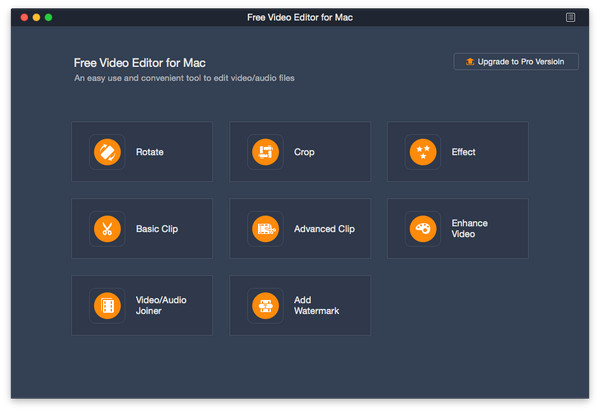
NetCrunch Tools is a completely free toolkit for network professionals, featuring Ping, Traceroute, Wake OnLAN, DNS Info, Who Is, Ping Scanner, Service Scanner, Open TCP Port Scanner, SNMP Scanner, DNS Audit and Mac Resolver in one.

It can work standalone, or in conjunction with the NetCrunch network monitoring system, an all-in-one, agentless network monitoring and management suite.


It is completely free to use, with no usage limitations of any kind. Future updates can be installed from the NetCrunch Tools homepage, or through the software itself.

Graphcat<

mysys 4.9.0.1

Product Page: https://www.integritech.ca/index.php/products/mysys

screenshot8.png

A Window into your System!

Do you have alot of files?
Do you spend too much time navigating hundreds of folders?
Do you sometimes forget where a file is?

mysys will be your new home away from all the pesky folders!

News Flash: Version 2 now reads the file tables directly dramatically improving DB creation speed!

If you have mapped network or encrypted drives a popup will ask which ones to include in the
database. Those drives will take longer to index depending on the network connection speed.

CD/DVD/Flash drives will not be indexed, only Fixed drives and optionally Network/encrypted drives.

Use the Schedule button to create a Windows Task Schedule so the indexing happens at
a time which is most convenient. To delete the task just click Cancel.

Once the database is created you are ready to find files, fast!

In the top left text box, type any filename and hit enter or click Search.

Wild cards are supported such as read*.txt.

You can use AND/OR/- like: this OR that
the – is to exclude like: this -notthat

Use double quotes to find whole phrases.

Use brackets like: (afoldername or anotherfolder) and (*.c or *.rc or *.h)
For that example you would check on the ‘Include folder names’ option and probably the ‘Exact match’ option also otherwise will find *.cs, *.css, *.hpp, etc…

You can use the Containing text box to search within the files found. Contents are never
indexed but uses a fast highly multi-threaded algorithm.

File sizes, Dates and Attributes are all read live off the disk, these are not stored in the database.

Aiseesoft Free Video Editor for Mac

Product Page: https://www.aiseesoft.com/video-editor/

free-video-editor-interface.jpg

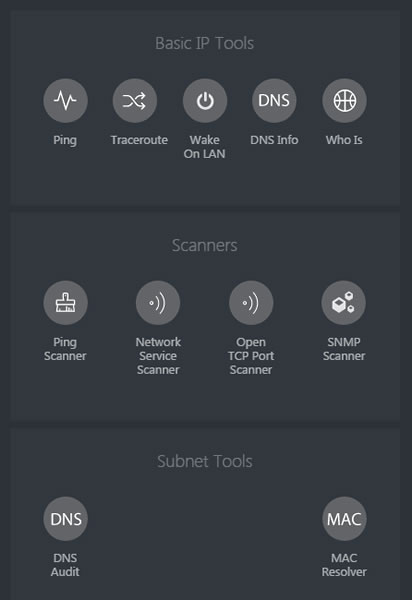
Want to remove black bars around your videos? Want to clip your videos? Want to rotate your videos? Aiseesoft Free Video Editor for Mac could help you.

Key functions:

1. Rotate and flip videos
With Aiseesoft Free Video Editor for Mac, you could rotate the video 90 clockwise or 90 counterclockwise. In addition, you could also flip video vertically or horizontally according to your need.

2. Crop, clip/join videos
Aiseesoft Free Video Editor for Mac can remove the unnecessary black bars around your videos with its crop function. It provides four modes: Pan & Scan, Letterbox, Medium and Full for users, so you could choose the one as you like. If you want to cut off the unwanted part of your media files, you could use the clip function of Aiseesoft Free Video Editor for Mac to remove the part you do not want. Moreover, you can use the video/audio joiner feature to fulfill your goals.

3. Convert video/audio files
Aiseesoft Free Video Editor for Mac could also be a free video converter, it could convert various media files to other formats like MP4, M4V, AVI, FLV, MP3, FLAC, AIFF, OGG, and more.

4. Edit video effects
Aiseesoft Free Video Editor for Mac also provides video editing feature for you to adjust the brightness, contrast, saturation, hue, and audio volume of your video files. Adding watermark to your videos is also possible.