Antamedia HotSpot Software 7.5.5.0

Product Page: http://www.antamedia.com/hotspot/

hotspotsoftware.png

Hotspot software by Antamedia is the Industry leading software to manage and sell Guest WiFi Hotspot access and Hotel WiFi Internet. It helps you control and bill Internet usage by redirecting customers to login with username and password, social account, email or watch ads. It is suitable for Hotel WiFi, Social marketing, ISPs, Hotspots, Airports, Hotels, and for all purposes where customers should be redirected to the login page to sign in or pay for the Internet access. Upon the successful login, customer will see remaining time and bandwidth, browse the Internet until account expires, and refill the account when needed.

Our HotSpot solution works with any active and passive network hardware. You are not required to buy specific access point models and in many cases not even required to reconfigure your network. HotSpot software acts as a gateway – it will accept traffic to one network card, analyze it, and if customer is allowed to browse, it will pass traffic to second network card connected to Internet using preferred line (ADSL, Cable, WiFi…). It is suitable for ISPs, Hotspots, Airports, Hotels, Internet and Cyber cafes. Automate your hotspot by accepting credit card payments with PayPal or one of the 70 supported payment gateways.


Graphcat<

QnE Companion 1.11

Product Page: https://www.terabyteunlimited.com/qnecompanion/

ss_qne_large_a-min.png

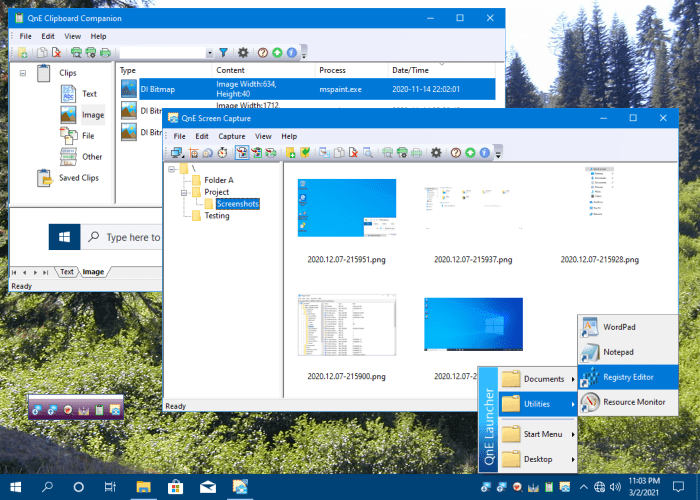
QnE Companion, by TeraByte, Inc., is a set of quick and easy to use utilities for your PC. Boost your productivity with a clipboard manager, screen capture utility, launcher, and desktop icon utility. These utilities can be conveniently and quickly accessed from the Windows taskbar, a small floating window or through traditional shortcuts.

The QnE Clipboard Companion gives you easy access to all your clips and makes the standard Windows clipboard much more powerful. You can search your clips, sort them, and even save them for repeated use.

The QnE Screen Capture utility makes it easy for you to capture a picture of your screen. Capture the entire screen or just a specific area with ease. Multiple monitor support is included.

The QnE Launcher provides a handy popup menu that you can populate with the programs, folders, and documents that you use the most. You can organize the menu with cascading submenus and get quick access to the things you use the most.

The QnE Desktop Companion is available as both a floating window and a taskbar toolbar. Whichever form you use it, it provides access to the QnE Icon Companion and a single location to quickly launch the other utilities included in the package.

The QnE Icon Companion, which is accessed through the QnE Desktop Companion, provides you with all the functionality you need to work with the location of icons on your desktop. Save and restore locations easily, search on a wide range of criteria, and more.

QnE Companion is an excellent package that you owe it to yourself to try.

Apeaksoft iPhone Data Recovery for Mac

Product Page: https://www.apeaksoft.com/iphone-data-recovery/

interface.jpg

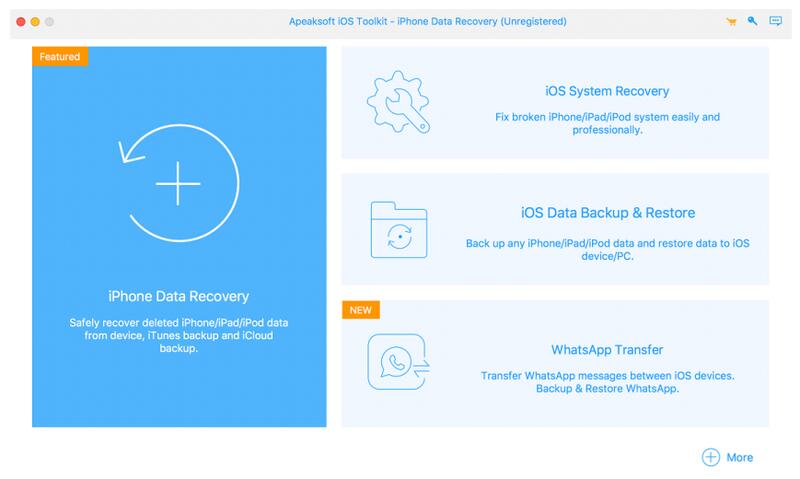
Apeaksoft iPhone Data Recovery for Mac can recover lost Messages, Contacts, Call History, Notes, QQ/WeChat data, etc. from iOS devices or from iTunes/iCloud backup files. It supports the latest iOS devices, including iPhone 13.

Key functions:

1. Recover lost data from iOS devices
If you want to recover lost data such as Contacts, Messages, Call history, Notes, Photos, Voice memos, QQ/WeChat data, media content of Line/Kik/Viber, etc. from your iOS devices, Apeaksoft iPhone Data Recovery for Mac could do you a favor.

2. Recover data from iTunes backup files/iCloud
Apeaksoft iPhone Data Recovery for Mac can recover lost data as long as your device has been backed up with iTunes/iCloud. So even you lose your data, with it, you are able to get your lost data back conveniently.

3. Back up iOS data and restore the data
The iOS Data Backup and Restore function can help you back up your iOS data to computer in one click and you could also restore your data to iOS device or computer without any hassle.

4. iOS System Recovery function
iOS System Recovery function can help you fix your iOS system back to normal state in various situations including stuck in recovery/DFU mode, white Apple logo, black screen, looping on start, etc. Moreover, this function also enables you to upgrade or downgrade iOS device system.

5. Transfer WhatsApp data
With the WhatsApp Transfer function, you could transfer your WhatsApp data between two iOS devices. In addition, you are able to back up WhatsApp data to computer and restore the backed up data.