LoMag Inventory Management 7.1.9.100

Product Page: https://www.LoMag.eu
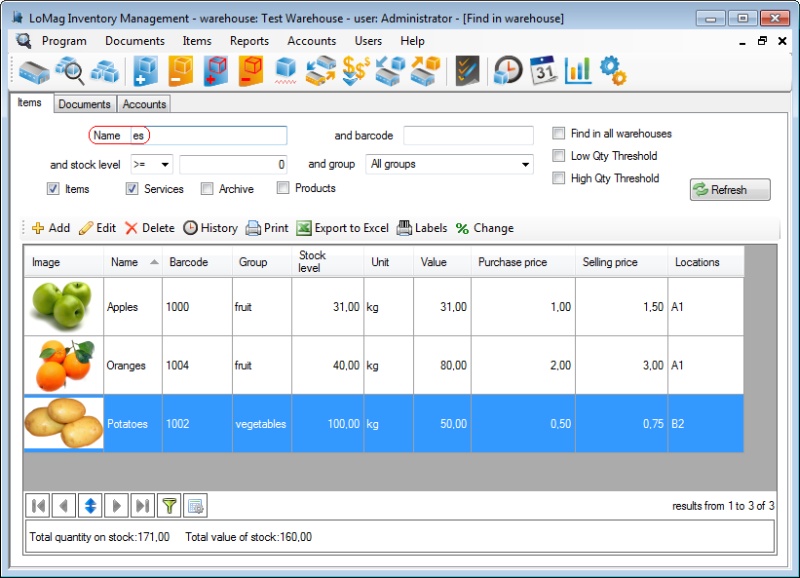
LoMagScreenshot.jpg

LoMag Warehouse Management is a simple intuitive tool, prefect for the management of a small or medium-sized enterprise. It allows you to manage any number of warehouses, makes creating warehouse documents easy and offers you the option of working on several computers at the same time. Working with LoMag is fast and safe.
Simple, intuitive user’s interface:
The program puts great emphasis on user-friendliness. It employs the standard Windows components: menus, tool bars and other typical controls. Thanks to this approach, you can start working very fast without any training.
Adjusting the configuration to your needs:
In LoMag the support of prices and accounts is optional. If you don’t need to manage accounts, you can mark this option and the windows in the program will not display the accounts or ask you to type them in. You may also adjust the composition and content of all tables in the program, e.g. hide the unneeded columns in the report or add your own. If you need to describe a given item, you may add your own description fields or columns, e.g. weight, length.
Designing your own document templates and labels:
We also offer you a visual designer of documents, in which you may create your own printouts, e.g. with your own logo. The editor allows you to use barcodes for any of the program fields, e.g. you can add a barcode to any given field in a table with a list of issued items, so that you do not have to enter any values manually. You may also add photos of the items to the printouts. The advanced label designer even allows you to create complex labels of various sizes. You can also print out many small labels on one page, e.g. 10 labels on one A4 sheet (5 rows, 2 labels each).
Support of barcode readers and label printers:
The advanced label designer supports almost all label printers and label sizes. The program supports both stationary barcode readers, as well as wireless data collectors.


Graphcat<

HEIC Converter Plus 2.0.0.0

Product Page: https://www.abyssmedia.com/heic-converter/

heiconverter.png

High Efficiency Image Formats allows you to create and store photos at a much smaller size without losing image quality. But not all users can open and view HEIC and AVIF images due to compatibility issues. With HEIC Converter Plus you can simply convert HEIF (.heic) and AVIF (.avif) images to JPEG or PNG on Windows without any limitations. After that, your live photos will be viewable anywhere. You can upload all your photos for conversion at one time, which means a decent saving of time if you have a lot of photos. At the same time, you can adjust the image quality according to your needs. Exif data will also be saved during the conversion process.

Tipard DVD Ripper for Mac

Product Page: https://www.tipard.com/dvd-ripper-for-mac.html

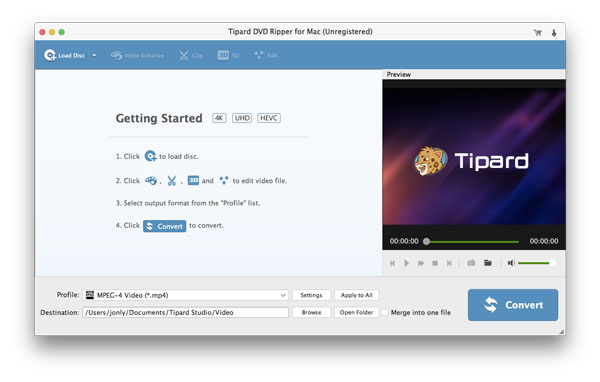
interface-1.jpg

Tipard DVD Ripper for Mac enables you to rip DVD disc/folder/ISO file to 4K/1080p HD video formats like HD H.264, HD AVI, HD TS, HD WMV, HD MPEG 4, HD MOV and more on Mac. Meanwhile, it can also convert DVD movie to common video formats like MP4, AVI, MOV, WMV, MKV, M4V, etc. and audio formats like MP3, FLAC, WAV, WMA, AAC, ALAC, AC3 and so on for Mac. Plus, it is highly compatible with iPhone, iPad, iPod, Apple TV, PSP, Samsung Galaxy, Microsoft Surface and more. Key functions: 1. Rip DVD disc to popular 4K/1080p HD video formats Tipard DVD Ripper for Mac can help you rip DVD disc/folder/ISO file to HD H.264, HD AVI, HD TS, HD WMV, HD MPEG 4, HD MOV and other 4K/1080p HD videos. So you can get excellent video quality. 2. Convert DVD to general video formats Tipard DVD Ripper for Mac can convert your DVD movie to MP4, AVI, MOV, WMV, MKV, M4V, FLV and other general video formats. So you can enjoy your converted video on iPhone, iPad, iPod, Apple TV, PSP, Samsung Galaxy, Microsoft Surface, etc. 3. Extract original audio files from DVD With the assistance of Tipard DVD Ripper for Mac, you can extract audio from DVD and convert the audio to any popular audio formats, including MP3, M4A, WMA, FLAC etc. 4. Edit your video from multiple aspects The Crop function of Tipard DVD Ripper for Mac can help you crop the video frame so that you can remove the unwanted playing areas and the black edges to fit your player’s screen. The Trim function can trim your video length as your needs. The Watermark function allows you to add watermark to your video in the form of a text or image. 5. Preview and snapshot Tipard DVD Ripper for Mac allows you to preview the original video and output video effect. And you are able to capture favorite picture when you preview.