ThumbsPlus 10.SP2.4015.2

Product Page: http://www.thumbsplus.com/

ThumbsPlus800.png

ThumbsPlus is a multi-talented application that will help you organize, view, edit, print, catalog and find all of your graphic files. It supports over a hundred digital camera, raster, vector, font and multimedia file formats. It provides superb thumbnails, a comprehensive graphic database with keywords, user-defined fields, and an easy-to-use and customizable user interface.

It includes features found in no other product, such as sorting by image similarity and location of similar images. Other features include: 48-bit color and 16-bit grayscale support, contact sheets, printed catalogues, a Web Page Wizard, batch image processing, lossless JPEG rotation, watched (‘hot’) folders, automatic renaming, cataloguing of offline volumes, TWAIN support, and image galleries.


The program includes many image editing features, most available in batch as well as interactive mode, including: color adjustment, color depth, color balance, color profile, color replacement, histogram stretching, auto-correction, image stamping (text and images), alpha channel, image combination, image compare, watermarking, built-in and custom image filters, resizing, rotation, turning, mirroring, cropping, and trimming to proportion. Python scripting is also supported.

ThumbsPlus supports viewing and slide shows of raster, vector, multimedia and font files. Plug-ins are available in the Professional and Network versions for raw files from almost all digital cameras, Postscript, PDF, EPS and AI files, and EC Software IPP files.

ThumbsPlus uses a Microsoft Access (JET) database by default and includes SQLite 3 support. The Professional edition can also use the following databases: MS SQL Server 2000 and higher, MySQL, MariaDB, PostgreSQL

ThumbsPlus can share a database between multiple users and multiple computers, from a small workgroup to a large enterprise.

Graphcat<

BW Meter 9.0.3

Product Page: https://www.hexagonwebs.com/bandwidth-monitoring

screenshot.png

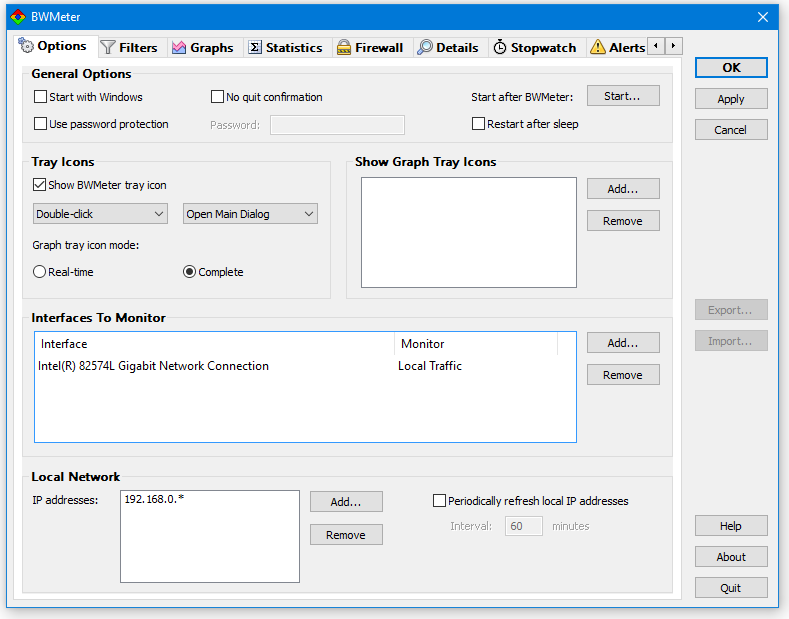
BW Meter is a powerful bandwidth meter, monitor, traffic controller and firewall, which measures, displays and controls all traffic to/from your computer or on your network. Unlike other products, it can analyze the data packets ( where they come from, where they go, which port and protocol they use). BW Meter creates statistics for all computers in your network, measuring and displaying all LAN traffic as well as download and upload from the internet. This makes it possible to distinguish between local and internet traffic for example. BW Meter can also be used for traffic control by setting a speed limit for all kinds of connections or restricting access to certain internet sites. You can even define filters which show your transfer with certain internet addresses ( e.g. to see how much data you download from your favorite news server). BW Meter is ideal for home users to get an overview of how much bandwidth they use, as well as small to large businesses, where on computer can control the traffic and maintain the statistics of downloaded/ uploaded data of all computers in the network. The product is easy to configure and offers a rich set of options and features for beginners as well as experts and network administrators.

Apeaksoft Data Recovery1.2.26

Product Page: https://www.apeaksoft.com/data-recovery/

icon1.png

Apeaksoft Data Recovery is powerful and safe data recovery software. It can help you recover lost files like photos, documents, e-mails, audio, videos and more from computer, hard drive, flash drive, memory card, digital camera, etc.

Key functions:

1. Recover many kinds of data
Apeaksoft Data Recovery is able to recover various lost files, such as images, documents, e-mails, audio, videos from computer, recycle bin, hard drive, flash drive, memory card, digital camera and so on.

2. Recover data from different circumstances
If you delete important data by mistake, your computer crashes, data system is damaged or virus attacks your computer, you can get all lost data back without hassle with Apeaksoft Data Recovery.

3. Save the scan result in SPF files
Apeaksoft Data Recovery provides two modes: quick scan and deep scan for users. In addition, you could save the scan result in SPF files. And you could also send the SPF files to other computers by external drives. Moreover, you could preview the files before recovery.

4. Safe and fast scanning speed
With Apeaksoft Data Recovery, you do not need to worry that your privacy will be let out, it can protect your private information well. And it also provides fast scanning speed for you, so you do not need to wait long for the scanning process.