MyDraw 5.3.0

Product Page: https://www.mydraw.com/downloads-download
MindMapBusinessPlan.png

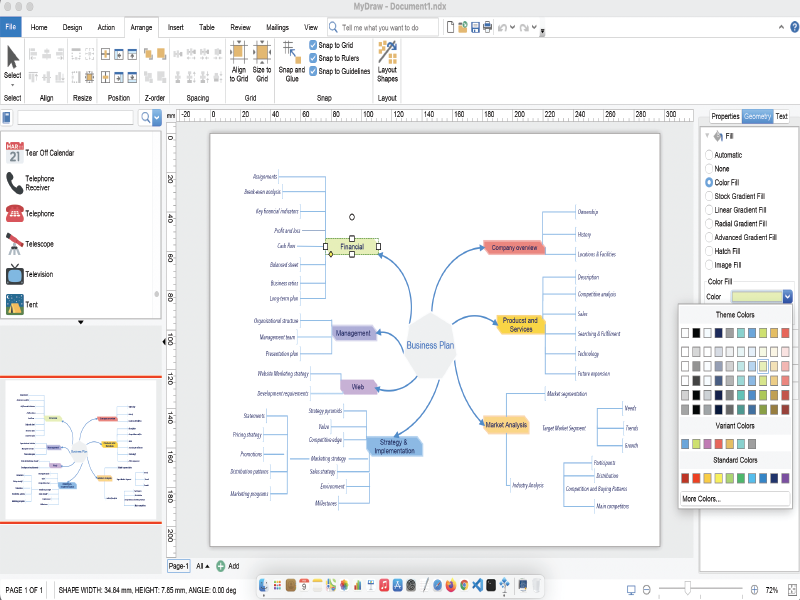
MyDraw for Mac is an advanced diagramming software and vector graphics drawing tool. This diagram software includes powerful features to help you create flowcharts, org charts, mind maps, network diagrams, floor plans, family tree diagrams, general business diagrams, vector drawings, flyers, certificates and others.
Following are the major features of the application:
-100+ Diagram Examples and Templates – includes many ready-to-use templates for flowcharts, organizational charts, flyers, certificates & business cards, family tree diagrams and many other diagram types.
-700+ Diagram Shapes and Symbols – more than 700 predefined shapes organized in 25 shape libraries.
-MS Visio Compatibility – MyDraw is the best Microsoft Visio alternative for macOS (Mac OS X). You can use it to view, edit and save your Visio Drawing (VSDX) and Visio 2003-2010 Drawing (VSD, VDX) files. MyDraw can also be used a Visio viewer. You can also import and export Visio Stencils (VSSX) and Visio 2003-2010 Stencils (VSS, VSX).
-Automatic Diagram Layouts – lots of automatic layouts to help you quickly arrange your diagrams
-Powerful Rich Text Support – powerful support for rich text and text formatting. You have full control over the text font, text styles, paragraph alignment, bullets and numbering, images, etc.
-Advanced Table Support – support for tables with master cells, multi cell selection, text orientation etc.
-Spell Check and Proofing Languages
-Import of map data from ESRI shapefiles.
-Support for creating and inserting in your diagrams more than 30 types of linear and matrix barcodes like EAN-13, UPC, UPC-A, Code-39, Code-128, ISBN, PDF417, Data Matrix, QR Code, etc.
-GEDCOM Format Family Trees – the software supports importing from and exporting to GEDCOM format. This makes it the perfect tool for drawing family tree diagrams.
-Export to PDF, SVG, EMF+, PNG, JPEG and BMP.
-Import from SVG, WMF, EMF, EMF+, PNG, JPEG and BMP.
-Windows and Mac versions.


Graphcat<

FaxTalk Multiline Server 10.0.1638.1

Product Page: https://www.faxtalk.com/faxtalk-multiline-server-network-fax-server-software/

screenshot-faxtalk-multiline-server.gif

Easy to use network fax server software and broadcast fax software. With FaxTalk Multiline Server your network based users can stop waiting in line to use the fax machine and quickly and easily create and send faxes directly from their computer. Provide an affordable, reliable network based client/server faxing solution for your network based users. Avoid the expense and hassle of setting up individual fax software solutions for each user and eliminate the need for dedicated telephone lines to each computer. Users can submit faxes directly from their machine without a phone line or modem connected to their computer.

A computer acting as a “fax server” running the FaxTalk Multiline Server software would transmit the faxes submitted by users on the network. There is no need for a dedicated “server” machine to use FaxTalk Multiline Server as a fax server. Any computer with a standard fax modem connected to a telephone line can operate as the fax server on a network. If your fax volume requires additional lines you can simply add additional standard fax modems or multiport modems to handle a maximum of eight lines. Network users would use the FaxTalk FaxCenter Pro software running on each individual client machine to create and send faxes over the network to the fax server for transmission.


The FaxTalk software includes powerful fax capabilities including broadcast faxing, high-speed Super G3 (V34 Fax) support, 2D, ECM, delayed scheduling, sending faxes over the Internet to an email address, direct access to contacts from Microsoft Outlook, Windows Address Book and Windows Contacts, markup and annotation tools, ability to design custom cover pages, TWAIN scanner support, junk fax blocking, Caller ID, Distinctive Ring, forwarding of faxes to email and much more!

Check PrintR Plus 5.07

Product Page: http://CheckWriter-Printer.com/indexwin.html#CheckPrintR

CheckPrintR_800x600.png

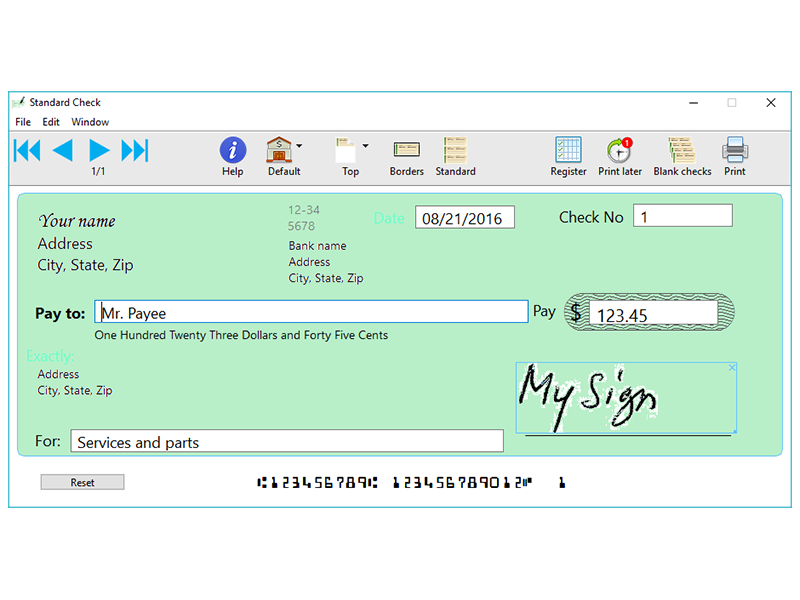
Print checks directly from your PC with this easy to use check printing application : enter the order (payee), the Dollar amount, and voila ! Check Writer III will automatically generate the word amount so you do not have to worry about spelling it out.

Multiple accounts are supported. Print deposit slips.

Drop the picture of your signature on to Check Writer III, and it will sign your checks automatically.

All elements of the check can be moved to perfectly fit your needs, and you can decide which elements will be printed (convenient for pre-printed paper).

Add up to 9 pictures to your checks for elaborate layout. Add your own photos as background.

Print as many blank checks as you want to use them like regular checkbooks.

Keep track of all your expenses and deposits with the built-in electronic record book (Register). Balance is calculated automatically. Reconcile with your bank statement just as easily as you would with a paper record book. Save, load data and settings to use different accounts. Set different fonts to print your name.

Checks can be printed on regular letter-size paper, plain white or color, as well as on professional looking check refill paper available from fine office supply stores.

Extremely accurate MICR E13B technology is used to print special characters at the bottom of checks so they are recognized by bank processing.

MICR Toner (magnetic ink) supported for any serious check printing, to comply with the American Banking Association MICR E13B standard. MICR E13B printing complies with ANSI X9.27-1995, ANSI X9.100-160-1-2009, and Canadian CPA006 standards.

The height of checks can be set in Preferences, to accommodate non standard pre-printed paper.

Printing can be nudged horizontally and vertically very precisely in 1/72th inches.

This app can be used on a windows tablet.