ACDSee Photo Studio Professional 16.0.0.2324

Product Page: https://www.acdsee.com/en/products/photo-studio-professional

screenshot.jpg

Your photos will thank you.
Bring out the best in your photos with ACDSee Photo Studio Professional 2023’s extensive RAW image editing and digital asset management toolset designed to streamline your workflow.

Selections, Evolved
With curves like these, what other tool could you need? The Polygon Selection tool has evolved into the Shape Selection tool, giving you more refined selections. Youll be able to perfect curved and cornered selections, making it easier than ever to select and tweak your favorite images.


Simplified Photo Merging
Utilize the new Photomerge tools to effortlessly combine multiple images into one. Use the Panorama Stitching tool to make wide panoramic shots, run High-Dynamic Range (HDR) to produce highly detailed photos, or apply Focus Stack to create an image with unparalleled depth of field.

A Painless Search Pane
Make the challenge of hunting for files a thing of the past with the new Advanced Search feature. Choose from numerous search criteria, including ACDSee Metadata and EXIF & IPTC fields. Built-in logic for AND/OR states let you narrow down results to a microscopic level.

Find Photos Faster
Quick Searchs all new search types allow you to quickly perform more complex searches. Select from a variety of search types such as Contains All, Contains Any, or Starts with and Ends with. Look back in your Quick Search history to find a list of all your recent searches, and spend less time waiting with its improved speed.

Non-Destructive RAW Photo Editing
With Develop mode, non-destructive editing has never been easier. ACDSees industry-leading Light EQ, Color and Tone Wheels, Noise Reduction, and local adjustments give you an edge over the competition. Create spectacular new looks in a single click with Develop presets.

Enhance Your Vision
Realize your creative edge with Edit modes wide array of adjustments, including enhancements such as Color LUTs, Liquify, and Smart Erase.

Graphcat<

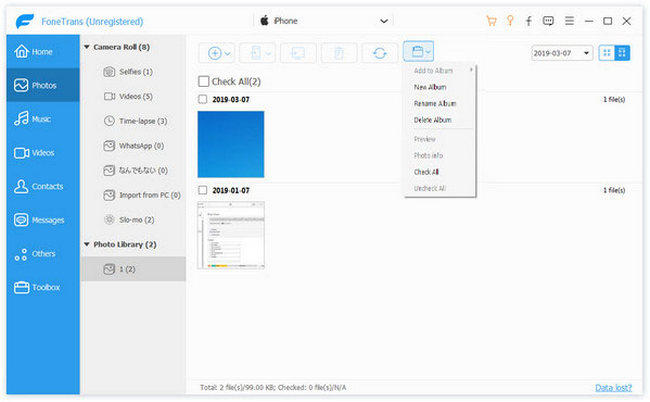
Aiseesoft FoneTrans

Product Page: https://www.aiseesoft.com/ios-transfer/

add-photo.jpg

Aiseesoft FoneTrans is powerful iPhone transfer software, which does well in file transfer between iOS devices and computer. It can help you sync and manage photos, music, contacts, messages, videos, notes, calendars, Safari, eBooks and call log from iPhone/iPad/iPod. It’s compatible with the latest iOS 16. It also enables you to make iPhone ringtone and convert image format from HEIC to JPG/PNG and more. And now it enables you to rotate photos when previewing them. Key Features: 1. Transfer file between iOS device and PC FoneTrans can help you import video, music, photo and other media files from computer to iPhone/iPad/iPod for enjoyment anywhere and anytime. It also allows you to export files from iOS devices to computer/iTunes for backup. 2. Share files between iPhone/iPod/iPad Apart from transferring files between computer and iOS devices, you are allowed to transfer files between any iOS devices for file sharing and the shareable files include music, movie, picture, TV show, Podcast, iTunes U, eBook, camera roll, ringtone, etc. 3. Back up iPhone SMS (MMS) and Contacts With FoneTrans, you can copy SMS to PC for backup and they can be saved in excel, text or html format. Users can also back up the important contacts to PC in case of losing or damaging of their iDevice. 4. De-duplicate Function To avoid repeated contacts/music, you can delete repeated ones or merge different contacts of the same person. 5. Ringtone Maker and HEIC Converter In the toolbox, there are two other features that allow you to make ringtones for your iOS device at ease. You can also convert HEIC images to other common formats like JPG or PNG.

ComPDFKit 1.6.0

Product Page: https://www.compdf.com/

500.png

ComPDFKit, a software development kit (SDK), consists of PDF SDK and PDF Conversion SDK. With this SDK, even developers with limited knowledge of PDF can quickly integrate professional PDF functions with just a few lines of code on multiple platforms. Following are the key features of ComPDFKit.

Viewer:
– Standard page display modes, including Scrolling, Double page, Crop mode, and Cover mode.
– Navigation with thumbnails, outlines, and bookmarks.
– Text search & selection.
– Zoom in and out.
– Switch between different themes, including Dark mode, Sepia mode, Reseda mode, and Custom color mode.
– Text reflow.

Annotations:
– Create, edit and remove annotations, including Notes, Link, Freetext, Line, Square, Circle, – Highlight, Underline, Squiggly, Strikeout, Ink, and Stamp.
– Support for annotation appearances.
– Import and export annotations to/from XFDF.
– Support for annotation flattening.

Forms:
– Create, edit and remove form fields, including Push Button, Check Box, Radio Button, Text Field, – Combo Box, List Box, and Signature.
– Fill PDF Forms.
– Support for PDF form flattening.

Document editor:
– PDF manipulation, including Split pages, Extract pages, and Merge pages.
– Page edit, including Delete pages, Insert pages, Move pages, Rotate pages, Replace pages, and – Exchange pages.
– Access document information.
– Extract images.

Security:
– Encrypt and decrypt PDFs, including Permission setting and Password protected.
– Create, edit, and remove watermark.
– Redact content including images, text, and vector graphics.
– Create, edit, and remove header & footer, including dates, page numbers, document name, author name, and chapter name.
– Create, edit, and remove bates numbers.
– Create, edit, and remove background that can be a solid color or an image.

Conversion:
– PDF to Word.
– PDF to Excel.
– PDF to PPT.
– PDF to PDF/A.
– PDF to TXT.
– PDF to CSV.
– PDF to Image.

Document comparison:
– Compare different versions of a document, including overlay comparison and content comparison.