CADopia 22 Standard 21.2.1.124426

Product Page: http://www.cadopia.com/compare-versions/
samvibe-screen.png

CADopia 22 Standard (PERPETUAL license) is a full-featured CAD solution. The advanced features in this edition include ACIS 3D solid modeling, customization tools, PDF to DWG conversion, voice notes, and support for DGN files as underlays in addition to all standard drawing and drafting functions.

The following new features and refinements are included in CADopia 22 in addition to the complete set of standard drafting features of previous releases of CADopia.


Drawing Comparision
Data Extraction Wizard
Associative hatching
Improved batch printing
Layer support in PDF import
Security enhancements

The major features supported in CADopia Standard are:

Powerful CAD functionality:
AutoCAD 2.5-2018 DWG Support
Export Adobe Acrobat (PDF) files from your drawings
Import PDF files and save as DWG file
Microstation DGN file Underlays
A comprehensive suite of drafting, design, and detailing tools
Supports standard CAD commands
Supports standard menu (.MNU) files
Optional Dark User Interface
Support for Digital Signature
New Layer Manager and Palette
2D Spiral
Redefine base point of a block
Edit block attribute properties
Dynamic custom coordinate system
Formulas in tables and export to Excel
Multileaders
Raster Image insertion and editing
Clipping support for references, images, and viewports
Quick input
Dimensioning an annotations
Annotation scaling
Pattern hatch
Curved text
Drawing tab
Heads-up display toolbar
Layer state manager
Polar tracking
Ribbon interface
Design Resources
Quick grouping and ungrouping
Drawing standards verification and support for DWS files
Complex Linetype
Dimensioning and annotations
Smart Dimensions
Dimensions on Sheets to Model Geometry
Attributes, text, multiline text
Template files
TrueType Fonts & more.

Graphcat<

Awario 4.5.8

Product Page: https://awario.com/

screen-02.png

Awario is a smart way to monitor, engage, and impact the web and socials for businesses and individuals alike. The platform takes the usual hassle of SMM away by letting you effortlessly:
– Monitor Twitter, Facebook, Instagram, Reddit, YouTube, News/Blogs and other online resources for mentions of any keywords, non-stop.
– Get notified when new mentions appear with daily or weekly emails about the latest posts.
– Prioritize mentions by their popularity for a smarter, more efficient SMM workflow.
– Interact with mentions in-app by quickly syncing your social accounts with Awario to comment, like, share, and retweet posts.
– Access the dashboard from any device and have your data with you at all times. Log in to your Awario account from your phone, tablet, desktop, or laptop to see the latest mentions and react to them in time, wherever you are.

Depending on your niche, Awario will help you achieve some (or all) of these business objectives:
– Market research – listen to what people say about your product to react to changes in time.
– Competitor research – know your enemy to be a step ahead.
– Social selling – use the new Leads module to find new heavyweight prospects.
– Influencer marketing – promote your brand only with the most influential and active in socials.
– Reputation management – never leave your customers alone with their problems. The right strategy will not only increase your clients’ loyalty but even retrieve up to 30% of the lost audience.

Don’t miss a lucky chance for your brand and sign up for the free trial!

Tipard Video Enhancer

Product Page: http://repository.appvisor.com/info/app-8000b59b151c/Tipard_Video_Enhancer_pad.xml

load-videos.jpg

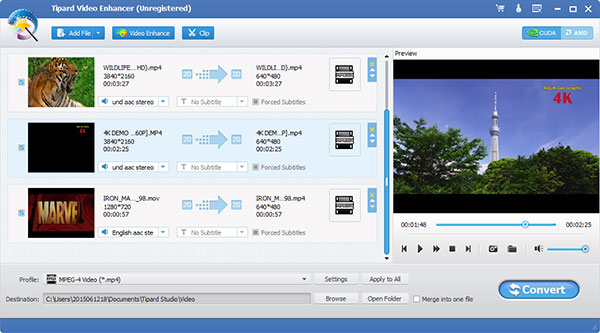
Tipard Video Enhancer is able to enhance your video quality greatly. It can also rotate or flip your video direction. Besides, this video enhancement software can edit your video with the function of clipping, cropping, and adding watermark. Apart from that, it can convert your video to MP4, MOV, M4V, MKV, AVI, WMV, TS and others. Key functions: 1.Enhance video quality Tipard Video Enhancer can enhance your video quality greatly. This video enhancement software can upscale resolution of the video, optimize brightness and contrast of the video, and remove video noise to make video quality better. 2.Rotate or flip video direction With Video Enhancer, you can rotate the direction of the video such as rotate 90 clockwise and rotate 90 counterclockwise. It also flips the video direction by horizontal flip and vertical flip. 3.Convert video to MP4, MKV, AVI, WMV and more This Video Enhancer can convert your video to 4K H.265/HEVC Video, 4K H.264/MPEG-4 AVC, 4K TS, 4K AVI, 4K H.264 FLV, 4K MKV and other 4k Ultra HD. Meanwhile, it can also convert video to MTS, TS, M2TS, HD MPG, HD MPEG, HD MP4, HD WMV, QuickTime HD MOV and more 1080p HD video. 4.Edit your video effect Tipard Video Enhancer can set the 3D effect as Side by Side (Half-Width/Full), or Top and Bottom (Half-Height/Full). Besides, it is able to crop the video frame at your disposal, adjust the Brightness, Saturation, Contrast, Hue and Volume of your video, and add text or watermark to the screen of the video. It can also clip your video into several segments.