Vidmore Video Editor

Product Page: https://www.vidmore.com/video-editor/
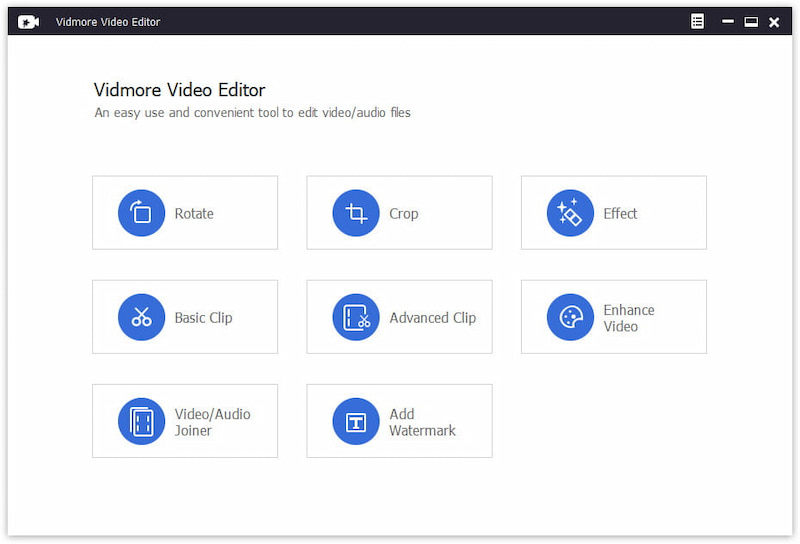
vidmore-video-editor-interface.jpg

Vidmore Video Editor is a powerful video editing program which lets you rotate and crop your videos according to your need. You could also add watermark to your vides or enhance your video quality. And it supports almost all popular video formats like MP4, MOV, MKV, AVI, WMV, FLV and so on. Key functions: 1. Rotate and crop videos Vidmore Video Editor could rotate a video in 90 counterclockwise or clockwise. And it is also able to crop the videos and get rid of black edges simply. 2. Clip videos It provides two clip methods for users: Basic Clip and Advanced Clip. With this function, you could divide one video into several parts or remove the unwanted parts and keep the parts you want. 3. Combine video and audio files If you have some video/audio clips and want to combine them together, the Video/Audio Joiner function could help you accomplish this. It could join some media files into one long movie or music file. 4. Adjust video effects and enhance videos Vidmore Video Editor is not only a video editing tool but also a video enhancement tool. It could enhance video quality by removing video noise, upscaling video resolution, reducing video shaking. You could also adjust video effects, such as contrast, hue, saturation, and brightness manually to create your own videos. Moreover, you are able to add watermarks to your videos according to your preference.


Graphcat<

PDF-Tools 9.3.361

Product Page: https://www.tracker-software.com/product/pdf-tools

ToolsV9.png

Create new PDF files from the output of any Windows app
Create and Edit Fillable PDF Forms; Dynamic Stamps; Interactive Adobe AcroForms
View Image and MSOffice files natively and convert to PDF automatically
Google Drive Support; OFFice2PDF
Convert PDF to MSPowerPoint format
Improved image and image text character conversion
ISO PDF/A 2a, 2b, 2u(RGB) format support
Supports Revision 6 of Acrobat X password security handler
World leading compression and optimization technology
ISO PDF/A 1a & 1b
Serity/Sign/Secure PDFs
PDF writer Optimization/Compression Controls
Advanced Memory Management
Convert Image files to PDF and back; .RTF & .DOC to PDF
Append/Prepend Pages from one PDF file into another PDF file
Scan Direct to PDF
OCR – searchable layer
Manipulate and Modify PDF files
Extract / Import Content from PDF to Text/Image/PDF formats
Export PDF to many file formats
Add/Edit/Modify/Export Bookmarks
Split/Merge/Delete/Crop/Rotate PDF pages
Re-Order Pages within a PDF file
Optimize PDF
Paper Settings & Custom Forms options
URL links embedded
MS Office Table of Contents
n-UP Printing mode automatically mounts/rescales pages to a single page and calculates correct page positions
Enhanced visual layout previewer resizes pages
Brochure/Booklet/Mirrored Printing
Flexible DPI output 50 – 2400DPI
CJK fonts/character set support
Add Watermarks or Overlay PDF pages to new PDF
Auto Bookmark/Auto Header/Footer generation
Graphics Downsampling embedding options
Extended Font embedding options
Create specific printer preferences and save to Profiles for future use.
MAPI/SMTP Automated Email integration options
Developers API available
Multi-language UI support
Citrix Metaframe/Terminal Server Certified.
‘Macro’ based Auto file naming/location – with JS rule based
Comprehensive Digital Signature and Security
Autosave
Merge pages
Timestamping
Touch/Mouse screen mode
Multilanguage support
Google Drive, SharePoint,
Ribbon/Classic UI

JRiver Media Center 29.0.58

Product Page: https://www.jriver.com

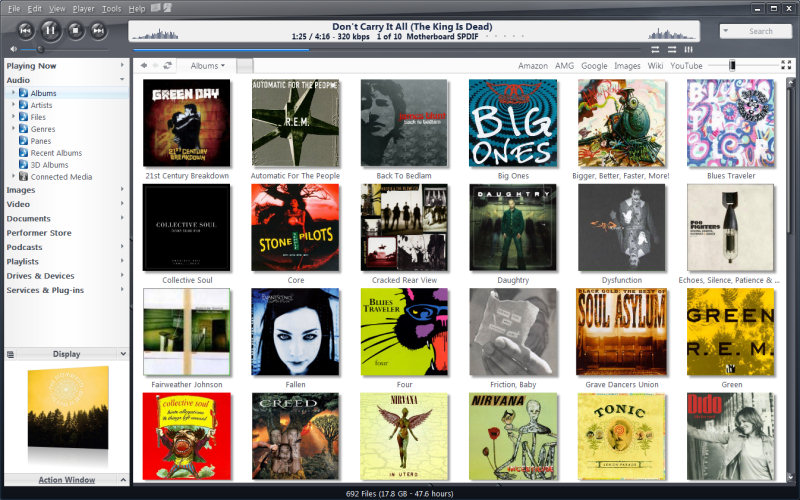
screenshot.jpg

High quality media solution for large libraries. Organize, play, tag all types of media files. Rip, Burn, serve to Xbox, PS3, UPnP, DLNA, TiVo. Audiophile quality, DSD, madVR, Ten foot mode, remote control, HD TV recording in real time. Customizable media views. 3D views. Supports iPods, cameras, 90+ media file formats. Integration with Facebook, Flickr, Audible, Amazon MP3, Google, Youtube, Wikipedia, Hulu, Last.FM, Twitter. Cover art lookup.

Three skinned interfaces. A Visualization Studio feature lets you create your own visualizations, and a DSP Studio allows personalization of the listening environment. Media Scheduler for sleep, alarm and recording functions, Media Editor for editing sound files. Smartlists based on rules. Drag-and-drop for easy Playlist creation. Unique media browsing views for faster, easier and more powerful file search and play. Tagging studio. Integrated CD labeler. Support for CD and DVD database and support for popular handheld players, Sony PSP and PlaysForSure devices.