Aiseesoft HEIC Converter for Mac V1.0.22

Product Page: https://www.aiseesoft.com/free-heic-converter/
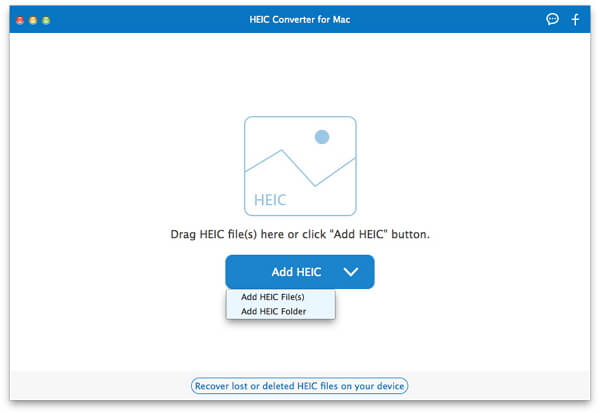
add-heic-files.jpg

Aiseesoft HEIC converter for Mac enables you to convert all your HEIF (.heic) photos to JPG/JPEG or to PNG on Mac without any hassle. Besides, it provides amazingly fast and time-saving conversion process. This software supports Mac OS X 10.6 or above (macOS Catalina and macOS Mojave included). And it also supports most popular portable devices, like iPhone 13 Pro Max/13 Pro/13/12 Pro Max/12 Pro/12/11 Pro/11 Pro Max/XS/XR/XS Max/X/ 8/8 Plus/7/6/6S/5S/5C, iPad mini 3/2, iPad Air 2/iPod, etc.

Key Features


1. Convert HEIC to JPG/JPEG on Mac
JPG/JPEG is more useful and compatible with the majority of platforms. With this HEIC Converter for Mac, you can easily convert HEIC pictures to JPG/JPEG format for playback on any devices.

2. Convert HEIC to PNG and Batch Convert HEIC Files
PNG images support multiple colors and internet graphics. This HEIC Converter for Mac can help you professionally convert unlimited HEIC images to JPG or PNG without hassle.

3. Adjust image quality

This HEIC Converter for Mac allows you to adjust image before converting HEIC to JPEG/PNG.

4. Free and Fast
HEIC Converter for Mac lets you convert 10 HEIC files for free, providing amazingly fast and time-saving conversion process. It adopts more advanced and modern compression, allowing digital photographs taken by iPhone, iPad or iPod running iOS 11 or above to be created in smaller file sizes, while keeping higher image quality.

Graphcat<

Aiseesoft Mac Screen Recorder V2.1.8

Product Page: https://www.aiseesoft.com/screen-recorder/

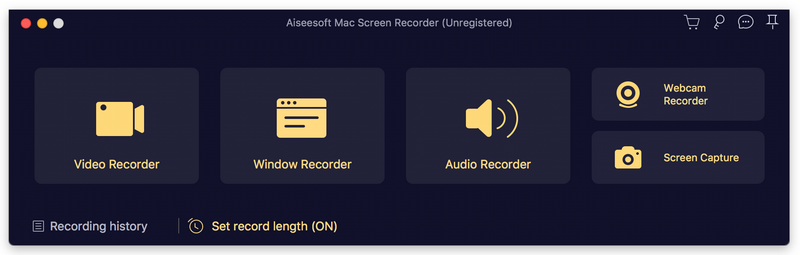
interface.jpg

Aiseesoft Mac Screen Recorder makes it easy to record any video or audio played on Mac. The powerful video recording function allows you to save almost any video to your computer, such as video tutorials, online conference, gameplays, video/audio calls and more. You can choose to record system audio of your computer or microphone voice.
Key features:
1. Record video, capture audio, take snapshots
Aiseesoft Mac Screen Recorder is a professional video recording app. You can set recording area in full screen or customized screen size to record videos with high quality. Besides, you can record any music, radio, audio call and take a snapshot as per your need.
2. Choose audio source as you like
You can choose to record the system sound or microphone voice or both according to your need. You can save the recorded audio in MP3/WMA/AAC/M4A for easy playback. This audio grabber can save any audio from your Mac computer, including audio track in MV, voice in teaching videos and more.
3. Edit video/snapshot, record window
This Mac Screen Recorder allows you to edit video/snapshot while screen recording, you can also draw new labels to output file. In addition, you are able to record window on your computer and you could choose to record single window or multiple windows as you like.
4. Highlight the mouse cursor as you wish
This is especially useful when you make video presentations. You can highlight the mouse cursor to make your action easier to be tracked on screen. Also you can define the color and the shape of the highlight.

FaxTalk FaxCenter Pro 10.0.1638.0

Product Page: https://www.faxtalk.com/faxtalk-faxcenter-pro-fax-software/

screenshot-faxtalk-faxcenter-pro.gif

Easy to use Windows fax software to send, receive, view and print faxes. FaxTalk manages your incoming and outgoing fax communications quickly, efficiently, and reliably. Whether you’re a small business or an individual, FaxTalk’s advanced send and receive fax features turn your computer into sophisticated fax machine and eliminates the need for a stand-alone fax machine. From a single application you can send, receive, view and print faxes, organize fax documents, create and manage contacts and phonebooks and control all fax operations.
Whether you are sending a fax to a single recipient or broadcasting faxes to multiple recipients the FaxTalk fax software provides the features you need. Regardless if you’re using a fax modem to fax over a telephone line, or T.38 Internet fax support to fax over the Internet, FaxTalk provides a solution. In both cases, your confidential fax and contact data is kept on your computer where it belongs. Produce professional looking faxes, even combine multiple documents into a single fax, and broadcast faxes to multiple recipients with just a few mouse clicks. With the FaxTalk fax software you can fax directly from Windows applications and utilize powerful features such as color fax, broadcast faxing, delayed scheduling, high-speed V.34, fax to email, access to contacts stored in Microsoft Outlook, export to TIFF or PDF, fax markup and annotation tools, custom designed cover pages, scanner support and resend previously sent faxes.
Receive faxes on your computer with features that save you time and money. Avoid printing unwanted faxes and view received faxes on screen, print a copy, or save the fax for future review. Automatically forward received faxes to an email address or another fax number. You can even have received faxes automatically forwarded to your Microsoft Outlook Inbox to create a unified messaging solution. You can also block the reception of unwanted, unsolicited “junk faxes”.